2
How the System Works
If the sensors detect an event, they send a signal to the control panel. An alarm is sounded and an
SMS is sent to all stored phone numbers. If the alarm is not deactivated, the control panel then places
a call to all stored phone numbers. If an external siren (optional) is attached it sounds in parallel with
the system.
GETTING STARTED:
Inserting the SIM card
1. Ensure the security system is switched on.
2. IMPORTANT: Permanently delete the default code of the SIM card.
3. Make sure the voicemail function is deactivated.
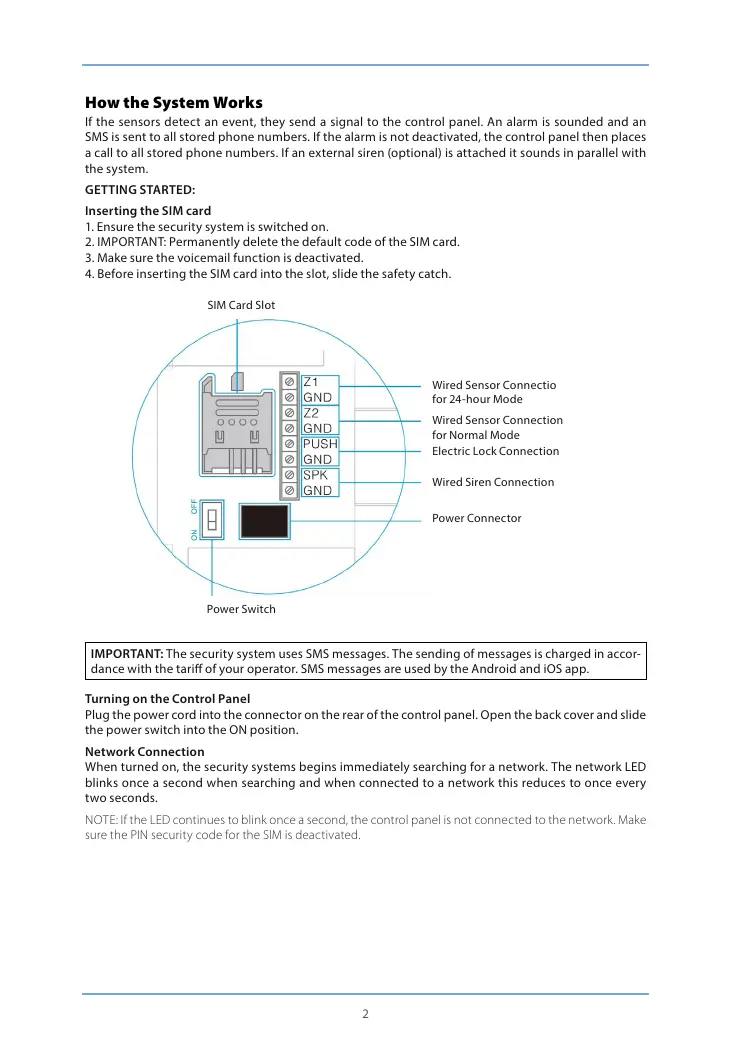
4. Before inserting the SIM card into the slot, slide the safety catch.
SIM Card Slot
Power Switch
Wired Sensor Connectio
for 24-hour Mode
Wired Sensor Connection
for Normal Mode
Electric Lock Connection
Wired Siren Connection
Power Connector
IMPORTANT: The security system uses SMS messages. The sending of messages is charged in accor-
dance with the tari of your operator. SMS messages are used by the Android and iOS app.
Turning on the Control Panel
Plug the power cord into the connector on the rear of the control panel. Open the back cover and slide
the power switch into the ON position.
Network Connection
When turned on, the security systems begins immediately searching for a network. The network LED
blinks once a second when searching and when connected to a network this reduces to once every
two seconds.
NOTE: If the LED continues to blink once a second, the control panel is not connected to the network. Make
sure the PIN security code for the SIM is deactivated.


 To Next Page