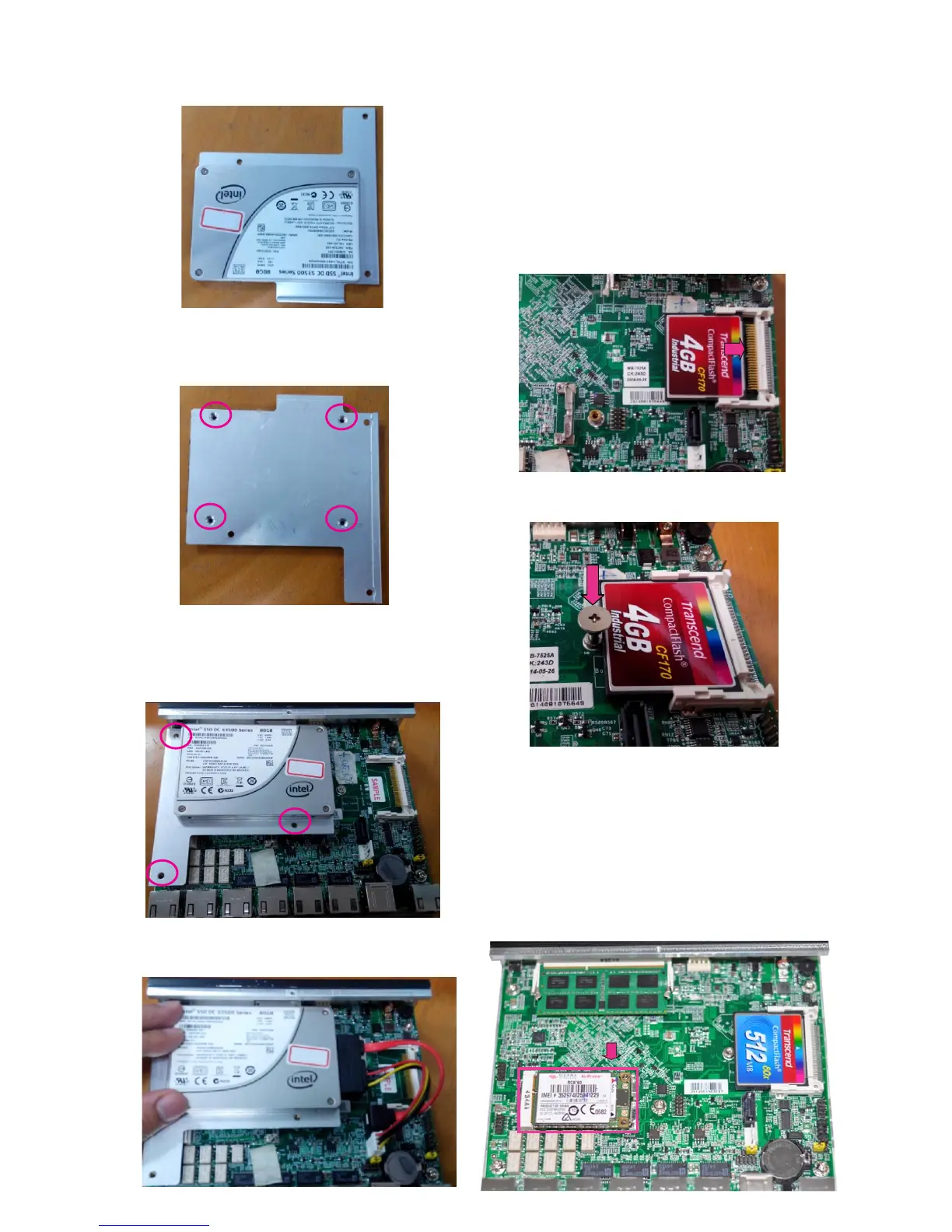
3. Place an SSD on the bracket as shown below.
4. Turn the bracket and the SSD around and align the 4
screw holes. Then, secure the SSD onto the bracket with
screws.
5. Turn the SSD and the bracket back and place it above
the motherboard. Please make sure the 3 screw holes
on the bracket match the locations of the 3 standoffs
installed earlier. Fasten the 3 screws.
6. Connect SATA cable between the SSD and the
motherboard.
Installing the CompactFlash Card
FW-7525 provides one CompactFlash slot. Please follow
the steps below to install a CompactFlash card.
1. Align CompactFlash card and the card slot with the
arrow pointing toward the connector. The card fits only
the correct way into the slot; do not force the card into
the slot.
2. Insert the card into the connector until it firmly fits in
place..
Installing the Mini-PCIe Card
FW-7525 provides one Mini-PCIe slot. Follow the
procedures bellow for installing a mini-PCIe card.
Align Mini-PCIe card key with the card slot notch 1.
Push the other end of the card to be tightened with 2.
the latch.



 To Next Page