39 | P a g e
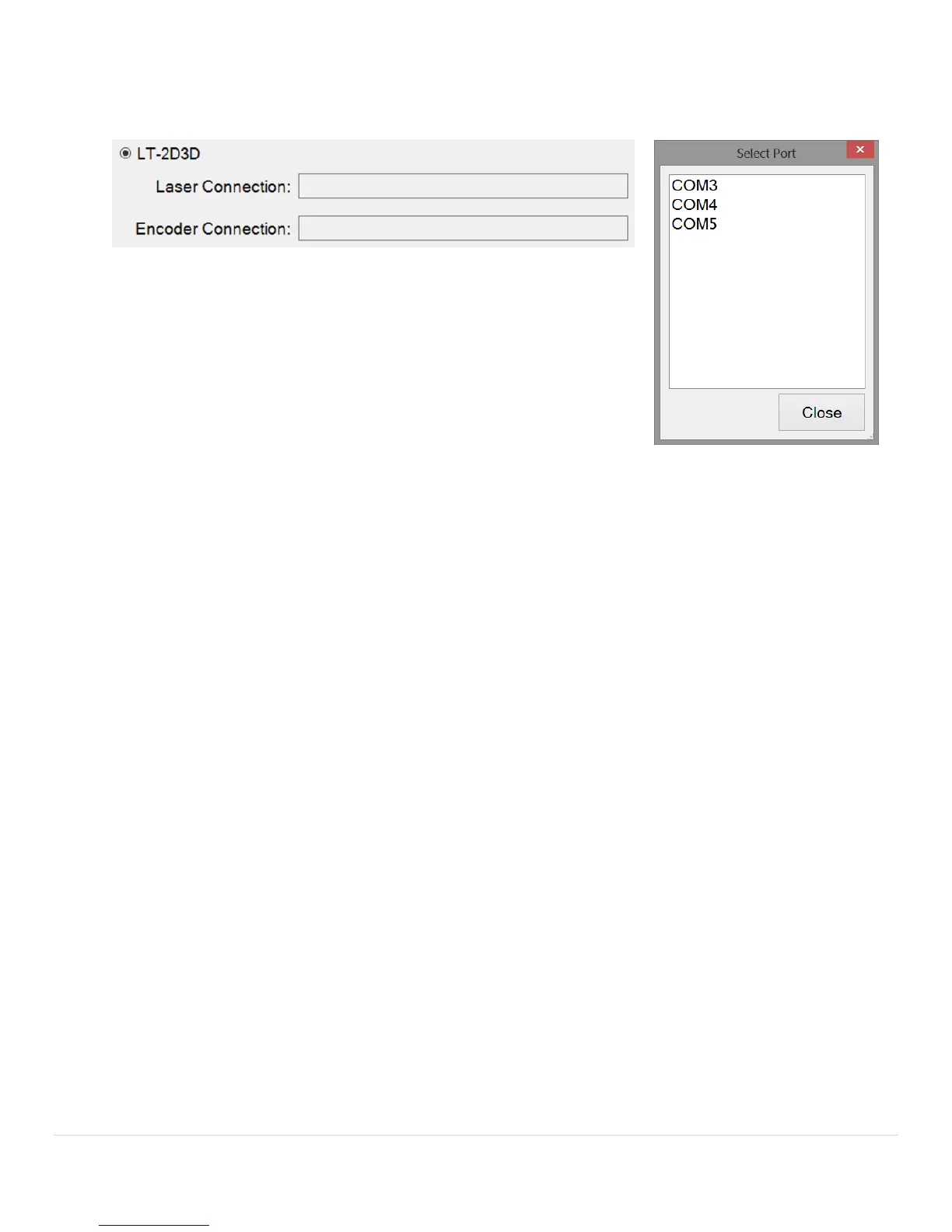
3.2 Setting Comports (Purchased Pre-February, 2016)
1. Open the Laser Templator program
2. Click File / Help / Setup Device
a. Double click in the box to the right of Laser Connection.
b. Double click on the correct COM Port # from the steps above.
c. Double click on the box to the right of Encoder Connection
d. Double click on the correct COM Port # from the steps above.
3. Click Connect and wait for the laser to connect.
3.3 Pair Laser to the Tablet PC (Purchased Post-February, 2016, marked R4.1 on the
bottom label)
1. Turn on tablet PC
2. Once finished booting, plug in USB cable and wait until you hear a kerplunk sound indicating it has
connected.
3. Click Start (Windows logo) and type Devices and Printers. Click Enter
a. Click Add a device
b. Turn on the Laser by pressing the power button.
c. A green LED will light up on the side indicating it is on.
4. You will see a device appear that is first named “Disto ######”
5. Click on that device and then click Next.
6. Click Start (Windows logo) and type Device Manager. Click Enter.


 To Next Page