Section 10 - Troubleshooting Tips
Page 31
Section 10 - Troubleshooting Tips
If the above troubleshooting tips do not resolve your problem,
please contact LTI for assistance. Refer to the inside front cover for
LTI contact information.
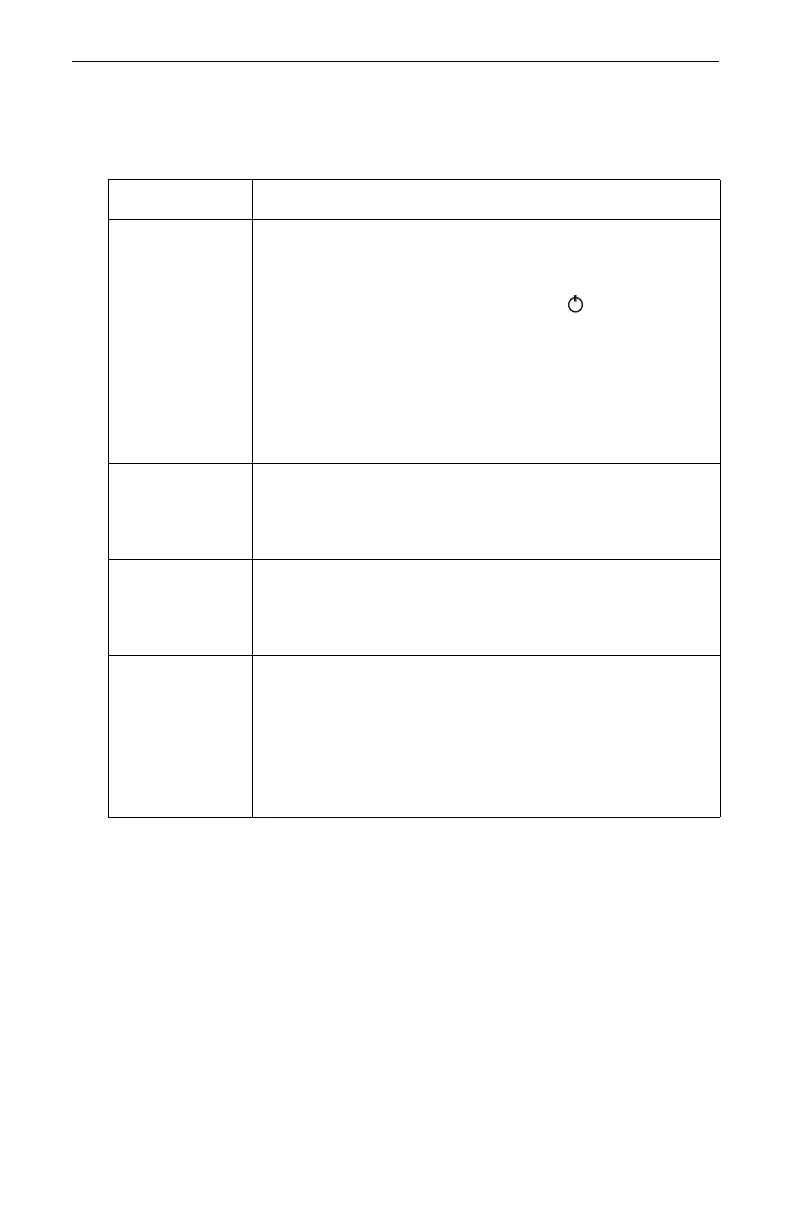
Problem Remedy
Unit fails to
power up.
Remove the battery door and ensure that the battery
connection is good.
1. Verify battery orientation (page 6).
2. Long press the Power button to turn ON the
unit.

If you are using two AA batteries and the
problem persists,
install a CRV3 battery and
repeat step #2.

If you are using a CRV3 battery and the
problem persists,
contact LTI.
Diameter
reading is 1/2 of
what it should
be.
If you are not using the Magnifier, ensure that the LCD
does not show "MAG". To turn the Magnification Constant
OFF, see page 15.
Diameter
reading is 2x
larger than what
it should be.
If you are using the magnifier, ensure that the LCD shows
"MAG". To turn the Magnification Constant ON, see
page 15.
The Magnifier
was attached
during a BAF
measurement.
If you mistakenly leave the magnifier attached while in
the BASAL AREA mode, more than twice the number of
trees will appear to be in your plot than should be for the
specified basal area factor.
1. Remove the Magnifier (page 15).
2. Turn the Magnification Constant OFF (page 15).
3. Repeat the BAF measurement.












 To Next Page