4
5
6
7
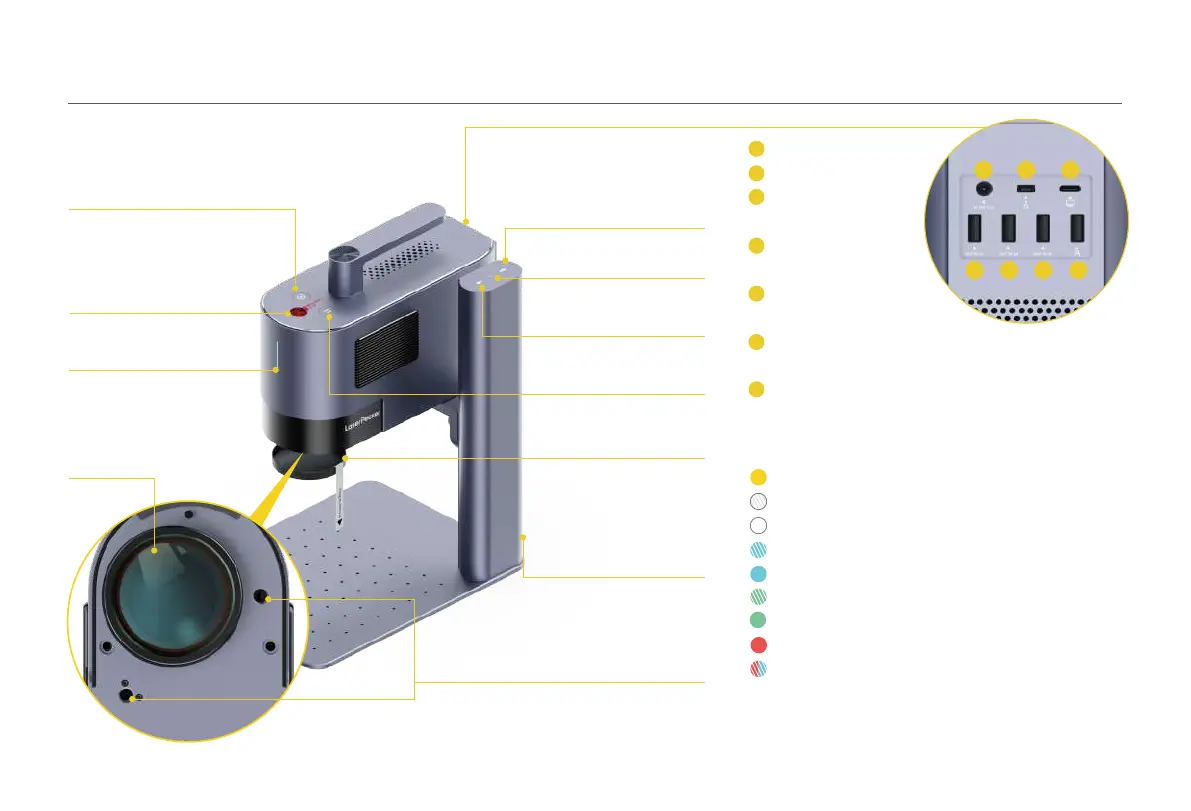
DC Power Port
Security Key
USB-C Port for
Computer Connection
USB Port
(for Accessory)
USB Port
(for Electric Stand)
USB Port
(for Conical Protective Cover)
USB Port for Flash Drive
1
2
3
Preview Buon
Emergency Stop Buon
Laser Unit Indicator
Field Lens
Down Buon
Up Buon
Electric Stand Indicator
Pause/Resume Buon
Dual Red Dots for Focusing
Field Lens Cover
Electric Stand
Power Input Port
Component Introduction
Laser Unit Indicator
Solid yellow: Powering on
Blinking white: Not connected to network
Solid white: Connecting to network
Blinking blue: Connected to network
Solid blue: Connected to Software
Blinking green: File in transit
Solid green: Engraving in progress
Solid red: Emergency stopped and disconnected
Blinking red, blue: Firmware updating
08



 To Next Page