19
Area / volume /pythagoras measurement with
camera
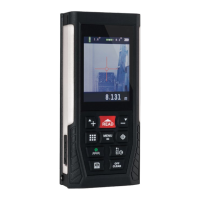
a) The camera can also be used during area, volume or
pythagoras measurement. Press the multi-function button
to enter the desired measurement mode.
b) Press the camera button to view the target area through
the camera.
c) Target the desired area and press the read button. Press
the camera button to return. Repeat until all measurements
have been taken.
Storage and browsing
Save a reading
Press and hold the data storage button. The data will
automatically be stored in the memory of the unit.
View storage
To view stored measurements, press the data storage
button. Press the addition / scroll up button or the
subtraction / scroll down button to browse through the
data.
Remove records
To remove a record, press the power o / clear button.
To remove all stored data press and hold the power o /
clear button.


 To Next Page