EasyManua.ls Logo

Lasertec LDM120 - User Manual

Lasertec LDM120
24 pages
Print Icon
To Next Page IconTo Next Page
Loading...
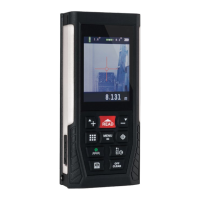
LDM120
120M LASER DISTANCE MEASURER
INSTRUCTION MANUAL

Questions and Answers

  • J
    Jill BarnettAug 8, 2025
    What to do if Lasertec LDM120 show ERR3?
    • J
      Joshua EspinozaAug 8, 2025
      If your Lasertec Measuring Instruments display 'ERR3', it means the battery voltage is too low. You should charge or replace the batteries to resolve this issue.
  • T
    Tyler KellyAug 14, 2025
    What to do if Lasertec LDM120 show ERR6?
    • K
      Kenneth WilliamsAug 14, 2025
      If you're getting 'ERR6' on your Lasertec Measuring Instruments, it indicates that you are exceeding the device's measuring range. Make sure to measure within the specified range of the instrument.
  • J
    jennifer10Aug 21, 2025
    What to do if Lasertec Measuring Instruments show ERR1?
    • X
      xwalkerAug 21, 2025
      If your Lasertec Measuring Instruments are showing 'ERR1', it means the signal is too weak. Try measuring target locations with stronger reflecting surfaces.
  • J
    jessica67Aug 27, 2025
    What to do if Lasertec LDM120 show ERR2?
    • E
      elizabethcastilloAug 27, 2025
      If your Lasertec Measuring Instruments display 'ERR2', it indicates that the signal is too strong. Try measuring target locations that have weaker reflecting surfaces.
  • Y
    yroachSep 2, 2025
    What to do if Lasertec LDM120 Measuring Instruments show ERR5?
    • B
      bernardvegaSep 2, 2025
      If you encounter 'ERR5' on your Lasertec Measuring Instruments, it signifies an improper measurement in Pythagorean mode. Remeasure, ensuring you're using the correct Pythagorean method.

Summary

SAFETY

PRODUCT OVERVIEW

CONTROL PANEL

DISPLAY SCREEN

USING YOUR LASER MEASURER

OPERATION

Explains how to turn the laser distance measurer on and off, including automatic shut-off functionality.

MEASUREMENT

Single measurement

Details the process for taking a single distance measurement using the read button and viewing results.

Continuous measurement

Describes how to perform continuous measurements and exit the mode using the read or off/clear buttons.

Area measurement

Explains how to measure area by taking two edge measurements using the multi-function and read buttons.

Volume measurement

Details the procedure for measuring volume by taking three edge measurements using the multi-function and read buttons.

Pythagoras measurement

Introduces Pythagorean mode for calculating unilateral distance and side lengths of triangles, with accuracy tips.

Calculate two sides of a right angle triangle

Guides on measuring the hypotenuse and tilt angle to automatically calculate the length of a right-angle triangle's side.

Calculate the side of a right angle triangle

Explains how to measure the hypotenuse and one side to calculate the length of the other side of a right-angle triangle.

Calculate the hypotenuse of a right angle triangle

Details measuring two rectangular sides to automatically calculate the hypotenuse length of a right-angle triangle.

Adding and subtracting single measurement

Adding and subtracting volume measurement

Camera

MENU OPTIONS

TROUBLE SHOOTING

WARRANTY

SPECIFICATIONS

Lasertec LDM120 Specifications

General IconGeneral
Measuring Range0.05 to 120m
Accuracy±1.5mm
Laser ClassClass 2
Laser Type635nm, <1mW
Units of Measurementm, in, ft
Battery Type2 x AAA
Operating Temperature0°C to 40°C
Resolution1mm
DisplayLCD
Weight100 g (without battery)

Related product manuals