LAUNCH X-431 PRO3 V4.0 User Manual
7
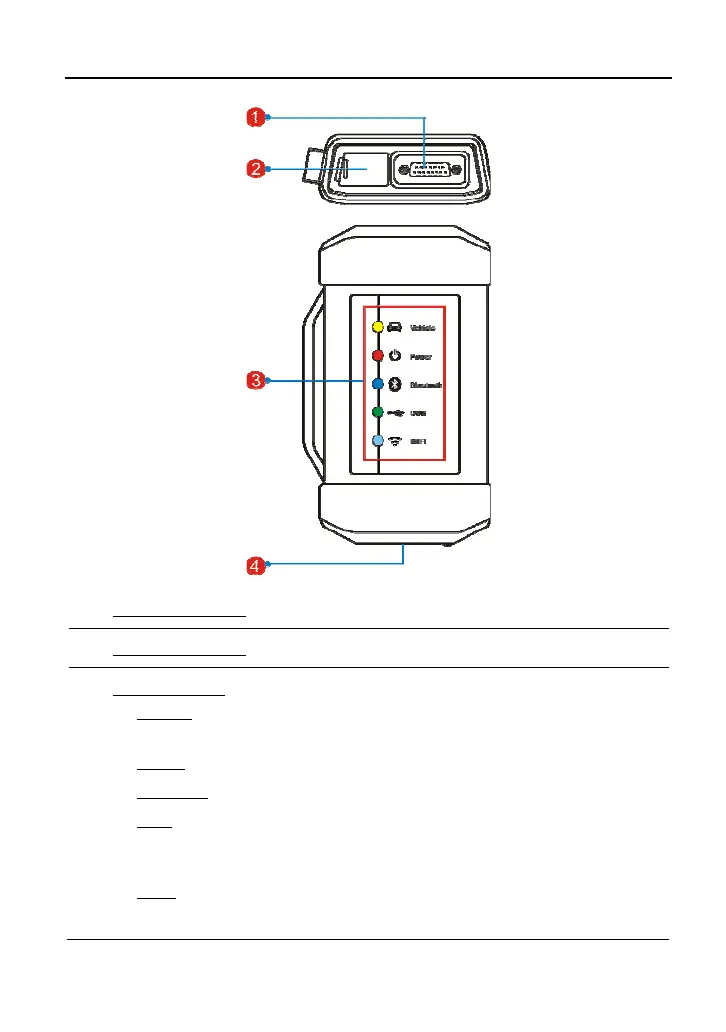
1 Diagnostic socket: For connecting the diagnostic cable.
2 DC-IN power jack: For connecting the power adaptor.
3
LED Indicators: It is defined as follows:
y Vehicle: While communicating with the vehicle, the indicator lights up
and flashes. Otherwise, it will not illuminate.
y Power: It illuminates solid red when the module is powered on.
y Bluetooth: Blue indicates the module is working in Bluetooth mode.
y USB: It lights up when the module is connected to the diagnostic tool
via USB cable (Currently disabled and only reserved for subsequent
function extension).
y Wi-Fi: It lights up when the module works as a Wi-Fi hotspot or
wireless adaptor.



 To Next Page