Initial Use
98********00
Password Envelope
1
2
2
WLANSetup
Register&Update (Continued)
2. Select the desired WLAN connection from the list (Password may be required for
secured networks).
The tablet has built-in WLAN module that can be used to get online. Once you're online,
you can register the tool, update diagnostic software & apk, surf the Internet and send
email on your network.
1. Tap on [Settings] on the home screen and then [WLAN] to configure WLAN setting.
3. When “Connected” appears, it indicates that it is properly connected to the network.
Register & Update
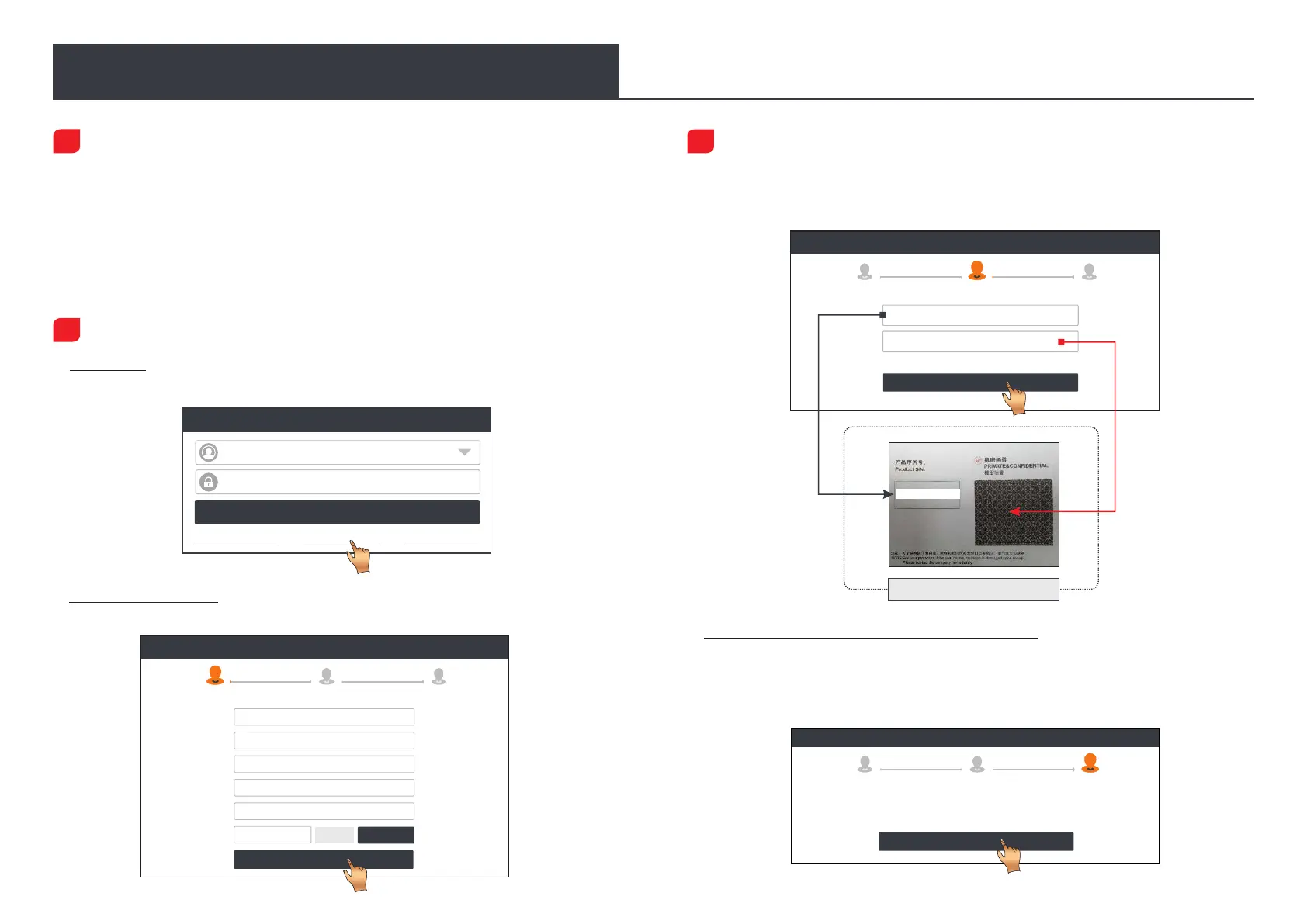
3. Activate VCI: Input the 12-digit Product S/N and 8-digit Activation Code (can be
obtained from the included Password Envelope), and then tap on “Activate”.
*Allsoftwareisupdatedperiodically.Itisrecommendedtocheckregularlyforupdatesand
installthelatestsoftwareversionforthe bestserviceandfunctions.
4. Finish Registration & Download Diagnostic Software: Tap on “OK” to enter the vehicle
software download screen. Tap on “Update” on the update page to start downloading.
Once downloading finished, the software packages will be installed automatically.
1. Launch App: tap on the application icon on the home screen, and then tap on “Login”
on the upper right corner of the screen. Tap “New Registration” to go to Step 2.
Create an Account Activate VCI Finish Registration
Register
Select Country
*
Password
*
Confirm Password
*
Email
*
CAPTCHA
*
CAPTCHA
Username
*
Register
2 3
1
2. Create an App Account: Input the information (items with * must be filled) and then tap
on “Register.”
Create an Account Finish Registration Activate VCI
Register
1
Serial Number
Activation Code
3
2
Where is my activation code?
>> Skip
Activate
Register
1
2
3
OK
Congratulations! You have successfully completed your
registration. Click OK to download the model software.
Create an Account
Activate VCI
Finish Registration
LOGIN
Username
Password
Retrieve Password New Registration Technician login
Device account login




 To Next Page