xii
DescriptionofThisManual
DescriptionofThisManual
Count
27
Chapter2DESCRIPTIONOFOPERATIONK4/K8
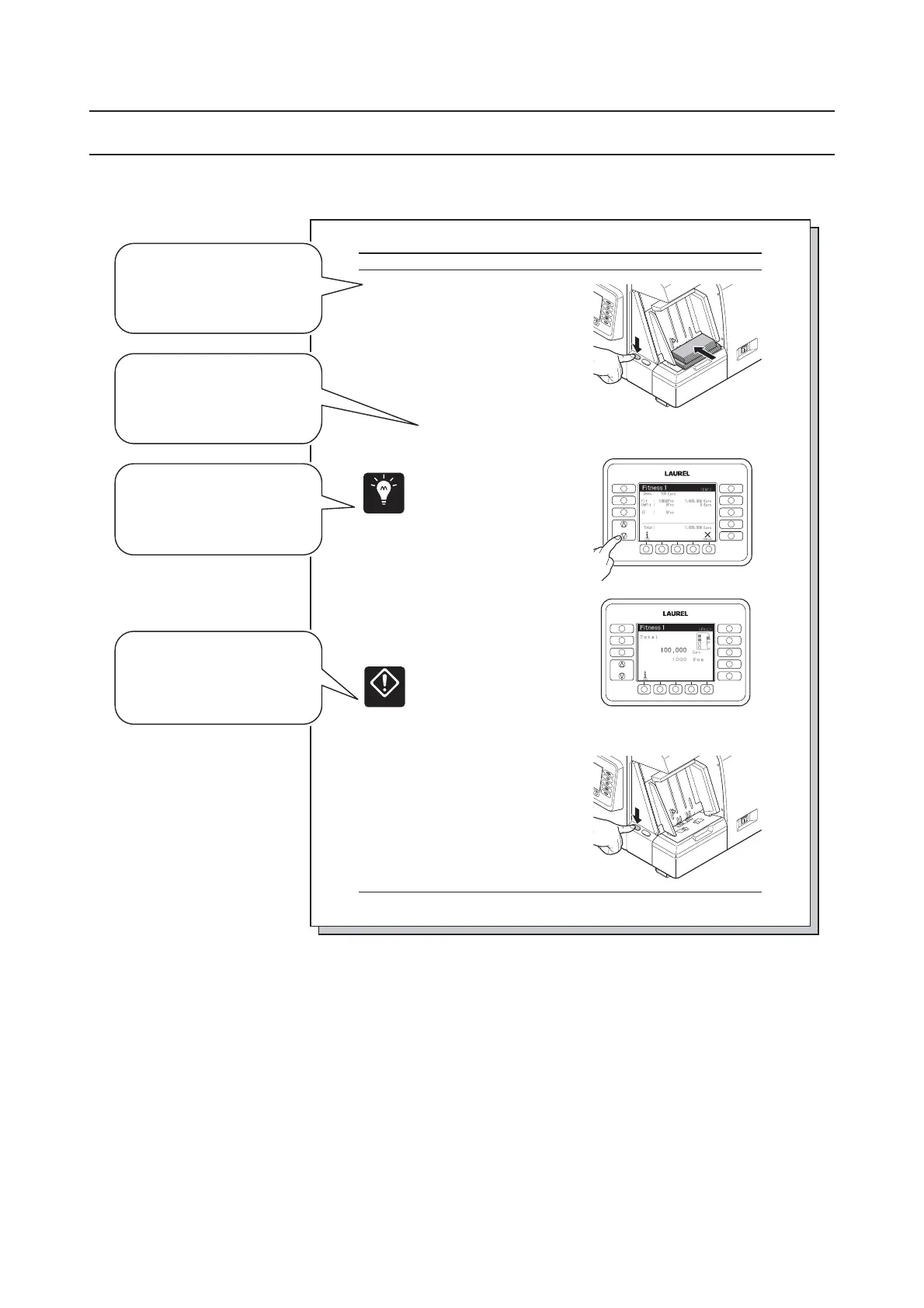
Alignthenotesandputthenotes
STEP-3
ontotheHopper.
Thecountstartsautomatically.▷
Ifthecount does notstart▷
automatically,pressSTART/STOP
Switchtostartcount.
Itispossible to putadditional▷
notestotheHopper.
Whenthecount starts, Main-▷
Displayindicatescount resultin
valueorquantity.
Itispossibletocheckthedetailed
♦
countresultsor reject reasons
bychangingdisplay indication.
PleaserefertoCountDisplaypage
9.
Whencompleting thetransaction
STEP-4
afterthe count,be surenonote
ontheHopperandpressSTART/
STOPswitch.
WhenSTART/STOPswitch is▷
pressedwithoutnote atthe
Hopper,thecount resultonthe
displayiscleared.
Whenthepocketbecomesfull,the▷
countstopsonce evenifnotes
remainonthe Hopper.Thecount
willstartafter removingnotesat
thepocket.
Thecountresult is accumulated
♦
tothepresent transaction.
Thereforebesure nottorecount
thenoteswhich aretakenout
formthepocket.
Point
Miscalculation
FUNCTION
FITNESS
SETTINGS
CF
SETTINGS
DISPLAY
FITNESS
ATM
SORT
FACE
ORIENT
ISSUE
FUNCTION
FITNESS
SETTINGS
CF
SETTINGS
DISPLAY
FITNESS
ATM
SORT
FACE
ORIENT
ISSUE
STEP-3
It describes operation
procedure.
▷
Supplemental remarks
aboutoperation.
Point
It describes important
pointsforoperation.
Miscalculation
Itdescribes
miscalculation.


 To Next Page