DescriptionofEachPart
5
Chapter1OVERALLDESCRIPTIONSK4/K8
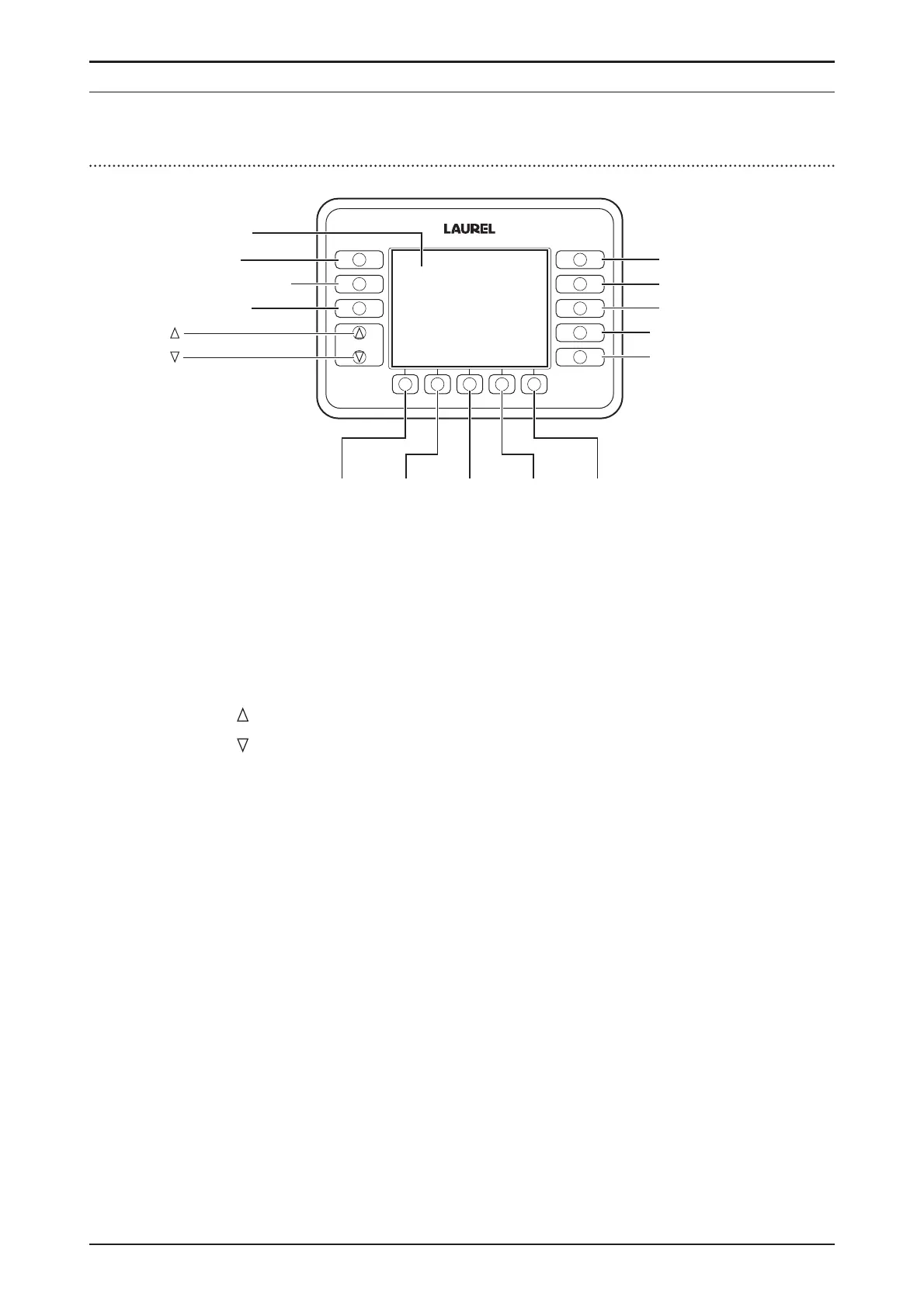
OperationPanel
FUNCTION
FITNESS
SETTINGS
CF
SETTINGS
DISPLAY
FITNESS
ATM
SORT
FACE
ORIENT
ISSUE
1.Main-Display
2.FUNCTION
3.FITNESSSETTING
4.CFSETTING
5.
6.
7.FITNESS
8.ATM
9.SORT
10.FACE/ORIENT
11.ISSUE
12.F1 13.F2 14.F3 15.F4 16.F5
1. Main-Display.......................... -indicatescountresultsinValue,Quantityor
Modesettings.
-indicatestheerrorcodeincaseofanerror.
2. FUNCTION............................. tosetBuzzersoundandContrastofdisplay.
3. FITNESSSETTING.............. tosetFitnessSortingLevel.
4. CFSETTING.......................... tosetofCFLevel.
5.
................................................ toturnthepagesormovethecursor.
6.
................................................ toturnthepagesormovethecursor.
7. FITNESS................................. tosetFITNESSMode.
8. ATM.......................................... tosetATMMode.
9. SORT....................................... tosetDenominationSortMode.
10. FACE/ORIENT...................... tosetFACEModeorORIENTATIONMode.
11. ISSUE...................................... to set ISSUE Mode to sort out old and new
issue.
12. F1............................................. toactivate thefunctioncorrespondingtothe
iconontheMain-DisplayaboveF1key.
13. F2............................................. toactivate thefunctioncorrespondingtothe
iconontheMain-DisplayaboveF2key.
14. F3............................................. toactivate thefunctioncorrespondingtothe
iconontheMain-DisplayaboveF3key.
15. F4............................................. to activatethe function correspondingthe
icononMain-DisplayaboveF4key.
16. F5............................................. toactivate thefunctioncorrespondingtothe
iconontheMain-DisplayaboveF5key.


 To Next Page