56
Howtoclearanerror
Chapter3IFANERROROCCURS K4/K8
Howtoclearanerror
Thischapterdescribesactiontobetakenwhenanerroroccurs.
ErrorDisplay
♦
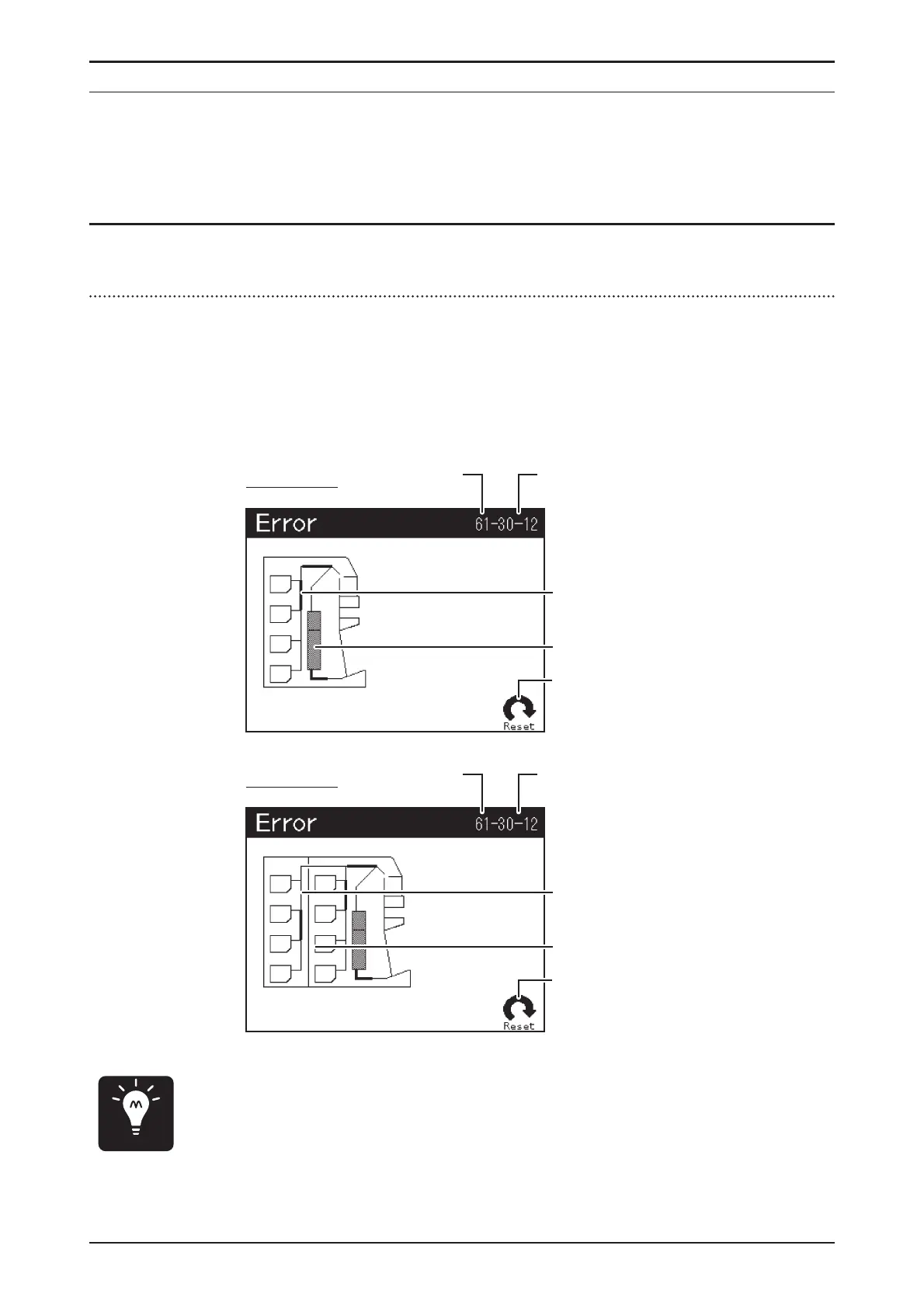
Ifanerroroccurssuchasnotejam,themain-displayswitchestoError
Displaywhichshowserrorcodeandlocationoftheerrorbyguidance.
♦
Inordertocleartheerror,checktheerrorcodeandlocationoferrorand
takeremedialactioncorrespondtoErrorandRemedialMeasurepage49.
♦
Incasetheproblemdoesnotclear,pleasecontactyourregional
distributorandinformthemofErrorCodeandErrorDetailCode.
Point
ErrorCode61
ErrorDisplay
ErrorDetailCode30-12.
Theguidanceisemphasized
wherenotesremains.
Thelocationoferrorblinks.
Reseticonappearswhenit
isvalid.
OnlyforK4
ErrorCode61
ErrorDisplay
ErrorDetailCode30-12.
Theguidanceisemphasized
wherenotesremains.
Thelocationoferrorblinks.
Reseticonappearswhenit
isvalid.
OnlyforK8


 To Next Page