LAVA X3
8.3. Create and Send Multimedia Message
A Message becomes an MMS if you send it to an email address,
or add multimedia media file(s).
Touch compose new message.
Enter or select a mobile phone number.
Touch the composition text box and write your message.
Touch Attach to attach various types of files.
8.4. Operation on a message:
Open the message thread containing the message you want
to operate.
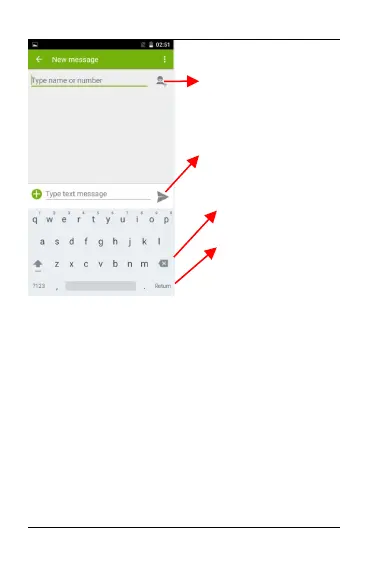
Recipient zone: write the
name, the number or tap the
icon on right to access contacts
list
This is to erase characters
This is enter key, press it then
cursor move to next line
Chose the SIM card you want
to send your message with.


 To Next Page