Target Value Jog
Each of the three target values can be jogged up or down in small increments by using the
arrow keys. This is done to help the operator achieve a perfect reading on the instrument in
the aircraft, by bumping the set-point in small increments. Another application of the “jog”
feature is while testing the Mach/Over-speed warning on the aircraft, where the airspeed is
incremented in small steps until the warning alarm sounds.
To jog a target value, select the value by pressing the appropriate target value key and then
use the arrow keys. The selected target value can be “jogged” with the arrow keys until any
key other than the arrow keys is pressed. Each time the arrow key is pressed, the selected
target value will be incremented (UP arrow) or decremented (DOWN arrow) by a specific
amount, depending on the units of the target value.
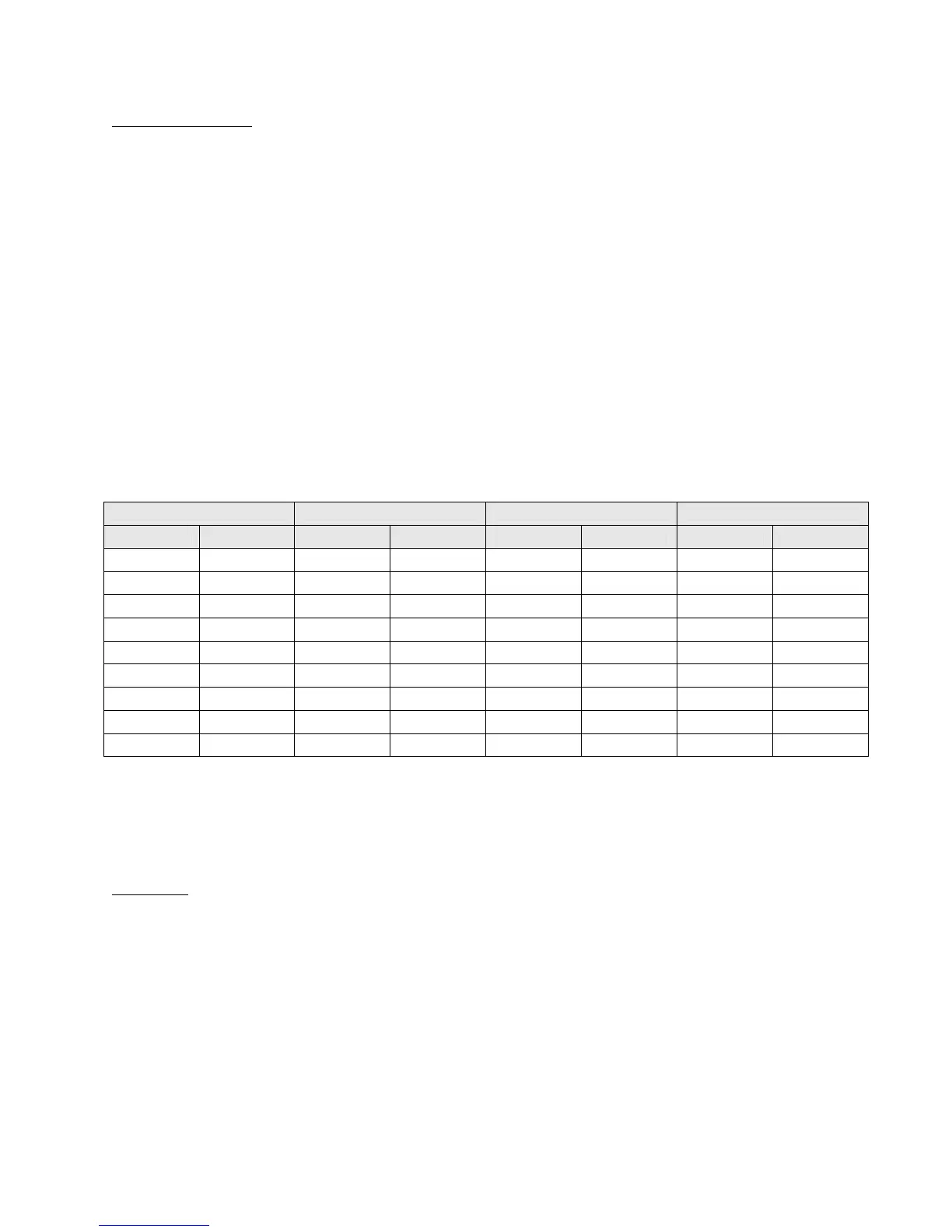
The increment amount for each “jog” is shown below for the different units of each target
value.
Pt target value Ps2 target value Ps1 target value Rate target value
Units Increment Units Increment Units Increment Units Increment
knots 1 Feet 1 Feet 1 Feet/min 10
Mach 0.001 meters 1 meters 1 meters/min 10
mph 1 inHg 0.001 inHg 0.001 inHg/min 0.01
kmph 1 mbar 0.01 mbar 0.01 mbar/min 0.1
Pt inHg 0.001 Diff. inHg 0.001
Qc inHg 0.001 Diff. mbar 0.01
Pt mbar 0.01 knots 1
Qc mbar 0.01 kmph 1
EPR 0.001
3.2.3 UNITS SELECTION
Pt Units : Pt units may be selected in both 2-output and 3-output formats. There are nine
units to select from on the Pt output. The units are: knots (Kts), Mach, Pt inHg (Ptin), Qc inHg
(Qcin), Pt mbar (Ptmb), Qc mbar (Qcmb), miles per hour (mph), kilometers per hour (kmph),
and Engine pressure ratio (EPR). EPR is defined as the ratio of Pt pressure to Ps pressure and
is unit-less. Any of these units can be selected by pressing the Pt key in the “Units” section of
the keypad. The choices will appear on line 4 of the display, four at a time. The cursor is
placed under the first choice. The cursor position is indicated by the blinking unit name. The
arrow keys can be used to move the cursor. The UP ARROW key moves the cursor right, the
DOWN ARROW key moves the cursor left. AS the cursor moves past the last selection, the
next selection will be displayed. The sample screen below shows the different Pt units, with
the cursor at “knots”, indicated by blinking “knots”.



 To Next Page