V1.0/256 V_pro8 Manual
Operation (Web Browser Control)
Delay
Delay
Variable delay is available for all SDI video, SDI audio and MADI audio channels. It can be applied at
the input and/or output to the routing matrix on a channel-by-channel basis.
Valid Delay Parameters
The maximum delay (input + output) is:
8 frames per video channel, adjusted in 1 frame steps.
320 ms per audio channel, adjusted in 1 ms steps.
Input Delay Operation
Input delay is applied at the input to the signal routing matrix, and therefore affects all destinations
assigned from the delayed channels.
1. First, select the input you wish to delay.
You can select any SDI input from the SDI In main menu, or any set of MADI input channels from
MADI In. In our example, we have selected SDI In and In 01.
2. And select the channels, see Channel Selection & Parameter Control.
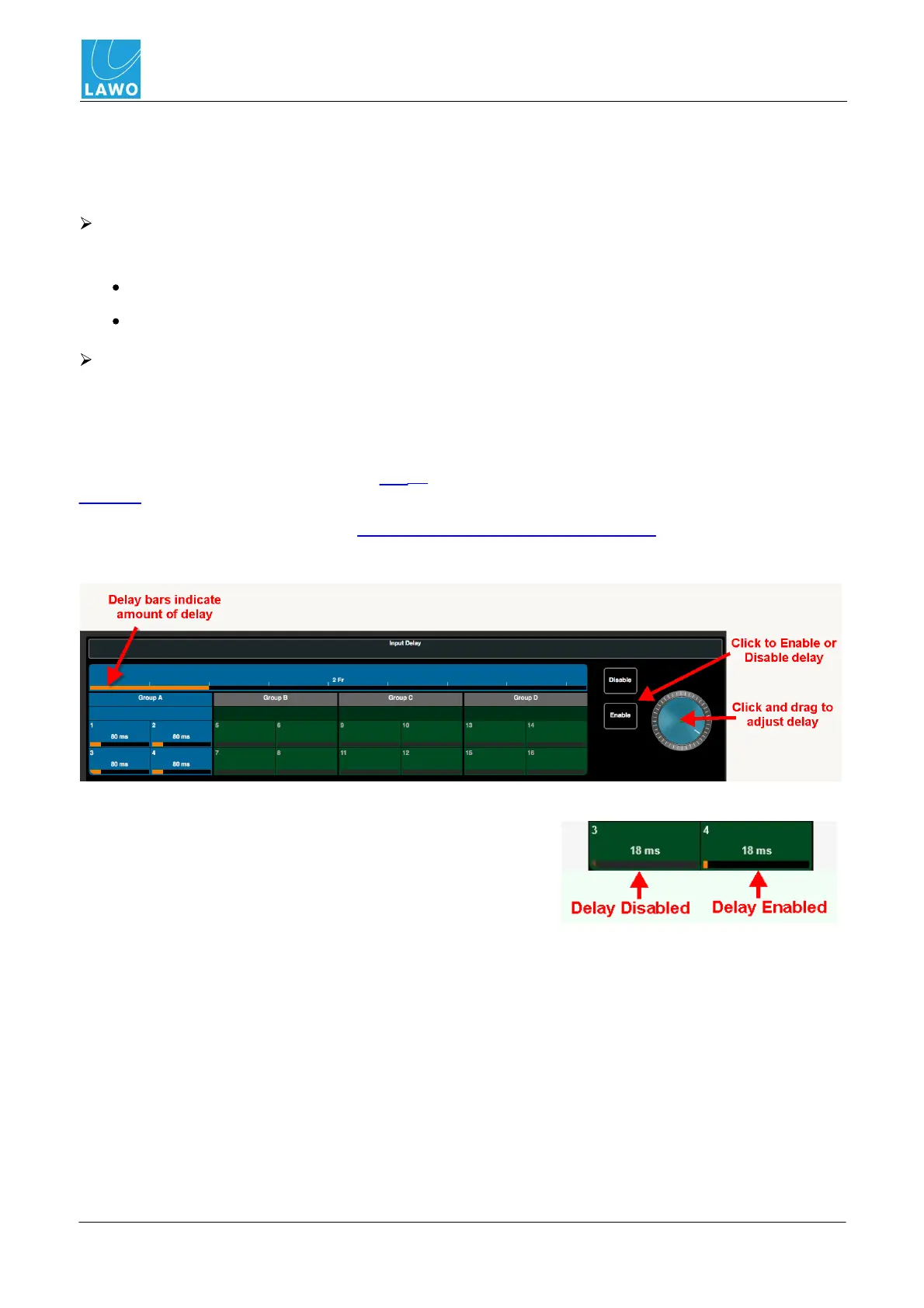
3. Then adjust the delay parameters:
The amount of delay is indicated by the horizontal delay bar
and frames/ms value inside each channel button.
If delay is enabled, then the delay bar is clear (Black or
Orange).
If delay is disabled, then the delay bar is greyed out.
If channels which already have delay are adjusted, then any
offsets are retained.



 To Next Page