EasyManua.ls Logo

LCI Floe 636 - User Manual

LCI Floe 636
8 pages
Print Icon
To Next Page IconTo Next Page
Loading...
1
lci1.com 574-537-8900 Rev: 11.05.20
Floë 636 Integrated
Water Drainage System
Installation and Owners Manual
(For Aftermarket Applications)
CCD-0003522
Table of Contents
Introduction ............................................ 1
Safety ................................................... 2
Resources Required ................................... 2
Parts List ................................................ 2
Installation Of Model 636 .............................. 2
Preparation ............................................ 2
Attach Box To Wall .................................... 3
Connect Tee Fittings And Air Line ..................... 3
Connect To 12V DC Power Supply .................... 4
Test For Air Leaks ..................................... 4
Operation ............................................... 5
What Is Floë ........................................... 5
Importance Of A Sealed System For Draining ......... 5
General Guidelines For Model 636 .................... 6
Model 636 Operation .................................. 6
RV Water System Diagram ............................ 7
Troubleshooting ........................................ 8
Floë 636
Induratec
Integrated
12V DC Water
Drainage System
Installation and
Owners Manual
(For Aftermarket Applications)
Floë Water Drainage KitFloë Water Drainage Kit
Part #Part # DescriptionDescription
809127
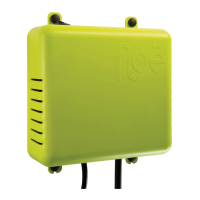
Model 636 12V DC water drainage system
Introduction
Floë is a water drainage device that will remove residual
water trapped in water supply systems in RVs, marine
vessels and mobile vehicles with a 12V DC electrical
system. This will prevent the pipes from freezing in the
winter and also flush out stale water in the summer.
Additionally, it will remove dirt and lime scale from hot
water heaters.
Additional information about this product can be obtained
from lci1.com/support or by using the myLCI app.
Replacement kits can be ordered from https://store.lci1.
com or by using the myLCI app.
The myLCI app is available for free on iTunes
®
for iPhone
®
and iPad
®
and also on Google Play
for Android
users.
iTunes
®
, iPhone
®
, and iPad
®
are registered trademarks of
Apple Inc.
Google Play
and Android
are trademarks of Google Inc.

Questions and Answers

  • J
    Justin DennisJul 28, 2025
    What to do if LCI Floe 636 Floë doesn't stop after sealing all air line connections?
    • C
      Carolyn BlairJul 28, 2025
      If all connections, including the water valve tee, are secure and Floë continues to run, the issue is likely within the vehicle or vessel. Turn off Floë and ensure all faucets, outlets, water heater dump valves, and city water connections are closed. Make sure the water heater is bypassed. Listen for escaping air from faucets, toilets, the hot water tank, and dump valves while Floë is running. Ensure the system draws from the onboard tank, not the city water inlet. Try switching Floë on again; if it stops, the system is pressurized. If it still doesn't stop, contact customer service.
  • S
    Sierra LawsonAug 5, 2025
    Why my LCI Remote Control Floë does not stop?
    • E
      erica84Aug 5, 2025
      If your Floë unit doesn't stop, it could be due to a malfunction or an air leak from one of the connections. To resolve this, ensure all air line pipes are rounded off using your thumb and forefinger, wetted at the ends, and inserted straight into the push-fit connectors to create an airtight seal. If Floë still doesn't stop at 15 psi, a tiny air leak is likely the cause. Start testing at the Floë unit and work toward the main water tee, continuously testing along the way.
  • M
    miguel77Aug 12, 2025
    What to do if LCI Floe 636 Floë does not stop after one second?
    • J
      Jane May DDSAug 12, 2025
      First, remove the connector from under Floë and tightly press your thumb over the end of the short air line stump to create a good seal. This step determines if Floë is functioning correctly; it should stop after one second with a tight seal. If Floë doesn't stop, contact customer service. However, if Floë stops, the unit is fine, so wet the air line end and reinsert it into the connector. Then, move to where the air line enters the main water valve tee and remove the air line from the tee. Hold your thumb over the air line end and switch Floë on. If Floë stops, the joints leading back to Floë are good. If not, the leak is with one of the connectors before and leading back to Floë, so remove, check, wet, and re-insert each connection, testing each time until Floë does stop.
  • J
    Joseph JacksonAug 19, 2025
    How to test main water tee of LCI Floe 636 if Floë does not stop?
    • P
      Pamela SmithAug 19, 2025
      To test the main water tee, remove the water line barbed connector from the short end of the tee leading toward the faucets, not the long end to the water tank. Insert your little finger into the tee to create an air-tight seal. This will test that all joints are secure, ensuring air isn't escaping from the tee. If Floë stops, proceed further. If Floë doesn't stop, recheck and tighten both barbed connectors, wet and reseat connectors into the tee. Note that this is the only connector that will seal by inserting finger. The rest of the time, only test the ends of the air line. Leaks can also be determined by spraying soapy water on the joints and watching for bubbles.

Summary

Introduction

Safety

Resources Required

Parts List

Installation of Model 636

Preparation

Steps to ready the system for installation, including tool gathering.

Attach Floë Box to Wall

Instructions for securely mounting the Floë unit to a wall.

Connect Tee Fittings and Air Line

How to connect the air line and fittings to the water system.

Connect to 12 V DC Power Supply

Details on connecting the Floë unit to the vehicle's power source.

Test for Air Leaks

Procedure to check for leaks in the air line connections.

Operation

What is Floë?

Explanation of the Floë drainage system and its benefits.

Importance of a Sealed System

Explains why a sealed system is crucial for effective drainage.

General Guidelines for Model 636

General advice and best practices for using the Floë system.

Model 636 Operation Steps

Step-by-step instructions for operating the Floë unit.

RV Water System Diagram

Troubleshooting

Floë Unit Does Not Stop

Addresses issues when the Floë unit fails to stop operating.

Persistent Leaks After Sealing

Troubleshooting steps for persistent leaks after sealing connections.

LCI Floe 636 Specifications

General IconGeneral
BrandLCI
ModelFloe 636
CategoryRemote Control
LanguageEnglish

Related product manuals