SP 600 PROFESSIONAL POWER AMPLIFIER USER MANUAL PAGE
16/9 V-1
Photo(
((
(5)
))
)
3)
))
)Parallel Mode
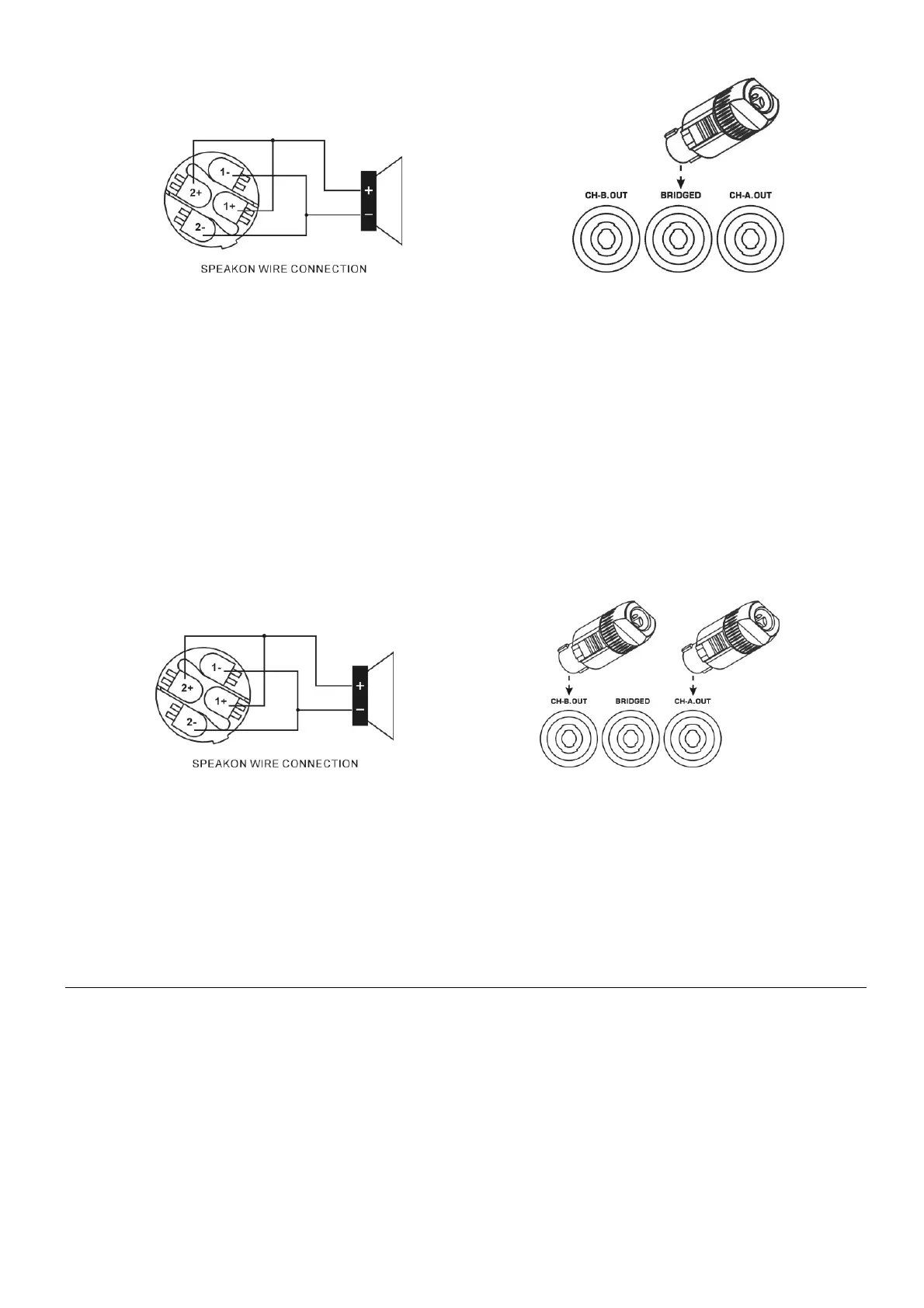
Photo 6- Signal output using Speakon connector
1+、2+ Signal output (+) connect to speaker (+)
1-、2- Signal output (-) connect to speaker (-)
Signal input from CHA, signal output from CHA & CHB.
Photo(
((
(6)
))
)
Note:Incorrect connection will result in malfunction. Make sure the connection & operation mode is correct
before switching the power on.
8.
..
.General Operation
1、
、、
、Operation procedures:
1) Connect to the matching speakers
2) Make sure all the input & output connections are correct and well connected
3) Make sure the mains power supply matches to the power indicated on the amplifier.
4) Connect the signal source equipment, eg : Mixer, to the amplifier’s signal input
5) Set amplifier’s input level (volume) to the minimum
6) Set the mode switch to the required operation mode ( stereo, bridge, or parallel ).


 To Next Page