Portable Plasma Torch Height Controller Manual (F1620)
10
¾ AUTO indicator:The indicator up the button named【AUTO】is indicated
whether allowed auto height control. If the indicator is lighted, THC will
allow auto height control. If the indicator is extinguish, THC will not allow
auto height control. The indicator is lighted after starting up. The indicator
condition will change when the button named【AUTO】is pressed.
¾ IHS TEST indicator:The indicator up the button named【IHS TEST】is lighted
during IHS test, it means IHS test is working. The indicator is extinguish
during other condition.
2.3 Menu operation explain
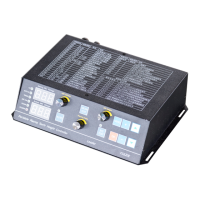
THC have concise menu, it can set some parameter and adopt to different work
condition. Menu operation use the button named【MENU】、【OK】、【+】、【-】and so on.
It also use two nixie tube to display parameter, the green nixie tube display parameter
number and the red nixie tube display parameter value.
When user use it on the scene, parameter number and meaning can refer to
concise parameter grid up the chassis.
During torch do not work, when arc start and IHS test do not work, user press the
button named【MENU】can enter into the menu operation model. After it enter into the
menu model, the button named【IHS TEST】、【ARCON TEST】
is trashy. Only the button
named【▲】、【▼】and the signal named THC_UP、THC_DN that CNC send is useful.
If THC enter into the menu model, it will not test and cut.
When THC enter into the menu model, it mean THC enter into first submenu
named “Pxx”(xx is parameter number),if the button named【MENU】is pressed again,
THC will enter into second submenu named“Hxx”. When the button named【MENU】
is pressed, THC can switch the next submenu. When it have switched the last
submenu, if the button named
【MENU】is pressed, it will exit the menu model. THC
can test and cut until it exit the menu model. So user need exit the menu model in time
after parameter have changed.
When THC switch submenu, the submenu is in a view model, it display first
parameter of submenu. For example, the first parameter of first submenu is named
“recover factory parameter”. The yellow LED display“P00”,the red LED display“ 1”.
When the submenu is in view model, pressing the button named【+】can switch the
next parameter in same submenu. For example, the yellow LED display“P01”, when
the button named
【+】is pressed, it can display“P02”. The red LED display value of
P02. When the button named
【+】is pressed again, it can display“P02”, by parity of
reasoning. Similarly, pressing the button named【-】can go back the last parameter
successively.
When the submenu is in view model, pressing the button named【OK】can enter


 To Next Page