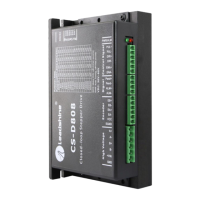
CS-D808 Closed Loop Stepper Drive User Manual
Page | 10
mechanical in nature. The next step is to isolate the system component that is causing the problem. As part of this
process you may have to disconnect the individual components that make up your system and verify that they operate
independently. It is important to document each step in the troubleshooting process. You may need this documentation
to refer back to at a later date, and these details will greatly assist our Technical Support staff in determining the
problem should you need assistance.
Many of the problems that affect motion control systems can be traced to electrical noise, controller software errors, or
mistake in wiring.
Connect power supply correctly
Microstep resolution setting is wrong
Setting appropriate microstep
Check wiring and restart power
Drive restore factory setting,
and keep ENA+, ENA- input
signals unconnected.
Wrong motor rotation direction
The Direction signal level is reverse
Toggling the SW5 DIP switch
Red light flashes once in a 5-second period
The motor coil may short circuit
or exiting the wrong wiring
Red light flashes twice in a 5-second period
The power supply exceeds Max.
operation voltage
Red light is always on after power on
Control signal is too weak
Ensure the current of control
signal is within 7-16mA
Control signal is interfered
Don’t tie the control signal
cable with power cable together
Refer to user manual of drive
and motor datasheet
Something wrong with motor coil
Check the motor is normal
Motor stalls during acceleration
Current setting is too small
Choose another power supply
with lager power or increase the
output current of drive
Motor is undersized for the application
Choose another motor with
higher torque
Acceleration is set too high
Power supply voltage too low
Choose another power supply
with large voltage output
Excessive motor & drive heating
Inadequate heat sinking / cooling
Motor peak current setting is too high
Reduce the current value refer
to motor datasheet
Motor vibration when power on
Speed loop Kp is too high
Reduce the speed loop Kp value


 To Next Page