25
Reference Manual for Operation
Rio Rancho, NM – USA
Changing the Passcode
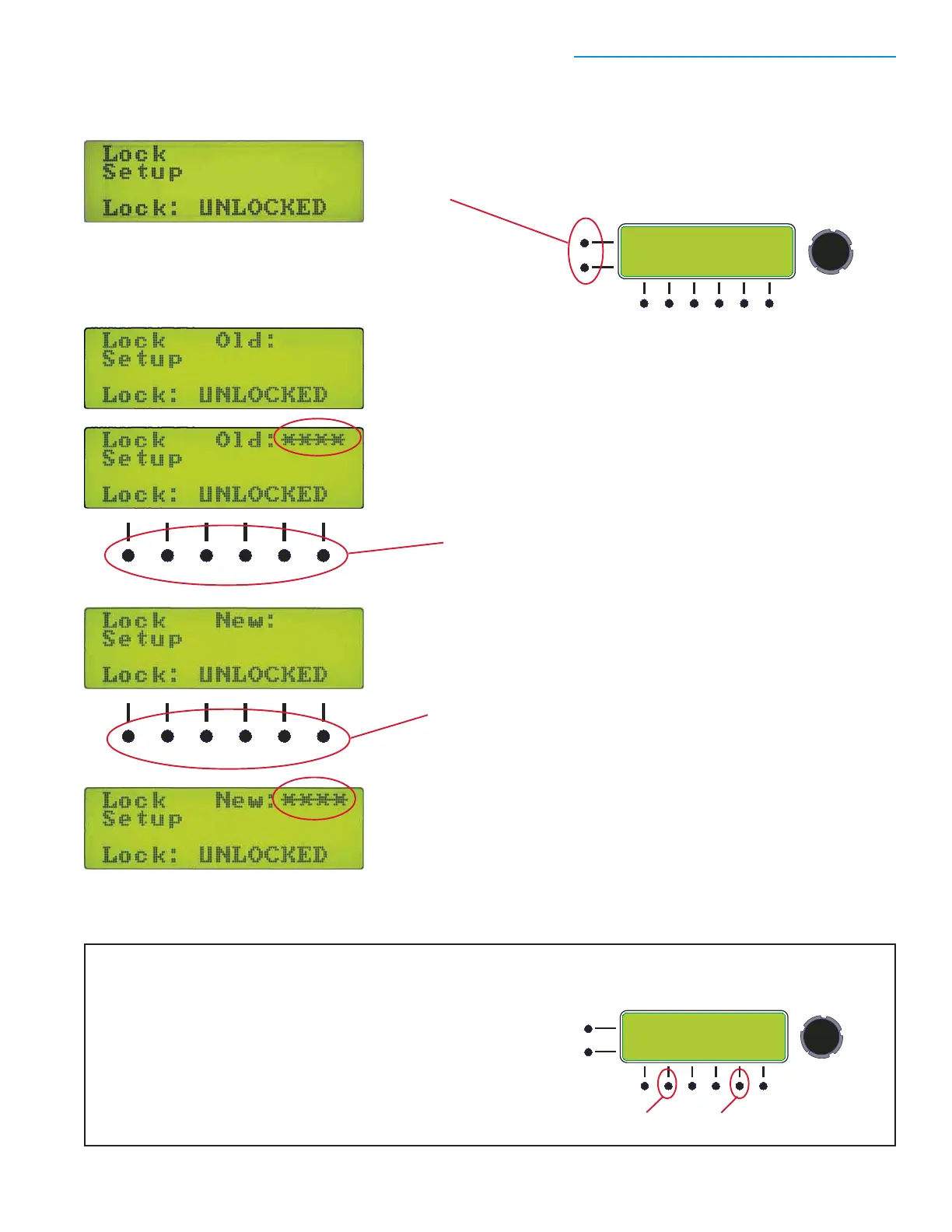
Enter the existing passcode
You will be prompted to enter the existing passcode when the word Old:
appears on the screen.
Navigate to the Lock Setup Screen
The status can be either UNLOCKED or LOCKED. Press
the two buttons to the left of the display at the same time.
Enter the existing passcode using the item select buttons under the
display. Symbols will appear in the upper right section of the screen to
confirm the button presses as you enter the passcode. Press the
encoder knob to accept the passcode. If the passcode is not correct,
an "Invalid" error message will appear briefly on the screen.
Enter the existing passcode with the item
select buttons below the display.
Enter the new passcode
When the existing passcode has been accepted, the word New:
will appear, prompting you to enter the new passcode. Use the
item select buttons below the screen to enter the new passcode.
Enter the new passcode with the item
select buttons below the display.
Symbols will appear in the upper right section of the screen as you enter
the passcode.
Press the encoder knob to accept the new passcode.
NOTE: the passcode must always include four button presses
Restoring the default passcode
Hold buttons 2 and 5 in while turning on the power. Hold the
buttons in for two or three seconds while the units boots up.
The passcode will be reset to the factory default: 1, 2, 3, 4.
PUSH FOR
MENU/SELECT
BACK
Button 2 Button 5
Hold in buttons 2* and 5 while powering up to
restore the factory default passcode: 1, 2, 3, 4


 To Next Page