Front Panel Operation
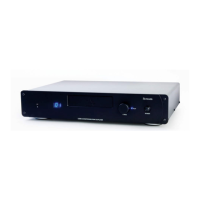
1. Standby - The Standby button toggles Stream between On and Standby. If a LIPS connection is used, the power status of
any other Leema components connected via LIPS will also be controlled.
Leema L-Drive control
Stream uses a radical new control device called L-Drive. All operational modes may be selected using this one simple
control. L-Drive removes clutter from the front panel while offering rapid track location. This feature is particularly useful to
classical music enthusiasts who frequently access higher numbered tracks.
1. OPEN/CLOSE - To open and close the drawer, press and hold the L-Drive control for around three seconds. If the unit is in
standby, it will power up and open the drawer. The drawer may also be pushed gently to close.
2. PLAY/PAUSE - Pressing the L-Drive control once will start playback. Pressing a second time places the unit in PAUSE.
3. TRACK SELECTION - To select a desired track, simply rotate the L-Drive control until the required track number is displayed.
After a second or so, the track will be selected and playback will start.
4. STOP - To stop playback, double-click the L-Drive device as you would when using a computer mouse.
Connections
Output
Connect the Left and Right outputs to your amplifier CD input using good quality phono-to-phono (RCA) interconnects to
provide maximum audio performance.
Front Panel Operation
STREAM
12


 To Next Page