LEGA
LEGA LEGA
LEGA
srl
srlsrl
srl
C
CC
Costruzioni
ostruzioni ostruzioni
ostruzioni A
AA
Apistiche
pistichepistiche
pistiche
–
––
–
via Maestri del Lavoro 23
via Maestri del Lavoro 23 via Maestri del Lavoro 23
via Maestri del Lavoro 23 –
––
–
48018 Faenza
48018 Faenza48018 Faenza
48018 Faenza
www.legaitaly.com
www.legaitaly.com www.legaitaly.com
www.legaitaly.com -
--
-
Tel 054626834
Tel 054626834 Tel 054626834
Tel 054626834 –
––
–
Fa
FaFa
Fax 054628279
x 054628279 x 054628279
x 054628279 –
––
–
P.iva 00043230390
P.iva 00043230390P.iva 00043230390
P.iva 00043230390
22 / 68
‘Tempo dosata’
(batching time) is the honey packing time.
‘Tempo sosta dopo dosata’
(waiting time after batching) is the time that elapses between honey packing end
and turntable restart.
These values are valid with the packer set for 1, 2 or 4 packing cycles.
6) Use the R.-H. direction arrow (2) to highlight the value to change.
7) Use the UP (1) or DOWN (4) arrow keys to adjust the value.
8) After entering the new data, press OK (5) to store the changes.
9) Use the arrow UP (1) or arrow DOWN (4) keys to switch from the T.DOSE (batching time) screen display
to the T.RUOTE (waiting time after batching) or the PRUDUCI 1 screen displays; after completing the
new data entry press OK (5) to store the changes.
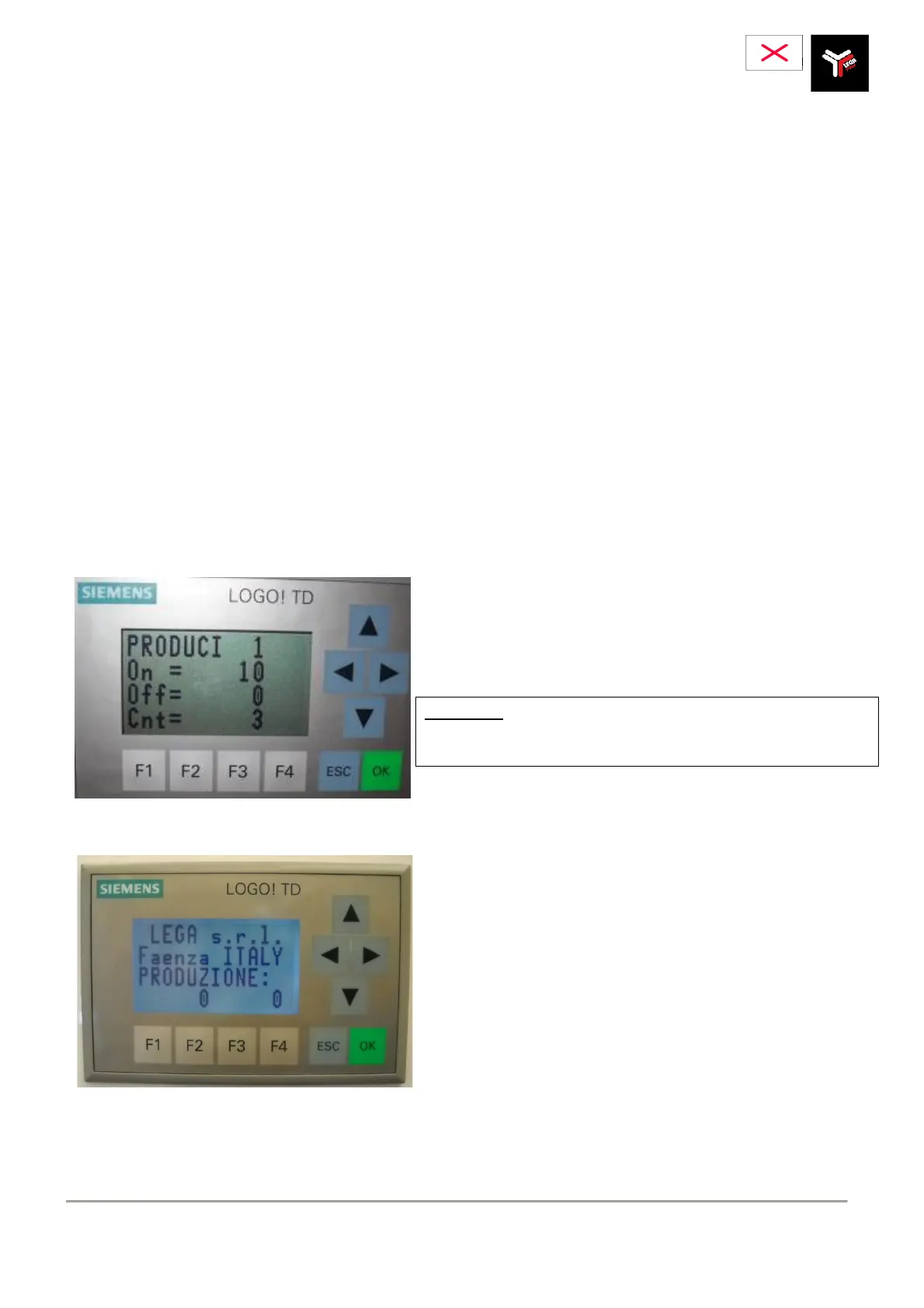
10) From the PRODUCI 1 screen display (pictured on page 7), it is possible to set the number of jars to fill by
adjusting the item “On” using the direction arrows. The item “Off” may not be modified, while the item
“Cnt” refers to the number of jars filled during the work cycle.
11) Press the ESC (6) key twice. The home page will be displayed. The machine is now ready to work
according to your newly entered values.
12) At the end of each work cycle, reset the screen display by holding down the emergency resetting control
(page 10, item 26) for approximately 10 seconds.
By selecting F4 followed by the R.-H. direction arrow (2), the
machine troubleshooting screen will be displayed which
can be checked over the phone with one of our
technicians in case of faults.
WARNING!
WARNING!WARNING!
WARNING!
The supplier declines all responsibility for any
The supplier declines all responsibility for any The supplier declines all responsibility for any
The supplier declines all responsibility for any
software fault resu
software fault resusoftware fault resu
software fault resulting from incorrect use or failure to
lting from incorrect use or failure to lting from incorrect use or failure to
lting from incorrect use or failure to
comply with directions.
comply with directions.comply with directions.
comply with directions.
4.1.1 Instructions for resetting product
4.1.1 Instructions for resetting product4.1.1 Instructions for resetting product
4.1.1 Instructions for resetting production
ionion
ion
capacity
capacitycapacity
capacity
Press F1 to view the screen shown here.
The first figure on the left shows daily production, the second
figure on the right shows total number of jars filled.
To reset the first figure, press and hold down the
“EMERGENCY RESET” key for more than three seconds.
To reset the second figure, press and hold down the
“EMERGENCY RESET” key for more than ten seconds.
If total number of jars filled is set to 999.999, the machine will
stop and regular work will be prevented.
It this case it will be necessary to reset the machine as
explained above.


 To Next Page