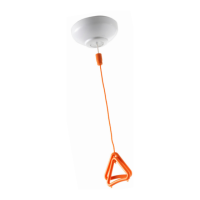
The document describes the Touchsafe® Pro Location Pendant, a wireless nursecall system component manufactured by Aidcall, a business unit of Legrand Electric Ltd. This installation guide (Doc No. FM5541 issue A) provides comprehensive information on the pendant's function, technical specifications, usage, and maintenance.
Function Description
The Touchsafe Pro Location Pendant is a battery-powered device designed to be worn around the neck. It communicates with the nursecall system using a standard 169MHz Telecare site-wide radio transmission and a short-range infrared transmission. Its primary function is to initiate a call on the nursecall system, displaying the user's name along with their location to the nearest Touchsafe Pro Call Point within infrared range. If the user is not within infrared range of a Call Point, the pendant call and user's name will still be displayed on the panel, but without specific location information. Calls initiated by the pendant can be cancelled by pressing the cancel button on the Touchsafe Pro Call Point that received the pendant location call, or on the user's bedside Call Point if no location was received. The pendant features a large orange call button and a red reassurance LED that flashes when a call is made. The keypads are embedded with an antimicrobial agent to prevent the growth of harmful micro-organisms. The pendant is compatible with Touchsafe Pro panel software V4.00a and Touchsafe Pro Call Point software V4.00a onwards.
Important Technical Specifications
- Aidcall Part No.: ZNC663
- Approvals:
- Safety: Compliance to EN 62368-1
- EMC: Compliance to EMC 2014/30/EU
- Radio: Compliance to RED 2014/53/EU
- Materials: Compliance to RoHS 2011/65/EU
- Transmission:
- Radio Frequency: 169.48125MHz
- Radio Range: 80m to 100m Typical (indoor)
- Radio ID Range: 20000001 to 20999999 (factory programmed)
- Infrared Peak Wavelength: 940nm
- Infrared Range: 10m to 15m Typical (line of sight)
- Infrared ID Range: 1 to 99 (user programmable)
- Features:
- Call Button: Rim Embossed Poly Dome; 280 grams operating force
- Visual Indicator: Red LED
- Neck Lanyard: 900mm long x 15mm wide black Polypropylene with Safety Closure
- PCB Jumper LK1: Position A = Program ID ~ Position B = Normal Operation
- Mechanical:
- Keypad: Polyester F200 with antimicrobial top layer
- Case Material: Infrared permeable PMMA (Black RAL 9005)
- Intermediate Ring Material: TPE (Orange)
- Flammability Rating: UL 94 HB
- Ingress Protection Rating: IP41
- Dimensions: 78mm x 48mm x 24mm (HxWxD)
- Weight: 54 grams (including battery)
- Power:
- Battery Type: 3.6V ½ Size AA 1.2Ah Lithium Thionyl Chloride
- Battery Manufacturers Part No.: SAFT LS14250
- Battery Life: 4 Years Typical (based on 5 calls per day)
- Environmental:
- Relative Humidity: Non-condensing
- Operating Humidity Range: 10% to 90% RH
- Operating Temperature Range: 5°C to 40°C (indoor residential)
- Storage Temperature Range: -20°C to 60°C
- Compatibility:
- Touchsafe Pro Panel: Software V4.00a onwards
- Touchsafe Pro Call Points: Software V4.00a onwards
Usage Features
The pendant is designed for ease of use and safety. It is supplied with a 900mm long woven neck lanyard featuring an anti-ligature safety closure, which will part if excessive force is applied and can be easily clipped back together. The large orange call button is prominent for quick activation. The red reassurance LED provides visual feedback when a call is made.
Programming the Location Pendant ID:
The pendant's infrared ID can be programmed in the range of 1-99. This range is also used by Touchsafe Pro Buddies and Pagers for Nurse Present mode, so care must be taken to assign a unique ID. The default ID is 1. Programming involves:
- Unscrewing and removing the lid (which remains attached by a keypad tail).
- Removing the battery and pressing the button for 1 second.
- Moving circuit board Jumper LK1 to position "A" and replacing the battery.
- Observing the red LED flashes to enter the TENS digit of the ID within 6 seconds (2 flashes for TENS digit input).
- Observing another red LED flash to enter the UNITS digit of the ID within 6 seconds (1 flash for UNITS digit input).
- The LED will go steady red to confirm programming completion.
- Removing the battery, pressing the button for 1 second, moving Jumper LK1 to position "B", and replacing the battery.
- Refitting the lid and screws.
For single-digit IDs (1-9), the 6-second timeout after the two red flashes should be allowed before entering the UNITS ID after the single red LED flash.
Touchsafe Pro Panel Programming:
To integrate the pendant with the nursecall system:
- Log on to the Touchsafe Pro Master Panel as an Engineer or Manager.
- Access the Telecare menu.
- Touch "Add Telecare Device" and enter the pendant's 8-digit radio ID (starts with 20xxxxxx).
- Enable the "Enable Location" checkbox.
- Enter the pendant's programmed Location ID (1-99) into the "Location ID" box.
- Select the relevant Call Point ID from the "Room" pull-down list (this Call Point will be used to cancel the call).
- Press "Save" and then "Close" to exit Telecare mode.
Testing the Location Pendant:
After programming, activate the pendant and verify the call display on the nursecall panel.
- If both radio and infrared location information are received, the panel will display "Pendant Location" with details of the pendant's location and user.
- If only radio transmission is received (pendant not within infrared range of a Call Point), the panel will display "Pendant Call" and the user's name.
The screen banner will be orange for a pendant call. Pressing "Accept" on the banner silences the alarm, and the banner changes to purple. To cancel the call, visit the Call Point that picked up the pendant location (or the user's bedside Call Point if no location was displayed) and press the light grey button.
Maintenance Features
Cleaning:
The pendant should be cleaned with a hard-surface disinfectant wipe or a damp cloth and a non-abrasive cleaning product. A dry duster can be used for polishing. Harsh, abrasive, or corrosive cleaning agents (e.g., scouring powders, bleaches, polishes) should be avoided.
Battery Replacement:
A "Device Status" alarm will be displayed on the Nursecall panel when the battery is low.
- Replace the battery within 72 hours of a low battery warning.
- If the warning changes to "CRITICAL," replace the battery IMMEDIATELY.
To replace the battery:
- Remove the 2 screws on the rear of the pendant and carefully remove the top cover (which remains attached to the keypad tail).
- Remove the battery from the retaining clips on the PCB.
- Only use a manufacturer-approved 3.6V ½ AA size 1.2Ah Lithium Thionyl Chloride battery (Aidcall Part No. F00171).
- Observe battery polarity markings on the PCB and label.
- Take care not to damage battery contacts.
- Refit the battery, top cover, and screws.
- Always perform a test call after battery replacement.
The pendant's programming is retained even when the battery is removed/replaced.
Used batteries must not be disposed of in domestic waste, incinerated, or mutilated due to corrosive chemicals. They should be disposed of and recycled according to environmental regulations.
Monthly Maintenance:
Location Pendants should be regularly checked for signs of external physical damage. Broken or cracked plastic can trap dirt and contribute to the spread of germs. Any pendants found damaged should be replaced immediately. Pendants needing repair can be returned via the website: https://www.aidcall.co.uk/returns-procedure/.
Bi-Annual Maintenance:
Although the Location Pendant battery has an estimated life of 4 years, it is best practice to replace the battery every 2 years. Section 9 provides the correct battery type. A test call should be made to confirm the battery has been fitted correctly and that the pendant is communicating correctly with the rest of the system.
Aidcall operates a policy of continual product improvement and reserves the right to modify the specification of its products. Any suspected variations to the document details should be reported to Aidcall's Technical Support.

 Need help?
 General

 To Next Page