Archimod®
Operating and maintenance manual
49
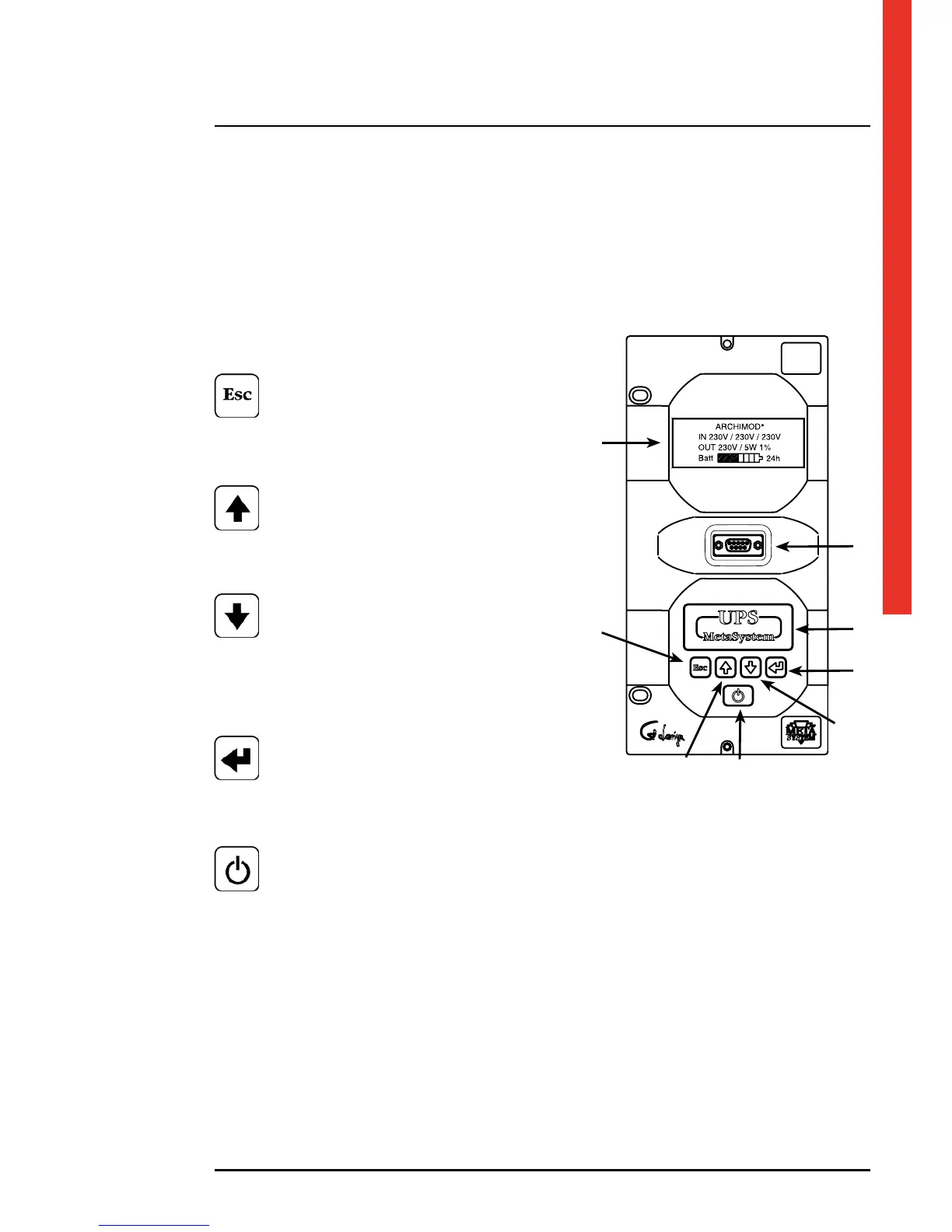
The control panel, at the front of the unit, has a 4-line, 20-character LCD display, a backlit multicolour status indicator and
a 5-key keypad.
The RS232 serial maintenance communication interface is under the display
The keys on the front panel are used to gain access to the UPS menus.
Legend
1 - 4 line x 20 character LCD display
2 - ESCAPE key
Main functions:
• Exit a function without modifying
• Goes from a lower to a higher menu level
• Exit the main menu and return to displaying status
• Silencing the acoustic indicator;
3 - UP ARROW key
Main functions:
• Exit a function without modifying
• Goes from a lower to a higher menu level
• Exit the main menu and return to displaying status
• Silencing the acoustic indicator;
4 - DOWN ARROW key
Main functions:
• Selects the next function
• Reduces a value inside a function
• Selects a new item inside a function
(e.g. from ENABLED to DISABLED)
• Scrolls the menus that contain more than 4 lines
• Changes the main frame page
5 - ENTER key
Main functions:
• Confirms a value
• Accesses a menu item
• Goes from a higher to a lower menu level
• It starts the service mode on;
6 - ON/OFF key
Main functions:
• it allows starting and stopping the UPS. Keep pressed for at least 2 seconds to shut down;
• it allows hot-swapping of the power module; press for at least 0.5 sec;
• it allows the output phases to be turned off individually, only with the UPS set as 3 independent phases
in output. Press for at least 0.5 sec;
7 - Multicolour backlit status indicator.
8 - RS232 maintenance serial communication interface.
7. Control panel
1
8
7
5
4
3 6
2












 To Next Page