10
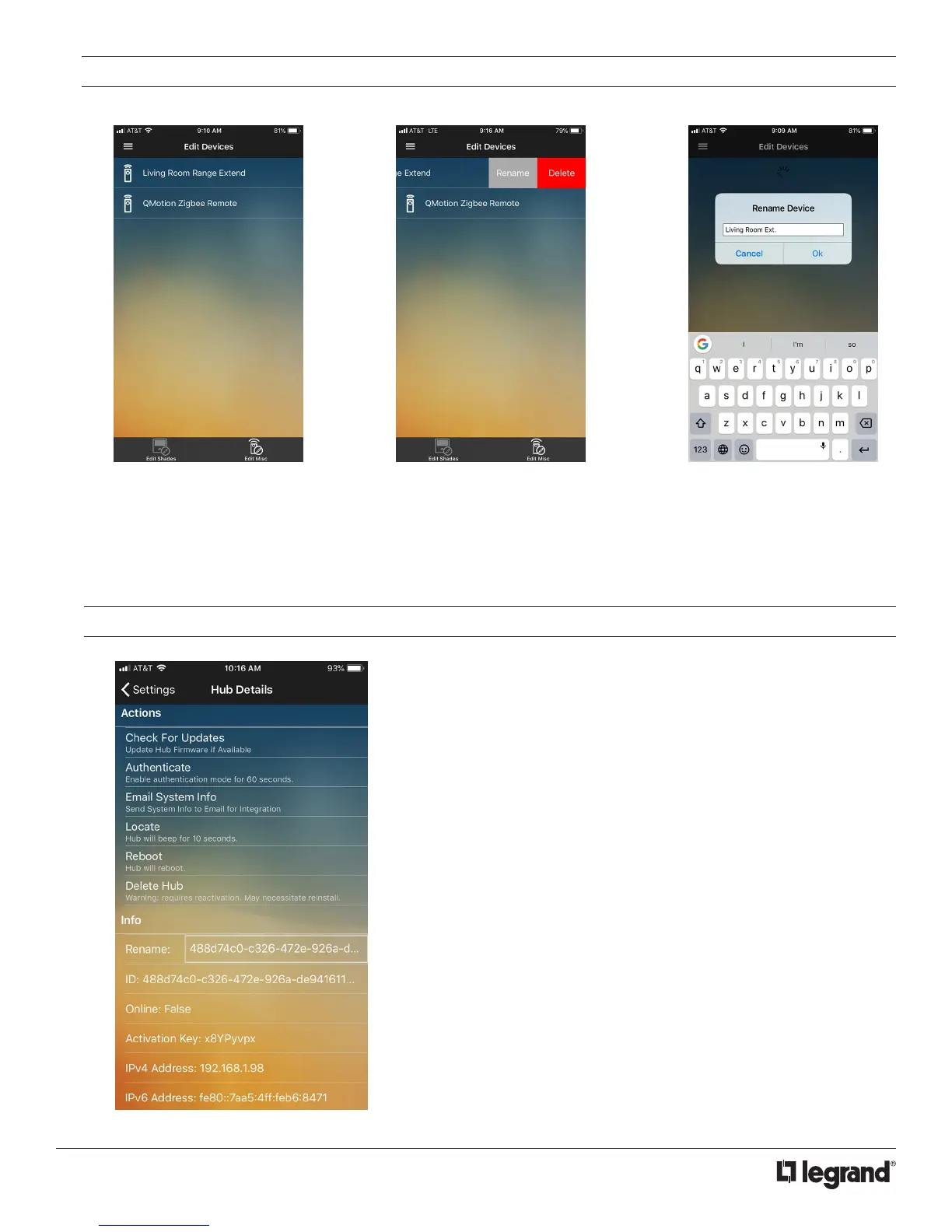
EDIT DEVICES - RANGE EXTENDERS AND REMOTES
1. Tap on the Edit Misc to go to the
list view of available extenders
and remotes.
2. Swipe or long press to access the
rename or delete options. Deleting
will prompt a confirm delete.
3. To rename, tap Rename, edit
name and save changes by
tapping OK.
SETTINGS
In the Settings page you may rename the QzHub. It also displays the
activation key used to authorized additional/other devices.
HUB ACTIONS
Check For Updates: Update QzHub firmware if available
Authenticate: Enable authentication mode for 60 seconds, allowing
additional devices to register the hub
Email System Info: Send system info to Email for integration
Locate: Hub will beep for 10 seconds
Reboot: Hub will reboot by power cycling
Delete Hub: Hub will be removed from device. Will require
reauthentication of device
INFO
Other data regarding the QzHub including IP addresses, firmware
versions, and ZigBee channels
Rename: Rename the hub to desired name
Activation Key: Alphanumeric sequence used to activate and
authenticate the QzHub



 To Next Page