Wattstopper
®
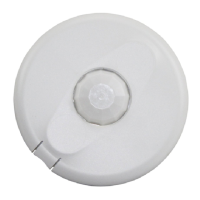
360° Passive Infrared-Low Voltage Occupancy Sensor
with Light Level, Isolated Relay and Manual On Feature (version 5)
Détecteur de mouvement basse tension à infra-rouge passif 360° (v5)
avec contrôle du niveau de luminosité, relais isolé et marche en mode manuel
Sensor de ocupación con tecnología infrarroja pasiva de baja tensión 360°
con nivel de luz, relé aislado y función de encendido manual (v5)
Installation Instructions • Instructions d’Installation • Instrucciones de Instalación
No:24053 – 09/20 rev. 2
Catalog Numbers • Les Numéros de Catalogue • Números de Catálogo: CI-300, CI-300-1
Country of Origin: Made in China • Pays d’origine: Fabriqué en Chine • País de origen: Hecho en China
DESCRIPTION AND OPERATION
The Wattstopper CI-300 360° passive infrared (PIR) occupancy sensors turn lighting systems on and off based on occupancy and
ambient light levels. The light level feature keeps lights from turning on if the ambient light level is sufficient.
The sensors can be configured to turn lighting on, and hold it on as long as the sensor detects occupancy. After no movement is
detected for a user specified time (30 seconds to 30 minutes) the lights are switched off. A “walk-through” mode can turn lights off after
only 3 minutes, if no activity is detected after 30 seconds of an occupancy detection.
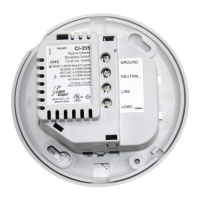
The CI-300 operates on 24V supplied by Wattstopper Power Packs, 24VAC, or half wave rectified AC. CI-300 sensors also have an
isolated relay with Normally Open and Normally Closed contacts for interfacing with HVAC or EMS.
PLACEMENT GUIDELINES
Depending upon obstacles such as furniture or partitions, the area of coverage may be less or more
than the sensing distances shown in the coverage pattern. This must be considered when planning
the number of sensors and their placement. It is also recommended to place the sensor 4 to 6 feet
away from air supply ducts as rapid air currents or the differences in temperatures may cause false
activations.
Mount the sensor to the ceiling. The CI-300 sensors are designed for a ceiling height of about 8-10
feet. Mounting above or below this range will significantly affect the coverage patterns. Be aware
that as you decrease the mounting height, you decrease the range and increase the sensitivity to
smaller motions. Conversely, when you increase the height, you increase the range and decrease
the sensitivity to smaller motions. At heights of more than 12-14 feet, you may start to significantly
reduce sensitivity. As a general rule, each occupant should be able to clearly view the sensor.
Often the best location to install a CI- 300 in a closed office is off-center. Avoid placing a sensor directly in
line with an open door through which it has a clear view out, as the sensor may detect people walking by.
Open Ofce Area Coverage
To get complete coverage in an open office area, install multiple sensors so that there is an overlap
with each adjacent sensor’s coverage area.
For open office areas with partitions it is best to place sensors over intersection of four workstations.
For large areas of coverage use multiple sensors.
Masking the PIR Lens
Opaque adhesive tape is supplied so that sections of the PIR lens can be masked. This restricts the
sensor’s view and allows you to eliminate PIR coverage in unwanted areas such as hallways outside of the desired coverage area.
Since masking removes bands of coverage, remember to take this into account when troubleshooting coverage problems.
6HQVRU
P
6HQVRU
P
P
SPECIFICATIONS
Voltage ................................ 18-28VDC/VAC, half wave rectified AC
Current Consumption ...............................................................15 mA
Power Supply ............................................Wattstopper Power Packs
Isolated Relay Rating ............................................ 1A @30VDC/VAC
Operating Temperature ..............................32° to 131°F (0° to 55°C)
Light Level One-Step Adjustment ................................10FC—300FC
Time Delay Adjustment .............................30 seconds to 30 minutes
Walk-Through Mode ...........3 minutes if no activity after 30 sec.
Test Mode ..................................... 5 sec. upon DIP switch reset
PIR Coverage
Model CI-300 .......................................................... up to 1200ft
2
Model CI-300-1 ........................................................up to 500ft
2
Sensitivity Adjustment ................................ High or Low (DIP switch)
UL & CUL Listed for use with Wattstopper Power Packs


 To Next Page
 General