EasyManua.ls Logo

LEGRAND Wattstopper DT-200 - User Manual

LEGRAND Wattstopper DT-200
21 pages
Print Icon
To Next Page IconTo Next Page
Loading...
Wattstopper
®
Dual Technology • Low Voltage Occupancy Sensor (version 3)
with Light Level, Isolated Relay and Manual On Features
Double technologie • Détecteur de présence basse tension (v3)
avec les fonctionnalités de niveau de luminosité, de relais isolé et de
marche manuelle
Doble Tecnología • Sensor de ocupación de Bajo voltaje (v3)
con nivel de luz, relé aislado y funciones de encendido manual
Installation Instructions • Instructions d’Installation • Instrucciones de Instalación
No: 24163 – 03/17 rev. 1
Catalog Number • Numéro de Catalogue • Número de Catálogo: DT-200
Country of Origin: Made in China • Pays d’origine: Fabriqué en Chine • País de origen: Hecho en China
DT-200-U is BAA and TAA compliant (Product produced in the U.S.)
SPECIFICATIONS
Voltage .........................................................................18-28VDC/VAC
Current Consumption ....................................................................25mA
Power Supply ................................................Wattstopper Power Packs
Isolated Relay Rating ................................................ 1A @30VDC/VAC
Operating Temperature ..................................32° to 131°F (0° to 55°C)
Light Level One-Step Adjustment ................................. 10FC to 200FC)
Time Delay Adjustment .................................30 seconds to 30 minutes
Walk-Through Mode ........... 3 minutes if no activity after 30 sec.
Test Mode .......................................... 5 sec. or DIP switch reset
PIR Coverage (Typical) .............................................................1000 ft2
Sensitivity Adjustment .............High or Low (DIP switch setting)
Ultrasonic Coverage (Typical) ............................................800-1200 ft2
Sensitivity Adjustment .............. Minimum to Maximum (trimpot)
Frequency ........................................................................40kHz
DESCRIPTION AND OPERATION
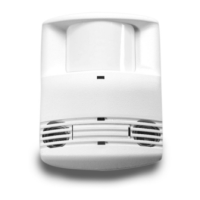
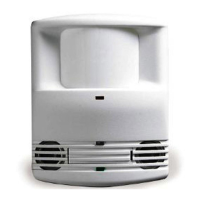
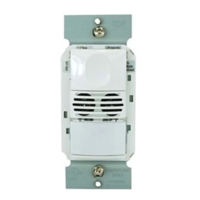
The Wattstopper DT-200 Dual Technology occupancy sensors combine advanced passive infrared (PIR) and ultrasonic technologies
into one unit. The combination of these technologies helps to eliminate false triggering problems even in difficult applications.
The DT-200 turns lighting systems ON and OFF based on occupancy and ambient light levels.
The DT-200 offers numerous operating modes that can be combined to create the ideal custom control. The sensors can be configured
to turn lighting ON, and hold it ON as long as either or both technologies detect occupancy. After no movement is detected for the
duration of the time delay (30 seconds to 30 minutes) the lights are switched OFF. A “walk-through” mode can turn lights OFF after only
3 minutes, if no activity is detected after 30 seconds of an occupancy detection.
The DT-200 operates on 24VDC supplied by Wattstopper Power Packs. DT-200 sensors also have an isolated relay with Normally Open
and Normally Closed contacts for interfacing with HVAC or EMS.
COVERAGE PATTERN
The DT-200 provides an elliptical coverage pattern. The coverage shown represents
walking motion at a mounting height of 10 feet. For building spaces with lower levels
of activity, or with obstacles and barriers, coverage size may decrease.

IW
IWIWIW IW
3,5
FRYHUDJH
IW
8OWUDVRQLF
FRYHUDJH
IW
Dense Wide Angle Lens
up to 2000 sq ft for walking motion
up to 1000 sq ft for desktop motion

Questions and Answers

  • J
    jackson74Aug 13, 2025
    How to fix LEGRAND Wattstopper DT-200 Accessories when lights don't turn on and no LED flashes?
    • L
      Leonard WilliamsAug 13, 2025
      If the lights don't turn on when you enter the room using LEGRAND Accessories, and neither LED flashes, start by checking that the circuit breaker is on. Then, check all sensor and power pack wire connections. Verify if there is a 24VDC input to the sensor between the red and black low voltage wires. If 24VDC is present, replace the sensor; if not, check the high voltage connections to the power pack. If the high voltage connections are good and high voltage is present, replace the power pack.
  • K
    Kathy MartinezAug 21, 2025
    What to do if LEGRAND Wattstopper DT-200 lights do not turn off?
    • J
      Jeremy JacksonAug 21, 2025
      If the lights do not turn off with LEGRAND Accessories, check all sensor and power pack wire connections. Disconnect the power pack blue wire. If the lights still do not turn OFF, check the power pack wiring and replace the power pack if necessary. If the lights turn off, the problem may be the sensor or wiring between the sensor and power pack. Reconnect the blue wire. Turn sensitivity and time delay to minimum, and allow the sensor to time out. If the lights turn off, the sensor is working properly – adjust sensitivity and time delay for the sensor. If the lights do not turn off, check the wiring between the sensor and power pack. If the wiring is correct, replace the sensor.
  • J
    John WallaceAug 25, 2025
    Why is the red LED randomly flashing on my LEGRAND Accessories?
    • R
      Richard CarrAug 26, 2025
      If the red LED randomly flashes on your LEGRAND Accessories, set the PIR sensitivity to minimum by turning DIP Switch 5 to the ON position.
  • J
    Jonathan WeaverAug 28, 2025
    What to do if the red LED does not flash on LEGRAND Accessories?
    • S
      Sharon DiazAug 28, 2025
      If the red LED does not flash on your LEGRAND Accessories, remember that when power is initially applied to the sensor, there is a warm-up period of 30 to 60 seconds before the LED becomes active. Also, make sure the PIR sensitivity is set to 100% (DIP switch #5 is in the “off” position).
  • R
    Robert SmithSep 1, 2025
    Why is the green LED on steady on my LEGRAND Wattstopper DT-200 Accessories?
    • M
      michaelgarrettSep 1, 2025
      If the green LED is on steady on your LEGRAND Accessories, check the ultrasonic sensitivity trimpot. The fully counterclockwise position is the override for the sensor. Turn the trimpot clockwise until the LED flashes only when movement occurs in the desired coverage area.
  • J
    Jessica MillerSep 5, 2025
    What to do if the green LED does not flash on LEGRAND Wattstopper DT-200 Accessories?
    • K
      Kristen LewisSep 5, 2025
      If the green LED does not flash on your LEGRAND Accessories, the ultrasonic sensitivity setting may need to be increased. Turn the adjustment trimpot clockwise until the LED begins to flash when movement occurs.
  • J
    John MartinezSep 9, 2025
    Why does the red LED flash briefly and the green LED not flash on my LEGRAND Wattstopper DT-200 Accessories?
    • A
      Alexis MclaughlinSep 9, 2025
      If the red LED flashes briefly and the green LED does not flash on your LEGRAND Accessories, check to see if you have used the Manual Switch connection. Do not connect anything to this terminal if you are not using a low voltage momentary switch between the sensor and power pack.
  • J
    Jose White PhDNov 16, 2025
    Why are the red and green LEDs flashing on my LEGRAND Accessories?
    • J
      Jessica RobinsonNov 17, 2025
      If the red and green LEDs are flashing on your LEGRAND Accessories, check all sensor and power pack connections. Also, check if the Light Level feature is enabled. If the occupancy indicator LEDs blink together every few seconds, the sensor is using the Light Level feature. If Light Level functionality is not desired, press and hold for 5 seconds to return the sensor to the default setting (maximum). Check for 24VDC at the power pack blue and black wire connections to the sensor while the sensor is active. If there is no voltage, replace the sensor. If there is voltage, check for 24VDC between the blue and black wire at the power pack; if 24VDC is present and the relay is not closing, replace it. If 24VDC is not present, check for a break in the low voltage wiring. If the LEDs are flashing...

Summary

Specifications

Wiring Directions

Low Voltage Wiring

Connect low voltage power (+24VDC and Return) from power pack to sensor.

Lighting Load Wiring

Connect sensor's blue wire to the lighting load for occupancy control.

Isolated Relay Wiring

Wire isolated relay common, normally open, and normally closed contacts.

Mounting the Sensor

Light Level Feature

Sensor Adjustment

Testing Occupancy Sensors

Steps to test sensors: set Test Mode, sensitivity, and observe LED behavior.

Manual On Function

DIP Switch Settings

Time Delay Settings

Configure time delay for lights OFF after no motion is detected.

Occupancy Logic Configuration

Configure initial occupancy, maintain occupancy, and re-trigger using DIP switches.

Overload Protection

Troubleshooting

LEGRAND Wattstopper DT-200 Specifications

General IconGeneral
BrandLEGRAND
ModelWattstopper DT-200
CategoryAccessories
LanguageEnglish

Related product manuals