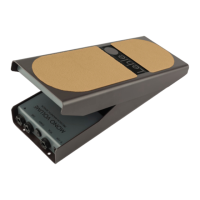
Need help?
Do you have a question about the Lehle DUAL EXPRESSION and is the answer not in the manual?
Explains the magnetic sensor and its calibration for precise pedal movement measurement.
Details the use of digital potentiometers for accurate expression data generation.
Covers the low-friction bearings and adjustable pedal mobility for user comfort.
Highlights the reduced size and weight compared to previous models.
Lists weight, dimensions, supply voltage, current consumption, and maximum level.
Explains how expression pedals control specific values in effects devices.
Defines the different connection types and their roles in signal routing.
Details the USB socket for firmware updates and MIDI-USB capabilities.
Explains the 50K socket and its modes (Autodetection, TRS, RTS), and connection types.
Details the 10K socket, its modes (Autodetection, TRS, RTS, momentary, latching switch).
Specifies the voltage and current requirements for the external power supply.
Describes the power LED and buttons for changing socket modes (10K and 50K).
Explains how to adjust the pedal's resistance using a screw.
Details how to mount the pedal using screws or 3M Dual Lock for stability.
Step-by-step guide to enter the calibration mode by holding a button.
How to set the minimum and maximum positions for the pedal's expression range.
How to set the trigger position for the relay switch output on the 10K socket.
Step-by-step guide to reset all settings and calibrations to their factory defaults.
How to use the pedal with standard effects pedals for parameter control.
Connecting the pedal to Kemper Profiler Head/Stage for expression and switching.
Using the pedal with multi effects units for expression and switching functions.
Controls effects and amplifier channels, including momentary and latching switch functions.
Controlling parameters like volume, pitch, or filter on synthesizers and keyboards.
Manipulating control voltage (CV) for modular synthesizers.
Sending MIDI data via USB to control software on a computer.
Visual guide for calibrating pedal range and switch output.
Visual guide for restoring the pedal to its factory settings.
Illustrates the internal connections and components of the LEHLE DUAL EXPRESSION.
 General
| Brand | Lehle |
|---|---|
| Model | DUAL EXPRESSION |
| Category | Music Pedal |
| Language | English |

 To Next Page