EasyManua.ls Logo

Leibinger Jet 3 - Page 136

Leibinger Jet 3
378 pages
Print Icon
To Next Page IconTo Next Page
To Previous Page IconTo Previous Page
Loading...
Group 7 Data/Programming Page 134
Release R2.0 LEIBINGER JET3
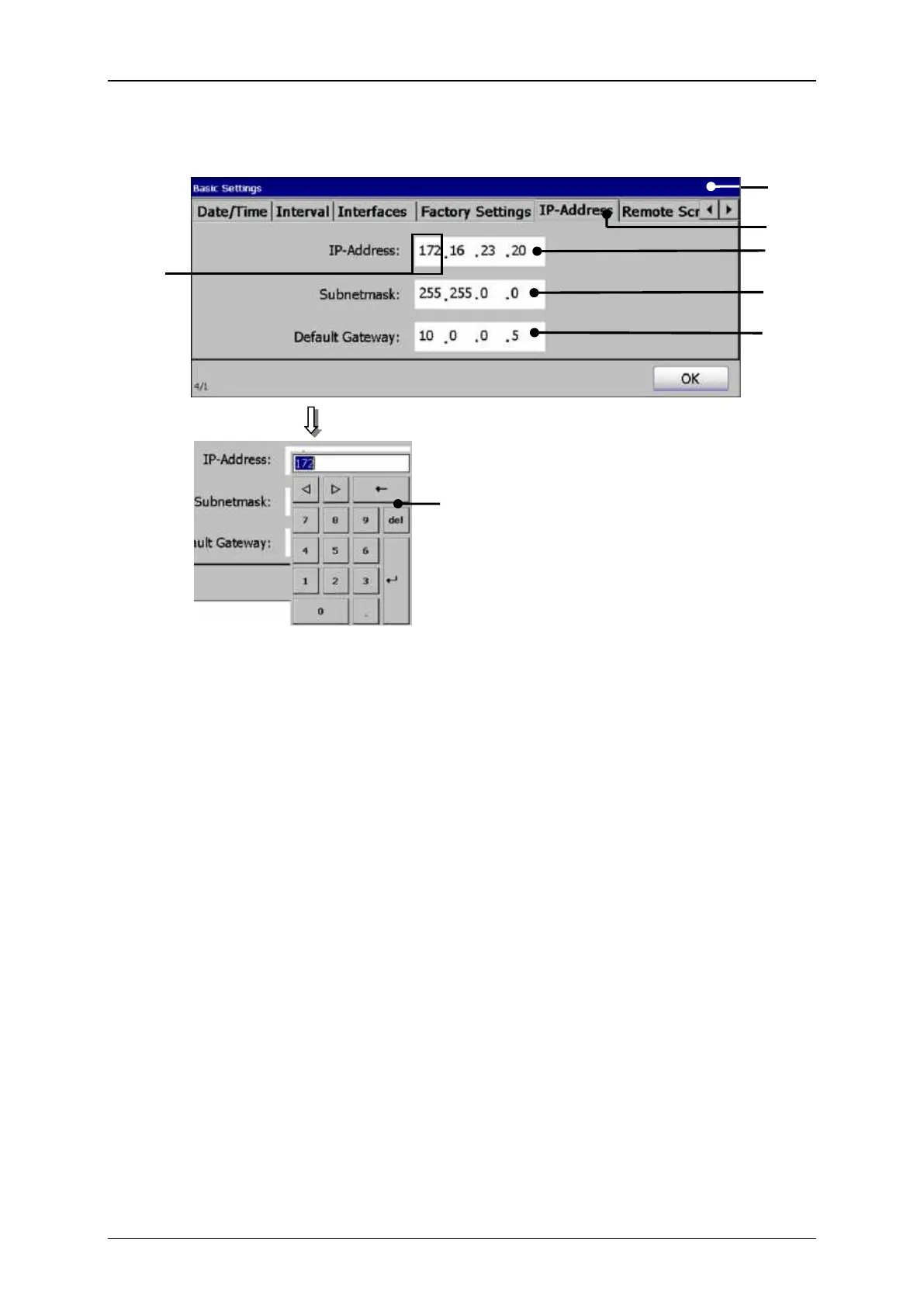
Figure 56
Set IP-address
Set IP-address
1 Dialog box <Basic Settings>
5 Setting field <Standard gateway>
2 Tab <IP-Address>
6 Address block (Example)
3 Setting field <IP-Address>
7 Numeric keypad
4 Setting field <Subnet mask>
7.3.1.7 Remote control
(Remote Screen)
With the tab <Remote screen> you can enter the required licence key and the
address of the Host-PC which are required for the working with the additional
software „Remote Control“.
Furthermore the MAC-address (physical address) of the printer as well as the status
of the licence key are displayed.
If you would like to work with the additional software „Remote Control“ you have to
transfer the MAC-address to the company Leibinger first to calculate a valid licence
key for the specific printer.

2
1
3
6
7
4
5

Related product manuals