Group 7 Data/Programming Page 178
Release R2.0 LEIBINGER JET3
Product counter (pre-defined print stop)
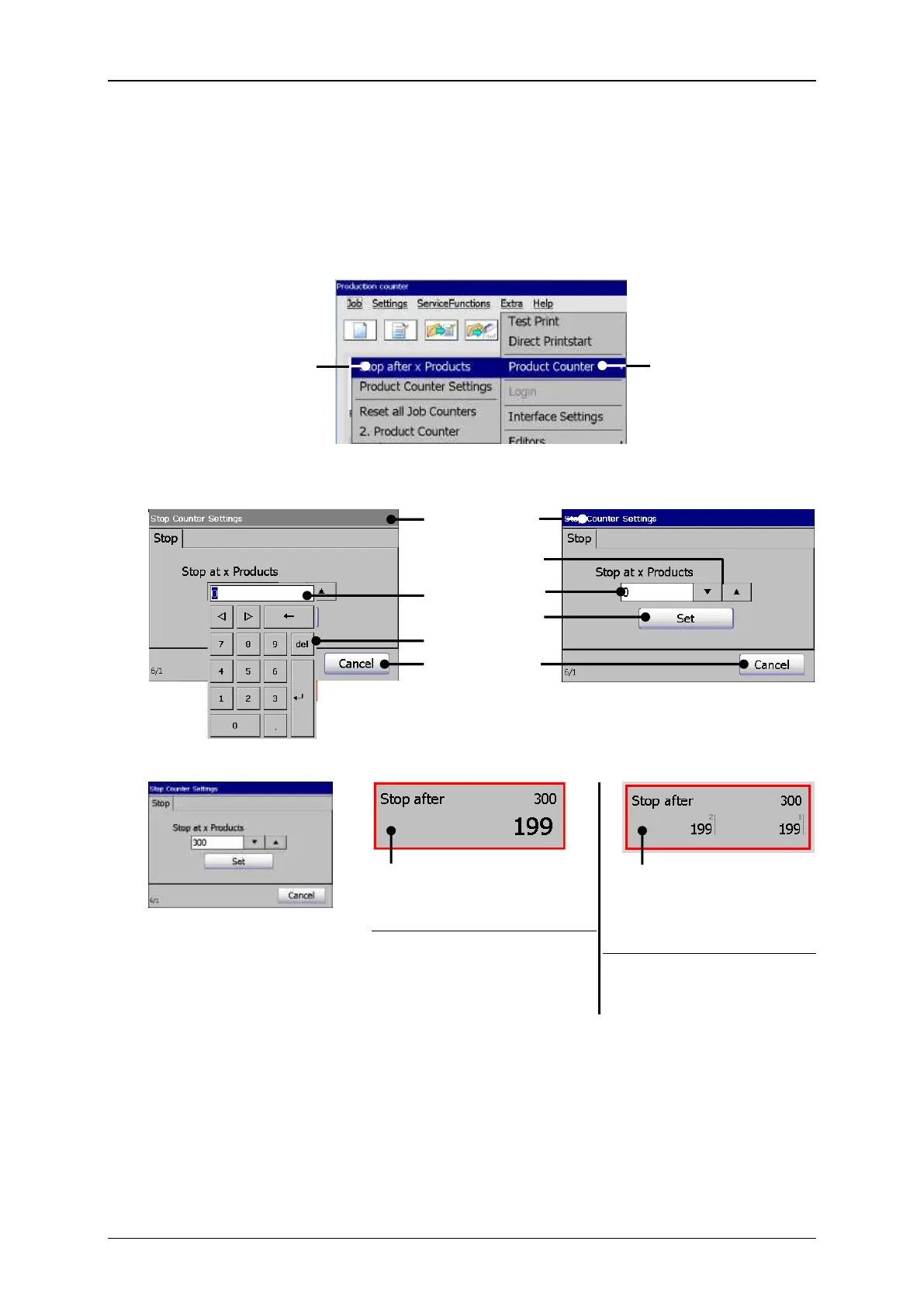
Select <Stop after x Products / 1 or 2 product counters
Basically this function works the same way no matter whether there are one or two
product counters defined. A second product counter does not have any effect on
this function. The only difference is the look of the status field.
The dialog box of the <Stop after x Products> function is a submenu of the
<Product counter> menu.
The parameter can either be set with the virtual keyboard or with the arrow keys.
Red frame as <Stop after x
Product setting> indi-cator
With one production
counter
Red frame as <Stop after
x Product setting> indi-
cator
With two production
counters
The settings are confirmed
with the <Set> button.
Depending on whether there is a second production
counter defined or not the status field looks different.
1 – Options <Product Counter>
2 – Option <Stop after x Products>
3 – Window <Stop at x Produts>
9 – Sta. field <Prod. Counter> 1 counter
5 – Counter display field
10 – Sta. field <Prod. Counter> 2 counter



 To Next Page