EasyManua.ls Logo

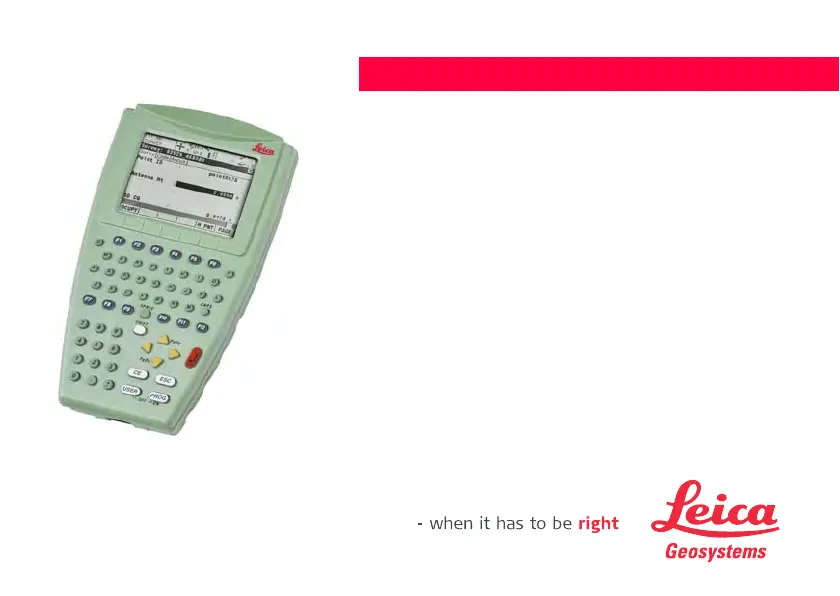
Leica Geosystems RX1250X - User Manual

Leica Geosystems RX1250X
230 pages
Print Icon
To Next Page IconTo Next Page
Loading...
Leica RX1200
User Manual
(Draft Copy Only)
Version 5.0
English

Table of Contents

Questions and Answers

Summary

How to Use the RX1200 User Manual

Understanding Instrument Keys

Details about fixed and softkeys on the instrument.

RX1200 System Concept

Software Architecture Overview

Explains the overall system concept and software architecture.

Types of RX1200 Software

Details on optional and custom application programs.

RX1200 Software Upload Procedures

Instructions on how to upload firmware to RX1200 models.

Specific Uploads for RX1250

Specific firmware upload instructions for the RX1250 model.

User Interface Navigation

Keyboard Layout and Functions

Details the layout and function of the instrument's keyboard.

Detailed Key Functions Explained

Explains the function of each type of key on the instrument.

RX1200 Screen Elements

Operating the RX1200

Keyboard and Touch Screen Operation

Explains how to operate the device using keyboard and touch screen.

RX1200 Operation Guide

Equipment Setup Procedures

Instructions for setting up the RX1200 equipment.

Mounting the RX1200 Unit

Mounting to Pole (Step-by-Step)

Step-by-step guide to mount RX1200 to a pole.

Detaching from Pole (Step-by-Step)

Step-by-step guide to detach RX1200 from a pole.

Mounting to GNSS Receiver

Step-by-Step Mounting Guide

Step-by-step guide for mounting RX1200 to a GNSS receiver.

Detaching from GNSS Receiver (Step-by-Step)

Step-by-step guide to detach RX1200 from a GNSS receiver.

Handstrap Attachment

Step-by-Step Handstrap Mounting

Step-by-step guide for attaching the handstrap to RX1200.

Setting Up with SmartPole

SmartPole Setup Illustration

Diagram and labels for SmartPole setup.

Setting Up with TPS Instrument

RCS Setup Using RadioHandle

Instructions for setting up RCS with RadioHandle.

Mounting Base Radio to Tripod (Step-by-Step)

Step-by-step guide to mount base radio to tripod.

RCS Setup Using TCPS27

Instructions for setting up RCS with TCPS27.

Setting Up with GNSS Receiver

SmartAntenna;RX1250 X Setup

Setup guide for SmartAntenna/RX1250 X in real-time reference.

SmartRover Setup with External Radio

Setup guide for SmartRover with external radio.

Connecting Radio Components

Connect Radio Antenna and Housing (Step-by-Step)

Steps to connect radio antenna and housing using cable.

Battery Management

Battery Operating and Charging Principles

Guidelines for battery usage, charging, and temperature ranges.

RX1220;RX1250 Battery Replacement

Step-by-Step Battery Change

Step-by-step instructions for changing RX1220/RX1250 battery.

SmartAntenna Battery Replacement

GHT56 Battery Replacement

Step-by-Step Battery Replacement

Step-by-step instructions for changing GHT56 battery.

Working with CompactFlash Cards

Inserting and Removing CompactFlash Cards

Step-by-step guide for inserting and removing CompactFlash cards.

Formatting CompactFlash Cards (Step-by-Step)

Step-by-step guide for formatting the CompactFlash card.

Attaching a Clip-On Housing

Attach Housing (Step-by-Step)

Step-by-step guide to attach a clip-on housing to the GHT56.

Detaching a Clip-On Housing

Detach Housing (Step-by-Step)

Step-by-step guide to detach a clip-on housing from the GHT56.

SIM Card Insertion Procedure

Step-by-Step SIM Card Insertion

Step-by-step instructions for inserting a SIM card.

SIM Card Removal Procedure

Step-by-Step SIM Card Removal

Step-by-step instructions for removing a SIM card.

Basic RX1200 Operation

Powering the RX1200 On

Procedures for powering on the RX1200 unit.

RX1200 States After Power On

Describes states and modes after the RX1200 is powered on.

Powering Off the RX1200

Procedures for powering off the RX1200 unit.

Managing RX1200 Licence Keys

Guidelines for Accurate GNSS Surveys

Ensuring Clear Satellite Signal Reception

Importance of clear satellite signal reception for survey accuracy.

Maintaining Antenna Stability for Static Surveys

Ensuring antenna stability during static surveys.

Proper Antenna Centering and Leveling

Importance of precise antenna centering and leveling over a marker.

RX1250 Connectivity Options

Connecting to SmartAntenna via Bluetooth

Steps to connect RX1250 to SmartAntenna via Bluetooth.

Connecting to Digital Cellular Phone

Steps to connect RX1250 to a digital cellular phone via Bluetooth.

Connecting to Personal Computer via USB

Steps to connect RX1250 to a PC using a USB cable.

Connecting to LGO via USB (Step-by-Step)

Step-by-step guide to connect to LGO via USB cable.

Connecting to PC via USB (Step-by-Step)

Step-by-step guide to connect to PC via USB cable.

Bluetooth PC Connection (Step-by-Step)

Step-by-step guide for establishing Bluetooth connection to PC.

Working with the TPS Instrument

Remote Mode Operation of TPS Instrument

Instructions for operating the TPS instrument in remote mode.

Transparent Mode Operation for TPS

Instructions for operating the TPS instrument in transparent mode.

Semi-Transparent Mode Operation for TPS

Instructions for operating TPS in semi-transparent mode.

Main Configuration Menu Overview

Choosing an Operating Sensor

Configuring Local Settings

Radio Communication Settings

Configuring Radio Settings

Working with Sensors

RX1200 Safety Directions

Hazardous Area Safety Precautions

Precautions for working in hazardous areas near electrical installations.

Electrical Installation Hazard Warnings

Warnings about electrocution risk near electrical installations.

RX1200 Trouble Shooting Guide

SmartAntenna Technical Specifications

Measurement Accuracy Specifications

Accuracy specifications for differential code and phase measurements.

GFU16 Bluetooth Communication Details

GFU17 Siemens MC45 Technical Data

GFU24 Siemens MC75 Technical Data

GFU19;GFU25 CDMA Technical Data

SmartAntenna with Bluetooth Specifications

Leica Geosystems RX1250X Specifications

General IconGeneral
TypeGNSS Receiver
Ingress ProtectionIP67
Communication InterfacesBluetooth, Serial, USB
Operating Temperature+65°C
Signal TrackingGPS L1/L2, GLONASS L1/L2

Related product manuals