EasyManua.ls Logo

Leica Z2X - Loading 35 mm Film; Step-by-Step Film Loading

Leica Z2X
47 pages
Print Icon
To Next Page IconTo Next Page
To Previous Page IconTo Previous Page
Loading...
Loading
the film
i
lf
there
is
a film
in
the,,6qmera,
ensure
that
it
is rewound
before
opening
the
back
cover,
i.e.
that
the frame
counter
is
set
at
,,0".
Otherwise
light
will
damage
any
expo-
sed film.
Attention'Whenever
possible,
do not
load
or remove
film
in
bright
light.
To
prevent
light
from
hitting
the
film,
load
or remove
it
in
your
body's
shaoow.
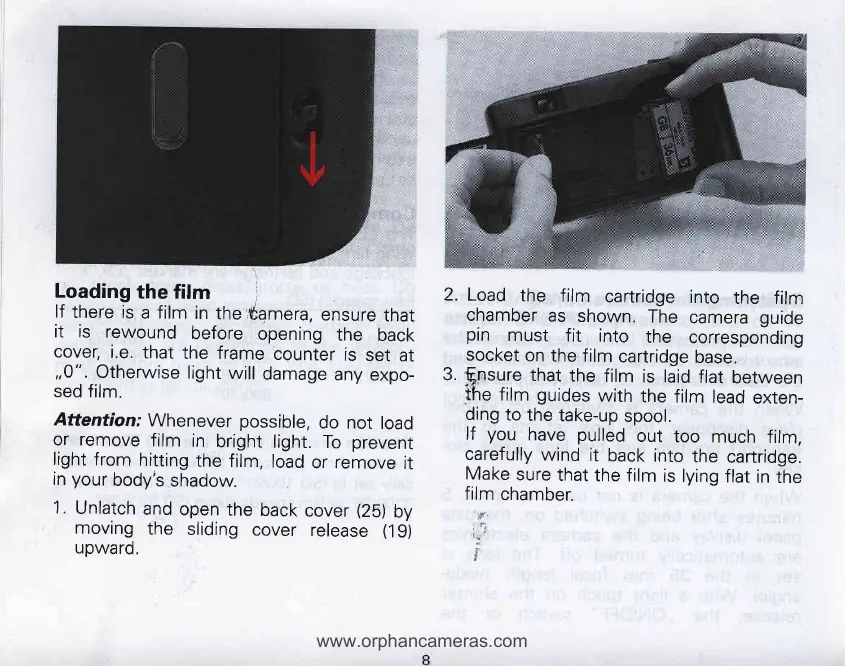
1.
Unlatch
and
open
the
back
cover
(25)
by
moving
the
sliding
cover
release
(19)
upwaro.
2. Load
the
film
cartridge
into
the film
chamber
as shown.
The
camera
guide
pin
must
fit into
the
corresponding
socket
on
the film
cartridge
base.
3.
f-nsure
that
the film
is laid
flat
between
the
film
guides
with
the film
lead
exten-
ding
to
the
take-up
spool.
lf
you
have
pulled
out
too
much
film,
carefully
wind
it
back
into
the
cartridge.
Make
sure
that
the film
is
lying
flat
in
the
film
chamber.
.d{
'
;fi
T
I
www.orphancameras.com