Switch the stabilizer ON using the
channel5 switch (lights: green ON, red OFF). Sharply move the plane in each of the three flight axes and check
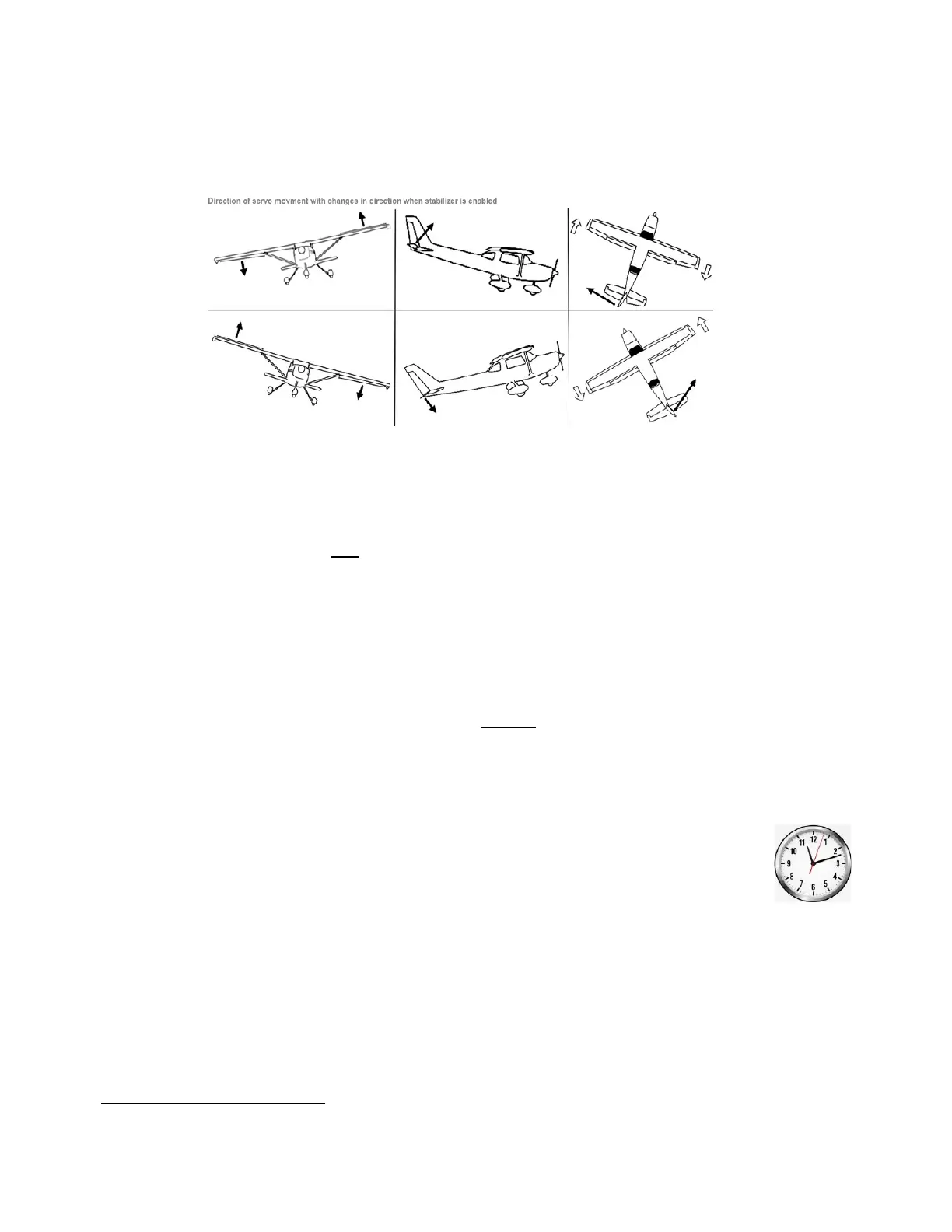
that the control surfaces move vigorously to oppose the disturbance. See diagram below.
The diagram shows how the surfaces should respond to movement of the model about each axis. When the
model is rolled sharply to the right, the right aileron should go down and the left aileron up to resist the
displacement. Likewise, when the model pitches nose-down, the elevator should go up to compensate. And
when it yaws nose-right, the rudder should go left.
Note that the control surfaces will only be displaced while the model is being disturbed; as soon as angular
motion stops, they will return to neutral. So, look for quick twitches of the control surfaces in the right
directions, not prolonged control offsets. If it is hard to see the movement, put your finger on the hinge line. It is
much easier to feel a small pulse than see it. To correct direction, change the appropriate channel as shown by
the blue LEDs: LED “A” (aileron), LED “E” (elevator) or LED “R” (rudder). Instructions for changing the response
direction are given on page 12.
THIS IS VITALLY IMPORTANT:
If stabilization moves the surfaces the wrong way (i.e., to increase the disturbance) your model may be
uncontrollable (until you switch off stabilization)!
Just as experienced RC pilots check stick directions before the first flight of the day, so a pilot using a stabilizer
should check that the surfaces move correctly in response to a disturbance.
9. Adjust the stabilizer gain pots (if applicable)
The direction of the screwdriver slot in the gain adjusting pots is described using the location of the
hour hand of an analog clockface. This one is approximately at “11 o’clock” for example. Clockwise
is in this direction ↻ and anticlockwise this ↺.
The gain pots on the Microbrick can be adjusted from approximately 8 o’clock, which is fully anti-clockwise, to
approximately 4 o’clock, fully clockwise. The 8 o’clock position results in virtually zero stabilization gain
(effectively turning stabilization OFF) while the 4 o’clock position is maximum gain. Noon (12 o’clock)
corresponds to mid-range. The actual gain required depends on the type and design of the plane, as well as the
size of the control surfaces. It can only be found definitively by flight testing, but many models work well with
aileron around 10 o’clock, elevator about 12 o’clock and rudder at 2 o’clock or even higher.


 To Next Page