EasyManua.ls Logo

Lemon Rx StabilizerPLUS LM0042 - User Manual

Default Icon
19 pages
Print Icon
To Next Page IconTo Next Page
Loading...
V. 1.5 – Updated 2022, February 28
Lemon RX StabilizerPLUS
7-Channel Receiver – LM0042/43/44
Essential Instructions
Contents
Introducing the Lemon Stabilizer PLUS .................................................................................................... 2
Requirements ......................................................................................................................................... 3
Functions ........................................................................................................................................................ 3
Transmitter Requirements .............................................................................................................................. 3
Servos and Power Sources.............................................................................................................................. 4
Setting up the StabPLUS.......................................................................................................................... 5
Installation ...................................................................................................................................................... 5
Binding ............................................................................................................................................................ 6
Setting Failsafe ................................................................................................................................................ 7
Flying ..................................................................................................................................................... 7
Preparing for the First Flight ........................................................................................................................... 7
First Flight ....................................................................................................................................................... 9
Setting up the Stabilizer PLUS in more Advanced Models ............................................................................. 9
Adjusting Gain .............................................................................................................................................. 10
Resetting the Stabilizer ......................................................................................................................... 11
Resetting Level and Alignment (Toggle during initialization) ....................................................................... 11
Resetting Stick Neutrals (Toggle after initialization)..................................................................................... 12
Calibration of the Sensors (no action normally needed) ............................................................................. 13
Special Options .................................................................................................................................... 13
Stabilizer Always-ON (requires Rebind) ........................................................................................................ 13
Mode Order and Autolevel Setting (Bind Plug on channels 4, 5, 6) ............................................................. 14
Hardware Reset (Bind Plug across channels 2, 3, 4)..................................................................................... 14
Other Issues ......................................................................................................................................... 15
IMPORTANT: Don't use Autolevel with Flaperons or Aileron Differential .................................................... 15
Using Other Mixes with Autolevel ................................................................................................................ 15
IMPORTANT: Don’t Use Elevon and V-tail Mixing in the Transmitter ........................................................... 16
Alignment and Mounting of the StabPLUS ................................................................................................... 16
Annexes ............................................................................................................................................... 17
Annex A: What do those tiny cryptic letters on the label mean? ................................................................ 17
Annex B: Stabilizer Mode Settings ................................................................................................................ 17
Annex C: Setting up a Current Generation Spektrum Transmitter for the StabPLUS ................................... 17
Annex D: Using a Two-Position Switch to Control Stabilization ................................................................... 18
Annex E: Setting up a DX6i for the StabPLUS ............................................................................................... 18
Annex F: Using Channel 7 on the Lemon Stabilizer (v4 and v4.5) and StabPLUS ......................................... 18
Further Information
For more detailed information see the Reference Guide to the Lemon RX Stabilizer PLUS.
A number of short instructional videos for the Stabilizer PLUS are available on the same RCGroups post.
To offer comments or raise questions about the Stabilizer PLUS or the instructions, please go to The Official
Lemon STABILIZER PLUS thread on RC Groups.

Question and Answer IconNeed help?

Do you have a question about the Lemon Rx StabilizerPLUS LM0042 and is the answer not in the manual?

Overview

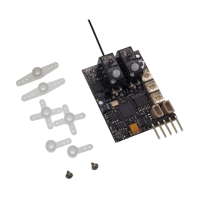
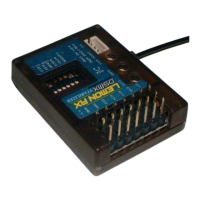
The Lemon RX StabilizerPLUS is a 7-channel receiver (LM0042/43/44) designed to provide stabilization for RC models. It builds upon the success of the basic Lemon Stabilized Receiver, offering enhanced features and capabilities for a wider range of applications, from beginner trainers to more advanced and responsive models.

Function Description:

The StabilizerPLUS acts as a DSMX/DSM2-compatible receiver with integrated stabilization. In its default configuration, with all DIP switches (J1-J6) set to OFF, it functions as a 7-channel unstabilized receiver. When activated by setting J4 and/or J5 to ON, it becomes a 6-channel receiver (channels 1-4 and 6-7) with three stabilization modes controlled by channel 5 (Gear):

  1. OFF: No stabilization.
  2. Gyro: Provides rate stabilization, counteracting turbulence for smoother flight. This mode is suitable for more advanced models and offers an AS3X-like experience.
  3. Autolevel: Limits bank and pitch angles and returns the model to level if the sticks are released. This mode is ideal for beginners, providing emergency recovery and a SAFE Technology Beginner mode-like experience.

The direction of stabilization action is determined by DIP switches J1, J2, J3. The unit can also be set to "Always-ON" mode, allowing all seven channels (including channel 5) to be used for flight functions. Always-ON is recommended only for Gyro mode, not Autolevel.

Important Technical Specifications:

  • Channels: Seven fully usable channels (when Always-ON or stabilization switched OFF); six usable channels in normal mode.
  • Compatibility: DSMX/DSM2-compatible, works with Spektrum® transmitters (e.g., DX4e, DX5e, DX6i, DX6, DX7s, DX8, DX8G2, DX9, DX18, iX12, JR 9503) and compatible Multiprotocol firmware modules (e.g., 4in1 types for FrSky Taranis/Horus or Turnigy 9XR Pro).
  • Antenna Options: Available with single antenna (LM0042) or dual diversity antennas (LM0043, LM0044).
  • Stabilization Axes: 6-axis stabilization (gyros and accelerometers).
  • Mixing Capabilities: Supports dual aileron, elevon (Delta wing), and V-tail mixing internally. Crucially, elevon and V-tail mixing MUST be done in the stabilizer, not the transmitter, to avoid crashes.
  • Master Gain: Channel 8 (Aux3) is dedicated to Master Gain control for transmitters with 8 or more channels, allowing overall gain adjustment.
  • Power Supply: Requires an ESC, BEC, or battery with ample current capacity, as stabilization increases servo current drain. Switching-type BECs (SBEC) are preferred. The unit is highly resistant to short power interruptions (<1s).

Usage Features:

  • Flexible Installation: Supports upright, inverted, or on-edge mounting. The long axis must be aligned with the flight direction, and servo connectors are typically to the rear. For best performance, it should be located near the model's center of gravity.
  • Binding: Standard bind procedure using a bind plug in the Bind/channel 7 slot. Indicator lights provide visual feedback during the process.
  • Failsafe: Offers both "No-pulse failsafe" (default, stops servo pulses) and "Pre-set Failsafe" (sets servos to chosen positions). Pre-set Failsafe is enabled by pressing the stabilizer button briefly during bind mode.
  • Gain Adjustment: Individual gain pots for Aileron, Elevator, and Rudder allow fine-tuning of stabilization response. Master Gain (if available) multiplies these individual settings. Gains should be adjusted to just below the point of oscillation.
  • Level Reset: A "toggle gesture" (rapidly flipping the channel 5 switch back and forth during initialization) allows resetting the stabilizer's perceived level and alignment, essential for non-upright mounting or fine-tuning Autolevel attitude.
  • Stick Neutral Reset: The same "toggle gesture" can be performed after initialization to reset the stabilizer's values for stick neutral positions, compensating for trim or subtrim adjustments.
  • Sensor Calibration: Automatic sensor calibration occurs during power-up if the stabilizer remains stationary. Manual calibration is rarely needed.
  • Special Options:
    • Stabilizer Always-ON: Allows channel 5 to be used for other functions by permanently enabling stabilization (requires rebind). Recommended only for Gyro mode.
    • Mode Order and Autolevel Setting: A bind plug across channels 4, 5, and 6 allows changing the default mode order (OFF/Gyro/Autolevel) and selecting between "Beginner" (severely limits bank/pitch) and "Advanced" (greater control) Autolevel settings.
    • Hardware Reset: A bind plug across channels 2, 3, and 4 resets the stabilizer to factory default settings, including offsets, orientation, failsafe, and mode order.

Maintenance Features:

  • Vibration Minimization: Autolevel stabilizers are susceptible to vibration. It is crucial to eliminate vibration sources (e.g., balance propeller, check motor shaft/bearings) to prevent deviations from level flight in Autolevel mode.
  • Mounting: Double-sided mounting tape (provided) or good quality servo-mounting tape (e.g., 3M Permanent Outdoor Mounting Tape) is recommended for secure attachment. Velcro®-type tape can also be used for easier removal, but care should be taken to avoid wobbling.
  • Troubleshooting: If unexpected behaviors occur, performing a hardware reset followed by rebinding is a good practice.
  • Documentation: Comprehensive "Reference Guide" and instructional videos are available for more detailed information and troubleshooting. An online RCGroups thread is available for comments and questions.

Warnings and Important Considerations:

  • Autolevel is NOT a substitute for adequate basic flying skills or advanced stabilization systems like Spektrum SAFE Technology®.
  • Autolevel is NOT recommended for use with Flaperons or Aileron Differential, as this can cause erratic behavior. Mixes should be configured to prevent Autolevel activation when these functions are in use.
  • Elevon and V-tail mixing MUST be done within the stabilizer, not the transmitter, to prevent crashes.
  • Beginners should be aware that Autolevel provides a different control feel, which can develop habits hard to break later.
  • Always test failsafe with the propeller removed or the model restrained.
  • Ensure correct control surface directions in OFF mode and correct stabilization action in Gyro/Autolevel modes before flight.
  • Do not use stabilization for initial takeoff unless absolutely confident in settings; use Gyro mode if stabilizing takeoff.
  • The Lemon Stabilizer PLUS receiver may not work properly with Spektrum® DM8/DM9 transmitter modules or certain non-Spektrum equipment.
  • Channel 7 (Aux2) can sometimes cause the receiver to enter bind mode if certain servos or electric retract units with low input resistance are connected. Solutions include using a different channel, plugging in after power-up, or adding a resistor to the signal lead.

Lemon Rx StabilizerPLUS LM0042 Specifications

General IconGeneral
BrandLemon Rx
ModelStabilizerPLUS LM0042
CategoryReceiver
LanguageEnglish

Related product manuals