EasyManua.ls Logo

Lemon Rx Microbrick - User Manual

Lemon Rx Microbrick
20 pages
Print Icon
To Next Page IconTo Next Page
Loading...
Version 1.0 2021-07-23
Lemon Microbrick Reference Guide
Contents
Introduction .......................................................................................................................................... 2
Features ............................................................................................................................................ 3
Applications for the Microbrick ........................................................................................................ 3
Supply Voltage .................................................................................................................................. 4
Speed Controller and Failsafe .......................................................................................................... 4
Basic Setups .......................................................................................................................................... 4
Connecting the Microbrick ................................................................................................................... 5
Setting Up the Microbrick .................................................................................................................... 5
Specific Issues ..................................................................................................................................... 10
Rudder Steering .............................................................................................................................. 10
Throttle Features ............................................................................................................................ 10
Indicator LEDs ................................................................................................................................. 11
Binding ............................................................................................................................................ 11
Programming ...................................................................................................................................... 11
Transmitter or Microbrick? ............................................................................................................ 11
Programming the Microbrick ......................................................................................................... 12
Swapping the Functions of the Onboard Servos ........................................................................ 12
Changing Stabilization Response Direction ................................................................................ 12
Selecting a Receiver Mix ............................................................................................................. 13
Enabling Dual Aileron Stabilization ............................................................................................ 14
Mixing Considerations .................................................................................................................... 14
Master Gain ........................................................................................................................................ 16
Troubleshooting ................................................................................................................................. 16
ANNEX A: Tips, Tricks and Modifications ........................................................................................... 18
The Variants of the Microbrick. ...................................................................................................... 18
Adding an External Bind Function. ................................................................................................. 18
Mounting the Microbrick with double sided tape. ........................................................................ 19
Power Supply Voltage and the Onboard Speed Controller............................................................ 19

Question and Answer IconNeed help?

Do you have a question about the Lemon Rx Microbrick and is the answer not in the manual?

Summary

Product Overview and Applications

Microbrick Features

Lists key specifications like size, weight, voltage range, and onboard components.

Ideal Applications

Discusses ideal applications for small park flier models and UMX type planes.

Power, Basic Setup, and Connections

Supply Voltage and Failsafe

Details voltage requirements, warnings, and failsafe behavior with onboard ESC.

Basic Setup Procedures

Guides through initial receiver configuration for 3-channel and 4-channel models.

Connecting the Microbrick

Explains physical connections for motor, battery, and servos using various connectors.

Core Configuration and Stabilization

Setting Up the Microbrick

Step-by-step guide for transmitter setup, binding, and bench testing.

Stabilization and Gain Adjustment

Covers testing stabilization response, direction, and fine-tuning gain pots.

Programming, Mixing, and Troubleshooting

Binding and Indicator LEDs

Covers the binding process and explains the meaning of red/green and blue LEDs.

Receiver Mixes and Stabilization Direction

Explains V-Tail, Elevon, and Dual Aileron mixes and response direction settings.

Troubleshooting and Master Gain

Addresses binding issues, LED problems, and master gain control for tuning.

Variants and Modifications

Microbrick Variants

Describes the four different connector and configuration options available.

Mounting and Bind Function Tips

Provides tips for adding an external bind button and secure mounting methods.

Overview

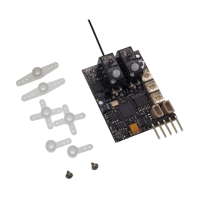
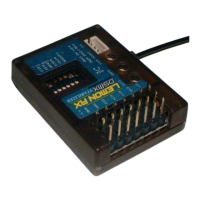
The Lemon Microbrick is a compact, lightweight, full-range receiver designed for small park flier models, particularly those under 250g. It is compatible with DSMP (DSMX™/DSM2™) transmitters and offers five flight channels (1-4, 6) plus two internal control channels.

Function Description:

The Microbrick integrates several key components:

  • Five-channel receiver: Provides full-range reception for throttle, aileron, elevator, rudder, and an auxiliary channel.
  • Two onboard rotary servos: These robust servos are capable of operating on a 2s LiPo.
  • 5A brushed speed controller (ESC): Manages brushed motor operation with a throttle safety feature requiring the stick to be low before activation. It also includes an integrated brushed Low Voltage Cut-off (LVC) for 1s LiPo setups, where the motor begins pulsing at 3.2V.
  • Optional 3-axis rate stabilization: This feature can be remotely turned On/Off via channel 5 and its sensitivity (master gain) adjusted via channel 8 (requires an 8+ channel transmitter).
  • Full onboard mixing: Supports V-Tail, Delta (Elevon), and channel 2/4 swap for various aircraft configurations. The channel 2/4 swap allows the aileron stick to control rudder-steered models.
  • Optional second stabilized aileron servo: Can be connected to channel 6 for dual aileron setups, following Spektrum™ standards.

The Microbrick is an ideal replacement for Spektrum™ AR6400 style integrated micro receivers in UMX models and is suitable for scratch builders of small 1s and 2s models.

Important Technical Specifications:

  • Size: 32 x 27mm
  • Weight: Less than 7g
  • Input Voltage Range: 3.1V to 8.5V (usable with 1s to 2s LiPo)
  • Onboard ESC Limit: ≤ 5 Amps
  • External Servo Connectors: Two JST-SH 1.00mm 3-pin connectors for channels 2 and 6. These carry the full supply voltage, so connected servos must be capable of tolerating the input voltage (e.g., Spektrum™ linear servos or HobbyKing HK5320/5330 servos are not suitable for direct 2s supply).
  • Motor Connection: Solder pads or a 1.27mm Nano socket (depending on variant) for brushed motors. Additional solder pads for battery connection. A 5-pin, 0.1" 90° header variant is available for brushless ESC connections.
  • LED Indicators:
    • Red/Green LEDs: Indicate stabilization mode (Green + Red = OFF, Green only = ON).
    • Blue LEDs (R, E, A): Indicate stabilizer response direction and assist in mix settings.

Usage Features:

  • Binding: A push button provides a convenient binding method. Hold the button while connecting power, release when the red LED flashes rapidly, then put the transmitter in bind mode.
  • Setup:
    • Start with a new ACRO model on the transmitter, omitting elevon or V-tail mixing (these are handled by the Microbrick if stabilization is active).
    • Set control throws to 100%.
    • After binding, attach servo arms at 90° when sticks are neutral.
    • Test in non-stabilized mode by turning gain pots fully anticlockwise or setting channel 5 to 100% (stabilization OFF).
    • Test in stabilized mode by setting gain pots to mid-point and channel 5 to -100% (stabilization ON).
  • Mounting: Install flat in the fuselage, aligned with the centerline. Firm mounting is crucial, especially for stabilization. Two screw holes are provided; avoid glue or double-sided tape directly on the secondary circuit board.
  • Servo Setup: Adjust transmitter reversing for correct servo direction. Align control surfaces with neutral trims and servo arms at right angles. Set end points/limits to recommended maximums.
  • Dual Rates and Expo: Set high rate at 100% and low rate at 65-75%. Use 20-25% expo for smoother response.
  • Stabilization Testing: With stabilization ON and gain pots fully clockwise, sharply move the plane in all three axes to check that control surfaces oppose the disturbance. Incorrect response requires changing the stabilization direction via button presses.
  • Gain Adjustment: Gain pots adjust stabilization sensitivity. Start at 10 o'clock position. Fine-tune during flight testing to avoid oscillation. Master Gain (channel 8) can speed up this process.
  • Programming:
    • Onboard Servo Swap: Swap Elevator and Rudder functions by holding the button while connecting power until the "A" blue LED flashes, then briefly press again within 3 seconds.
    • Stabilization Response Direction: Hold the button for specific durations (1s for Aileron, 3s for Elevator, 5s for Rudder) until the corresponding blue LED flashes, then briefly press to reverse.
    • Receiver Mix Selection: Hold the button for over 10 seconds until all blue LEDs flash, then briefly press to cycle through mix modes (None, V-Tail, Elevon/Delta, Aileron Stick > Rudder).
    • Dual Aileron Stabilization: Hold the button for over 18 seconds until "A" and "R" blue LEDs flash, then briefly press to toggle between single and dual aileron stabilization.
  • Throttle Features: Brushed ESC has a throttle safety feature. 1s brushed setups have LVC at 3.2V. Brushless ESCs will have their own LVC.
  • Mixing Considerations: V-Tail, Elevon/Delta, and Dual Aileron mixing must be done in the Microbrick itself when stabilization is active. Transmitter must be set to NORMAL aircraft type for these mixes. Flaperon mixing is done in the transmitter.

Maintenance Features:

  • Troubleshooting Binding: If binding is difficult, increase the distance between the transmitter and Microbrick (1-4m) and avoid metallic objects or strong 2.4GHz interference.
  • LEDs Not Changing: If red/green LEDs don't change, verify channel 5 switch assignment and servo travel on the transmitter monitor screen.
  • External Bind Function: Solder two fine wires to designated pads to add an external momentary switch or 0.1" header pins for a bind plug, making binding easier if the Microbrick is inaccessible.
  • Mounting with Double-Sided Tape (Caution): Lemon advises against mounting methods that stress the underside PC board due to the RF daughterboard's attachment. If using double-sided tape, run hot glue around the edges of the daughterboard to reinforce its connection to the main board before applying tape.
  • Power Supply: The Microbrick is 1-2s capable.
    • 1s LiPo: All components see max 4.2V. External 1.7/1.9g servos and 1s linear servos work.
    • 2s LiPo with external brushless ESC (BEC 5V): External 1.7/1.9g servos may work (rated 4.8V), but 1s linear servos are not suitable.
    • Direct 2s LiPo: External servos must be 8.4V capable. Onboard servos are fine. The onboard brushed ESC is limited to 5A regardless of supply voltage.

Lemon Rx Microbrick Specifications

General IconGeneral
BrandLemon Rx
ModelMicrobrick
CategoryReceiver
LanguageEnglish

Related product manuals