Lemon RX Stabilizer PLUS Receiver – Essential Instructions v.1.5
12
This is also required if the stabilizer is mounted inverted or on edge (e.g., on a profile fuselage), or if the unit
is mounted not quite level. All these cases require toggling.
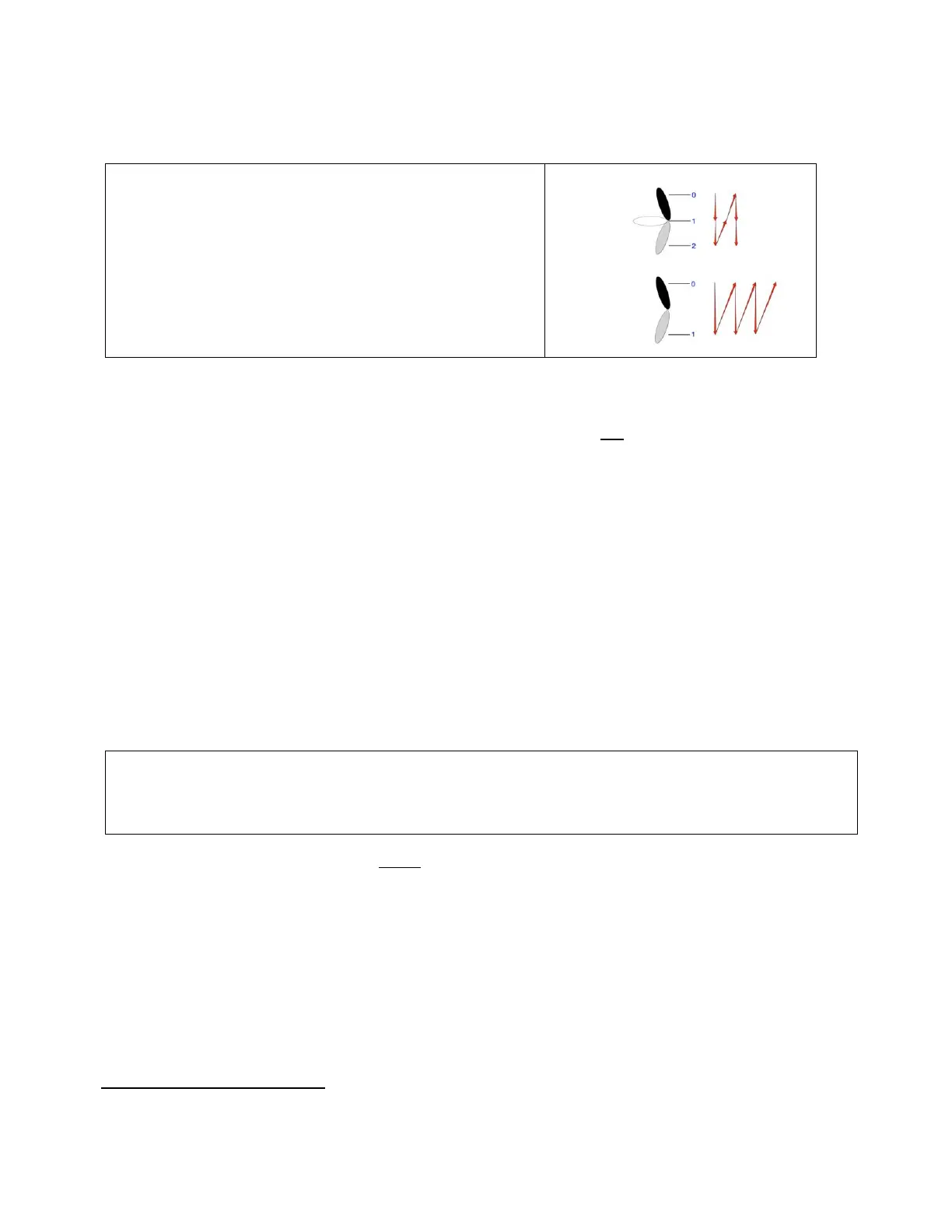
Toggle Gesture
Move the Stabilizer Mode switch on your transmitter back
and forth as quickly as possible through its full range for
2-3 seconds. This procedure applies to both 2- and 3-position
switches. At a minimum the stabilizer needs to see six
changes of switch position (see diagram) within 2 seconds,
but a few more changes are desirable to guarantee a
successful reset.
To reset level as seen by the stabilizer:
1. Set the model up in level flight position on the bench.
2. Turn on the transmitter and apply power to the stabilizer (bind plug not required if previously bound).
3. When Indicator 1 (Green/Blue) starts flashing, immediately (within 8 seconds) perform the toggle
gesture explained above, flipping the switch back and forth continuously for 2-3 seconds.
DO NOT MOVE OR DISTURB THE MODEL during the initialization period.
4. The Red LED of Indicator 2 should now come on for a few seconds. After a further wait, the Green LED
of Indicator 2 should flash four times to confirm initialization.
If you do not see this confirmation, repeat the whole process until you do. This is necessary to ensure
correct initialization. A possible reason for failure is movement of the model during initialization.
5. Power down the stabilizer
If you observe any unexpected responses from the model, on the ground or in the air, perform a Level Reset
as described above. Also, don’t forget to also reset the stick neutrals, as described in the next section, as
their setting, while not usually critical, can sometimes have an important impact on the model’s behavior.
The Stabilizer retains the values generated, even when powered down, so the procedure doesn’t need to be
repeated unless you want to adjust Autolevel attitude or you change the stabilizer's position in the plane.
If you perform this procedure, it’s REALLY important to verify that the “toggle gesture” is successful, as it
resets the Stabilizer’s orientation and Autolevel values. Be sure you see four Green flashes on the
Indicator 2 LED (near the pins). No flashes = no fly!
Resetting Stick Neutrals (Toggle after initialization)
To ensure optimum stabilizer performance, after any major adjustment of the trims or subtrims you should
use the toggle gesture (as defined above) to reset the stabilizer's values for the stick neutral positions. This
is an entirely separate process from resetting level and can be done at any time AFTER the stabilizer has
completed its initialization. During the reset, the aileron, elevator and rudder sticks and the corresponding
trims must not be moved.
With the transmitter and stabilizer ON, and leaving the sticks and trims untouched, move the Stabilizer
Mode (Gear) switch as quickly as possible back and forth for about 2 seconds.
There is no verification but the process is extremely simple and reliable.
Some models may need to be slightly nose-up (typically 1-3°) to maintain level flight at a normal throttle setting.



 To Next Page