12
TV
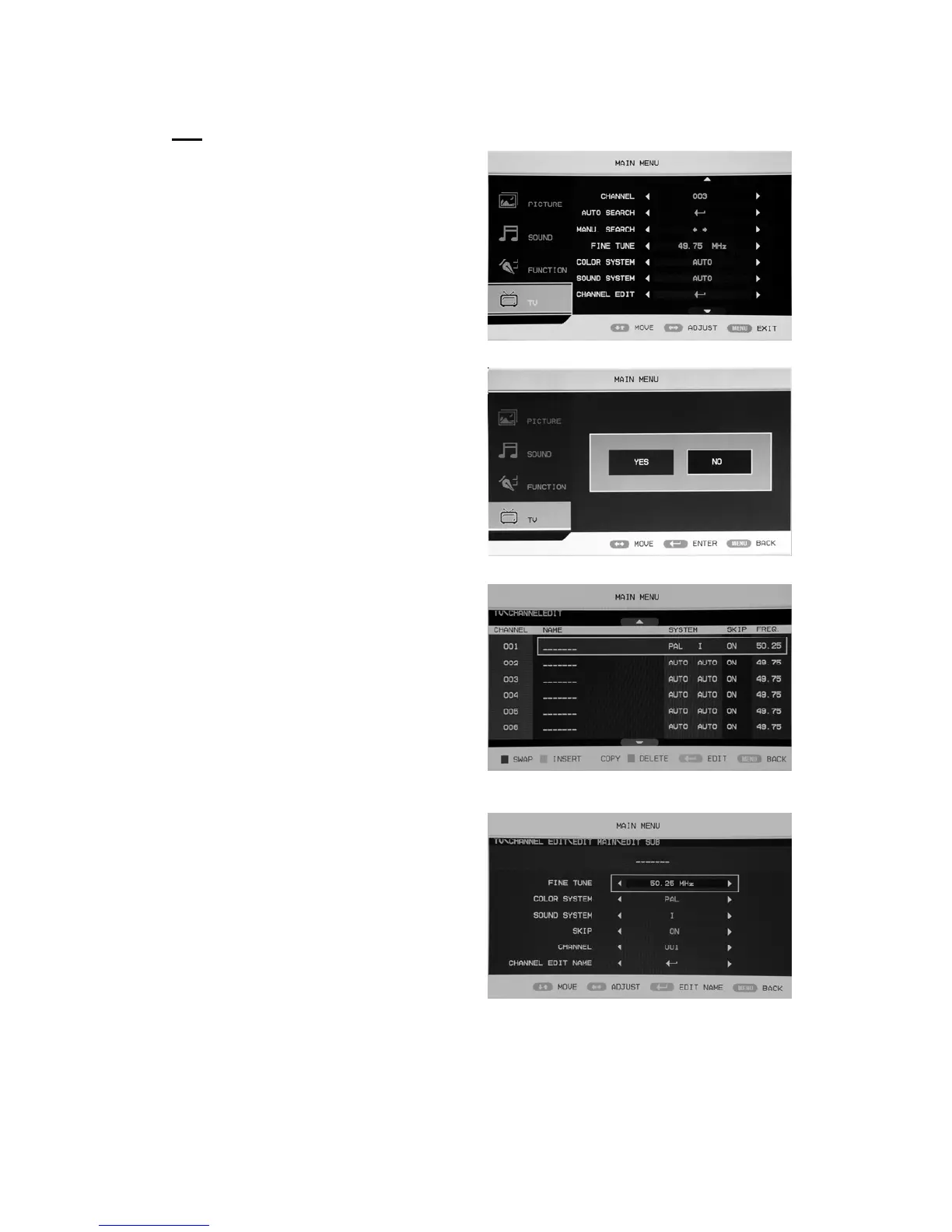
You can make the desired adjustment in the TV
mode.
1. Press “c/d” button to select “CHANNEL”
and press the “e/f” button to select the
different channel.
2. Press “c/d” button to select “AUTO
SEARCH” and press the “ENTER” button
to enter. Press the “e/f” button to select
“YES” or “NO” and press “ENTER”
button to confirm . Select “YES” to
do auto search and select “NO” to
return the previous menu.
3.Press“c/d” button to select
“MANU.SEARCH” and press the “e/f”
button to enter. Press the “e/f” button to
select
“YES” or “NO” and press
“ENTER” button to confirm . Select
“YES” to do manual search and select
“NO” to return the previous menu.
4. Press “c/d” button to select “FINE TUNE”
and press the “e/f” button to select the
frequency which you want to fine tune.
5. Press “c/d” button to select “COLOR
SYSTEM” and press the “e/f” button to
select the local color system .
6. Press “c/d” button to select “SOUND
SYSTEM” and press the “e/f” button to
select the local sound system.
7. Press “c/d” button to select “CHANNEL EDIT” and press the “ENTER” button to enter.
a. Press “c/d” button to select one channel
and press “RED” button to pitch on. Press
“c/d” button to select another channel
which you want to swap . Press “ENTER”
button to confirm.
b. Press “c/d” button to select one channel
and press “GREEN” button to pitch on.
Press “c/d” button to select another
channel which you want to insert . Press
“ENTER” button to confirm.
c. Press “c/d” button to select one channel and press “YELLOW” button to pitch on.. Press
“c/d” button to select another channel which you want to copy. Press “ENTER” button to
confirm.



 To Next Page