Main Menu Operation
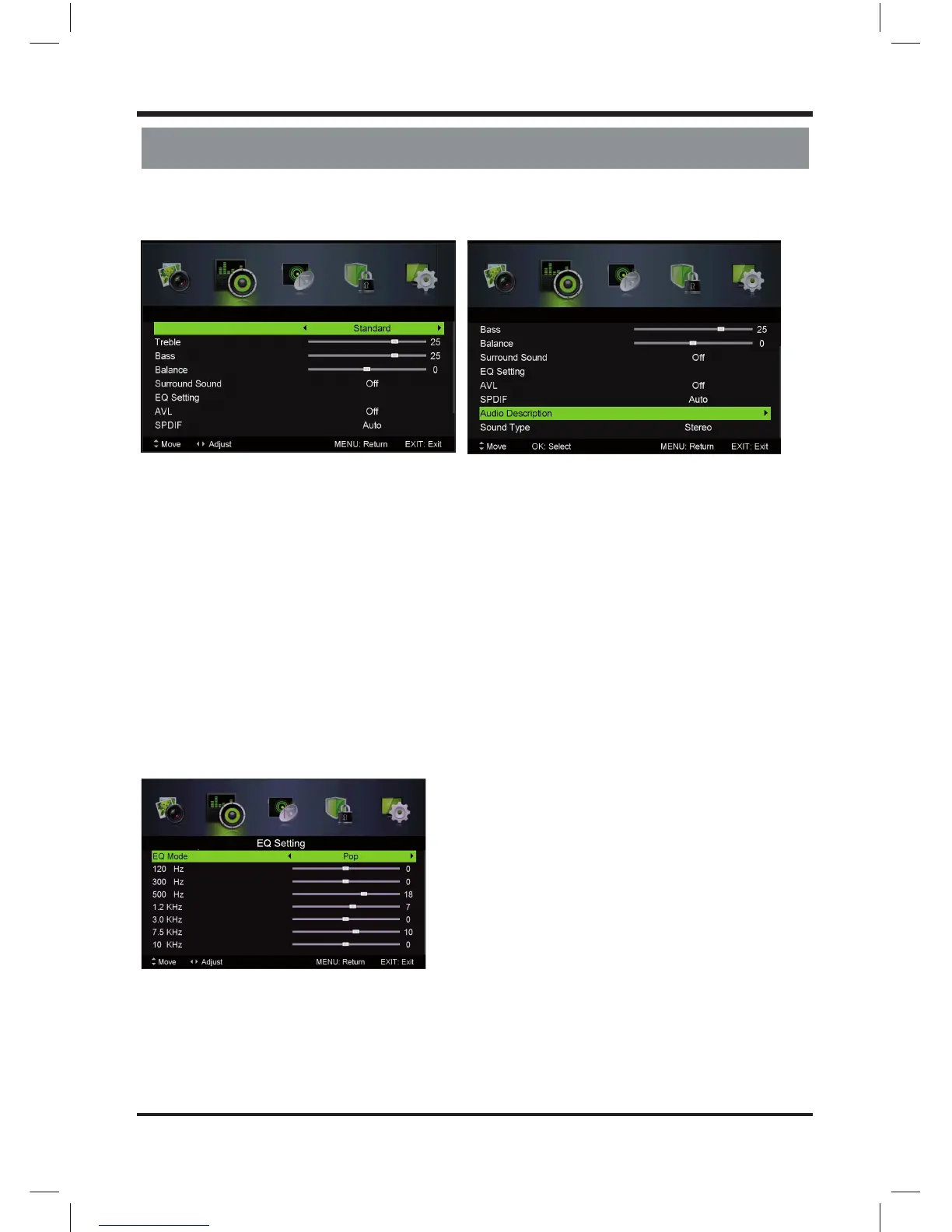
5.2 Sound Menu
Press MENU button to display the main menu.
Press / button select SOUNDin the main menu, then press ENTER / to enter.
1. Press / button to select the option that you want to adjust in the SOUND menu.
2. Press Enter/ / button to adjust.
3. After nishing your adjustment, Press MENU button to save and return back to the previous menu.
Sound Mode
Press / button to select Sound Mode, then press / button to select.
Treble/Bass/Balance
Press / button to select option, then press / button to adjust.
Treble Adjust the treble e ect. Increases or decreases high-pitched sounds.
Bass Adjust the bass e ect. Increases or decreases lower-pitched sounds.
Balance Adjust the balance between left and right speakers to adapt to your listening position.
Surround Sound
Press / button to select Surround Sound, then press / button to select On or O .
EQ Setting
Adjust the curve of 7 bands equalizer.
Press / button to select EQ Setting, then press Enter / button to enter sub-menu.
EQ Mode
Press / button to select EQ Mode, then press / button to select.
(Available EQ mode: O , Rock, Pop, Jazz, User).
AVL
Set the auto volume control.
Press / button to select AVL, then press / button to select On or O .
Standard
(Available Sound mode: Music, Personal, Movie).
Sound Sound
Sound Mode
10
LE D COLOR TV



 To Next Page