CD display
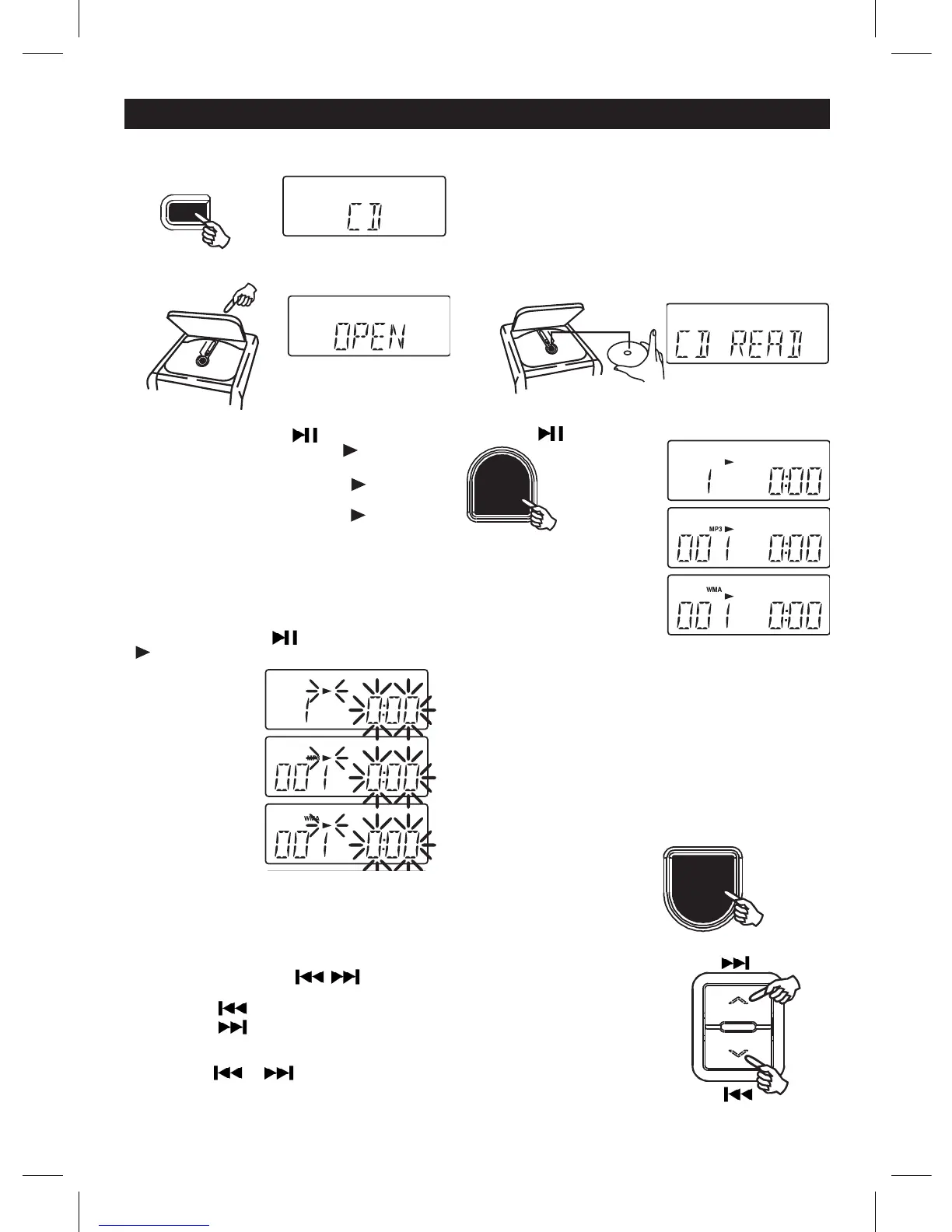
5. Press the PLAY/PAUSE button.
Tracknumber"1"&thesymbol""willbe
shownduringnormalcompactdiscplayback.
Tracknumber"001",thesymbol""&"MP3"
willbeshownduringMP3playback.
Tracknumber"001",thesymbol""&"WMA"
willbeshownduringWMAplayback.
GB 4
MP3 display
WMA display
COMPACT DISC PLAYBACK
1 . Press the FUNCTION button and select CD
mode.
2 . Press OPEN/CLOSE button to open CD door.
3. Insertadiscwiththelabelsidefacingup.
4 . Press OPEN/CLOSE button to close the CD door.
For CD: Total number of tracks and time will be
shown on the display.
For MP3: Total number of folder and tracks will be
shown on the display.
For WMA: Total number of folder and tracks will be
shown on the display.
CD display
CD display
TO SKIP TO THE BEGINNING OF A TRACK
• Presseitheroneoftheskipbuttonsaccordingtothedesiredskipdirection.
• Play/back resumes from the selected track.
• Whenthebuttonispressedonceduringplay,theprevioustrackstartsagain.
• Whenthebuttonispressedonceduringplay,thenexttrackplays.
SEARCHING FOR A PASSAGE WITHIN A TRACK
• Keeptheorbuttonpressedduringplayback,
andreleasethebuttonassoonasyourecognisethedesiredpassage.
Then normal CD playback will resume from this point.
TO INTERRUPT PLAYBACK
Press the PLAY/PAUSE button and the symbolPLAY/PAUSE button and the symbol button and the symbol
""andcurrenttimewillash.Pressthebuttonagain
to resume playback.
TO STOP PLAYBACK
Press the STOP/BAND button.
For CD: Total number of track and time will be
shown.
For MP3: Total number of folder and track will be
shown.
For WMA: Total number of folder and track will be
shown.
CD display
MP3 display
WMA display
FUNCTION
PLAY/PAUSE
STOP/BAND



 To Next Page