~ 18 ~
Playing Picture CD
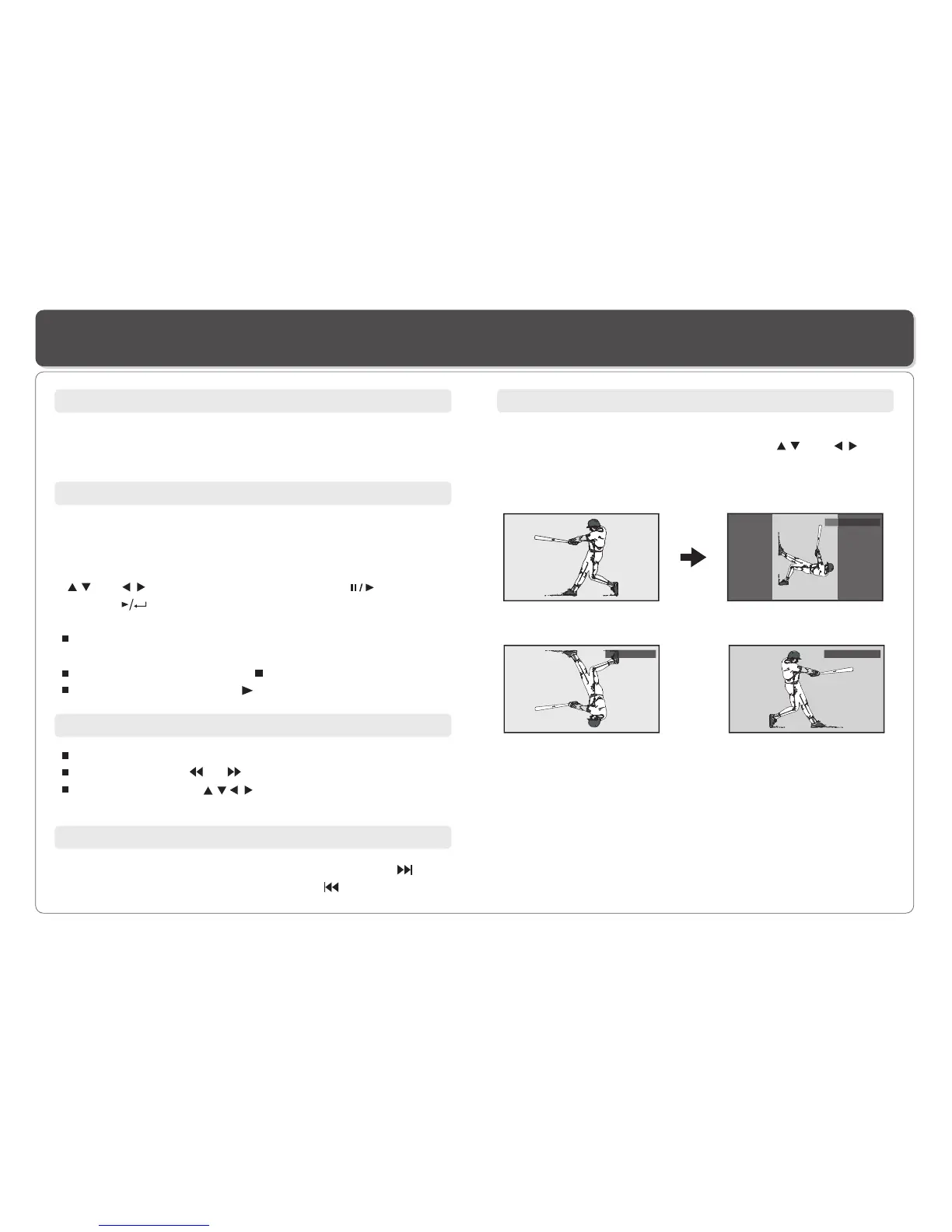
Rotate
Original
Rotate right 90 degrees
Flip vertically Flip horizontally
O
Rotate Right 90
Flip Vertically
Flip Horizontally
Valid Picture
The player can play both a Kodak Picture CD that you order
from photo processing store, and a home-made CD by burning
JPEG files onto a CD-R or CD-RW disc.
Next/Previous
You can manually skip to the next picture by pressing , and
to skip to the previous picture by pressing .
file will be shown.
In other cases, the file manager appears. Use direction keys
( and ) to select the picture and press on the
Player or on the remote control to start the slide show
( plays photos automatically).
To return to file list, press MENU/PBC. To return to directory,
press TITLE.
To display thumbnail, press " " during playback of images.
To start slide show, press " " during playback of images.
In most cases, after the disc is placed into the player, the first
Play
Press ZOOM.
Repeatedly press or to shrink or enlarge the image.
Use direction keys ( )to move around (pan and scan)
the enlarged image.
Zoom
The picture can be rotated and flipped.
1. During playback, use the direction keys ( and ) to
rotate; clockwise 90 degrees, 90 degrees counter clockwise,
flip vertically and horizontally respectively.


 To Next Page