O
N
O
FF
P
O
W
E
R
VO
L
~ 7 ~
Using the Remote Control
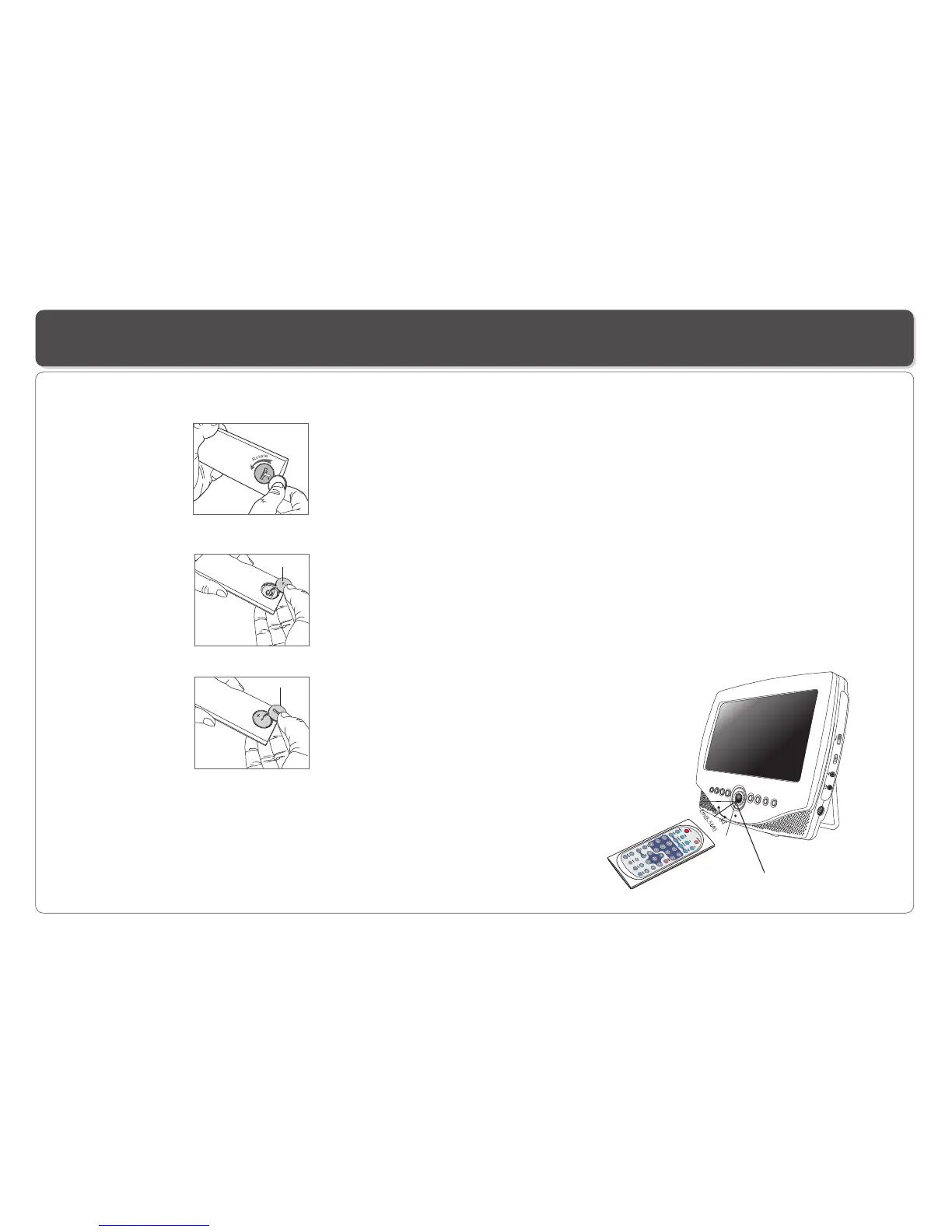
Using the remote control
Point the remote control directly at the remote sensor
on the front of the DVD Player.
5
6
Installing the battery
1. Open the battery compartment cover using a coin.
3. Replace the battery compartment cover and turn clockwise
until it stops.
2. Insert a 3V lithium battery into the battery compartment with
the polarity ( + ) facing up as marked.
Battery
battery compartment
cover
Remote Control Sensor
WARNINGS RELATING TO THE USE OF BATTERIES
* Batteries must be inserted taking care to match the polarities
shown.Make sure that the (+) and (-) terminals are placed in
the right direction.
* Never use batteries that show signs of electrolyte leaks or
cracking.
* Never dispose of used batteries in an open fire.
* Keep batteries out of reach of children.
* Never recharge disposable batteries.
* Never short circuit battery terminals.
* Always remove used batteries from the appliance case.
* Do not try to open the batteries.
* Do not mix up different kind of batteries or new and already used
batteries together.
* Only use batteries of the recommended or equivalent type.
* Remove batteries from the appliance before disposing of it at the
end of its service life.
CAUTION :
* For Lithium batteries, there is a risk of explosion if battery is
replaced by an incorrect type.
* When replacing used batteries, please comply with applicable
regulation relating to their disposal.
Please return them to a suitable collection facility for
environmentally friendly disposal.
* Type of battery:CR2025


 To Next Page