SETTING THE TIME AND DATE
1. Press the MENU/INFO button at standby mode, will then enter the main menu.
2. Press the SELECT button to enter the system settings.
3. Turn the TUNING button backward or forward to enter the Time/Date.
4. Press the SELECT button to set the Time/Date.
5. Press the SELECT button again and then the date digit ash on the display.
6. Turn the TUNING button backward or forward to adjust date digit.
7. Press the SELECT button to conrm it and then the month digit ash.
8. Turn the TUNING button backward or forward to adjust month digit.
9. Press the SELECT button to conrm it and then the year digit ash.
10.Turn the TUNING button backward or forward to adjust year digit.
11. Press the SELECT button to conrm it and then the hour digit ash.
12. Turn the TUNING button backward or forward to adjust hour digit.
13. Press the SELECT button to conrm it and then the minute digit ash.
14. Turn the TUNING button backward or forward to adjust minute digit.
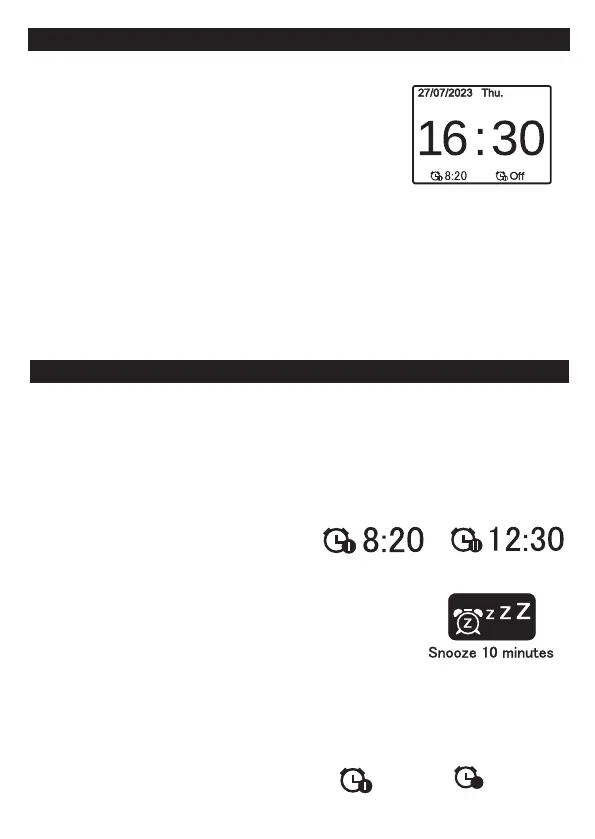
15. Press the SELECT button to conrm it, the correct time and date is shown on the display.
When the date is conrmed, “Time Saved” is displayed.
Then you can now use or and SELECT button to set followings:
- Auto update: Time update from Any or Digital Radio of FM or No Update.
- Set 12/24 hour: 12/24 hours clock display.
- Set Date Format: DD-MM-YYYY or MM-DD-YYYY.
- Note: When do the setting in the menu, press the MENU button to return back to previous step.
GB 3
SETTING THE ALARM / THE ALARM MODE AND SNOOZE
1. Press the STANDY button and then long press the MENU/INFO button to enter Main Menu .
2. Press the SELECT button to enter System Settings mode.
3. Turn the TUNING button backward or forward to select Alarm mode. Press the SELECT button to conrm it.
4. Turn the TUNING button backward or forward to select Alarm 1. Press the SELECT button to conrm it.
5. Press the SELECT button to select" On mode.
6. Turn the TUNING button backward or forward to select " Wake Up time" mode. Press the SELECT to conrm it.
And then the hour digit ash.
7. Turn the TUNING button backward or forward to adjust hour digit. Press the SELECT button to conrm it
and then the minute digit ash.
9.Turn the TUNING button backward or forward to adjust minute digit.
Press the SELECT button to conrm it.
10.The Wake Up Time is shown on the display.
12. Same procedure applies for Alarm 2 .
13. Press the STANDY button again, 2 ALARM CLOCK
indicators and the alarm times are shown on the display.
SNOOZE ( REPEAT ALARM )
When the alarm sounds at the preset time, you can turn o the sounds
temporarily by pressing the STANDBY button.
Turn the VOLUME button backward or forward to enter " Snooze 10 minutes".
The Snooze indicators are blinking on the display and count the time backwards.
TO STOP ALARM
1. Press the STANDY button and then long press the MENU/INFO button to enter Main Menu .
2. Press the SELECT button to enter System Settings mode.
3. Turn the TUNING button backward or forward to select Alarm mode. Press the SELECT button to conrm it.
4. Turn the TUNING button backward or forward to select Alarm 1. Press the SELECT button to conrm it.
5. Press the SELECT button to select" O mode. The alarm is cancelled and ALARM CLOCK OFF indicators
is shown on the display.
6. Same procedure applies for Alarm 2 .
I
Off
II



 To Next Page