12
2. PresstheRIGHT/LEFTkeytoselectthechannelfrequency.
3. PressOKtostartsearchingchannels.
Ifachannelisfound,itissavedandaddedtothechannelslist.Ifchannelscan’tbefound,thenexitthemenu.
Country
Selectyourcountryofresidence.
AntennaPower
SupplyPowertoAntenna.
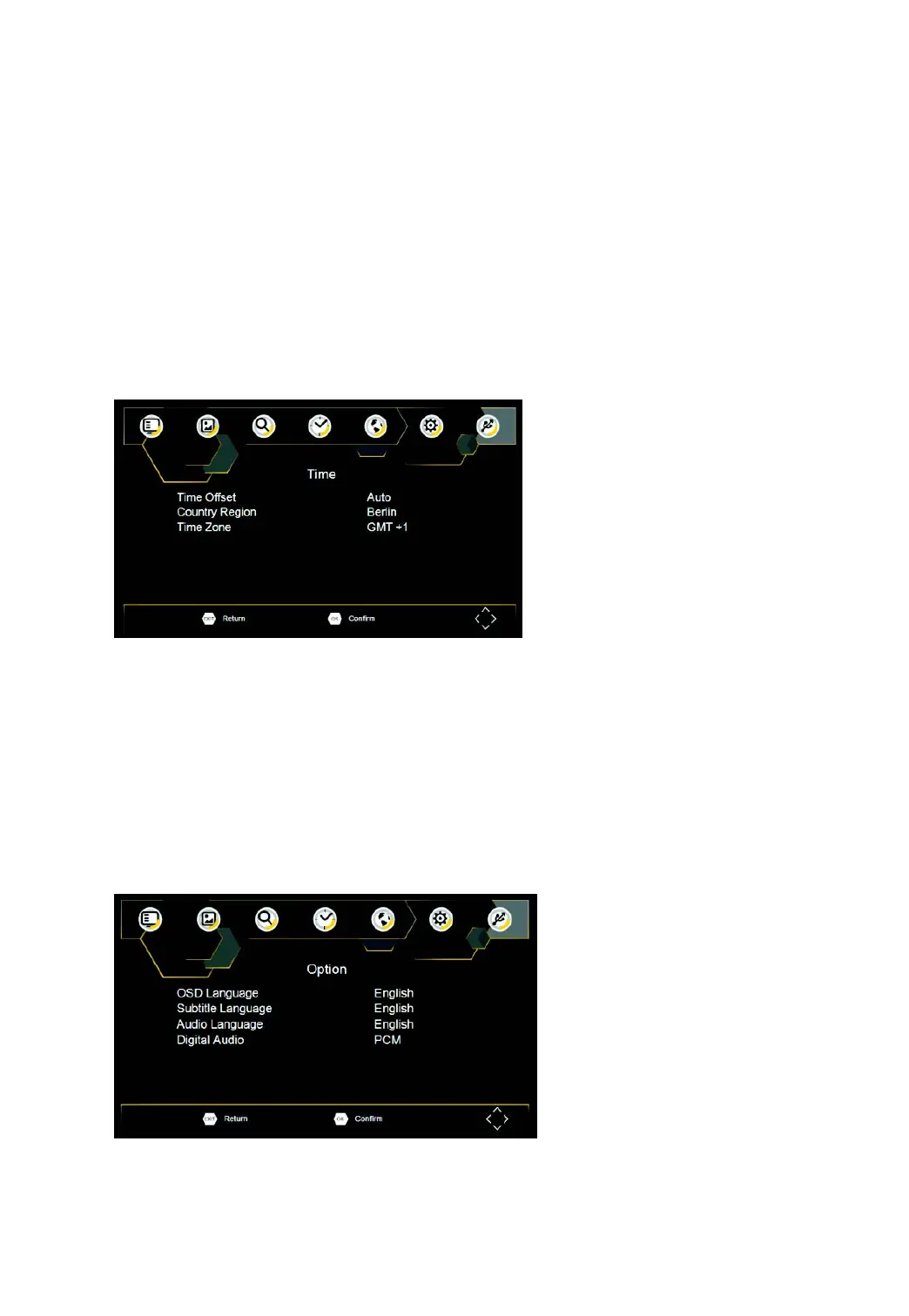
TimeSetting
ToaccesstheMenu,pressMENUthenselect[Time].TheMenuprovidesoptionstoadjustthetimesettings.
PressUP/DOWNtoselectanoptionandpressRIGHT/LEFTtoadjustthesettings.PressEXITtoexitthemenu.
Timeoffset
SelectautoormanualforGMToffsetadjustments.
CountryRegion
CountryRegionissetautomaticallywhenyousetthecountryatchannelsearchmenu.
TimeZone
SelecttheTimeZoneOffsetwhen[TimeOffset]issettoManual.
Option
ToaccesstheMenu,pressSETUPandselect[Option].ThemenuprovidesoptionstoadjusttheOSDLanguage,
SubtitleLanguageandAudioLanguage.SelectanoptionandpressRIGHT/LEFTtoadjustthesetting.PressEXIT
toexitTheMenu.



 To Next Page