8
FirstTimeInstallation
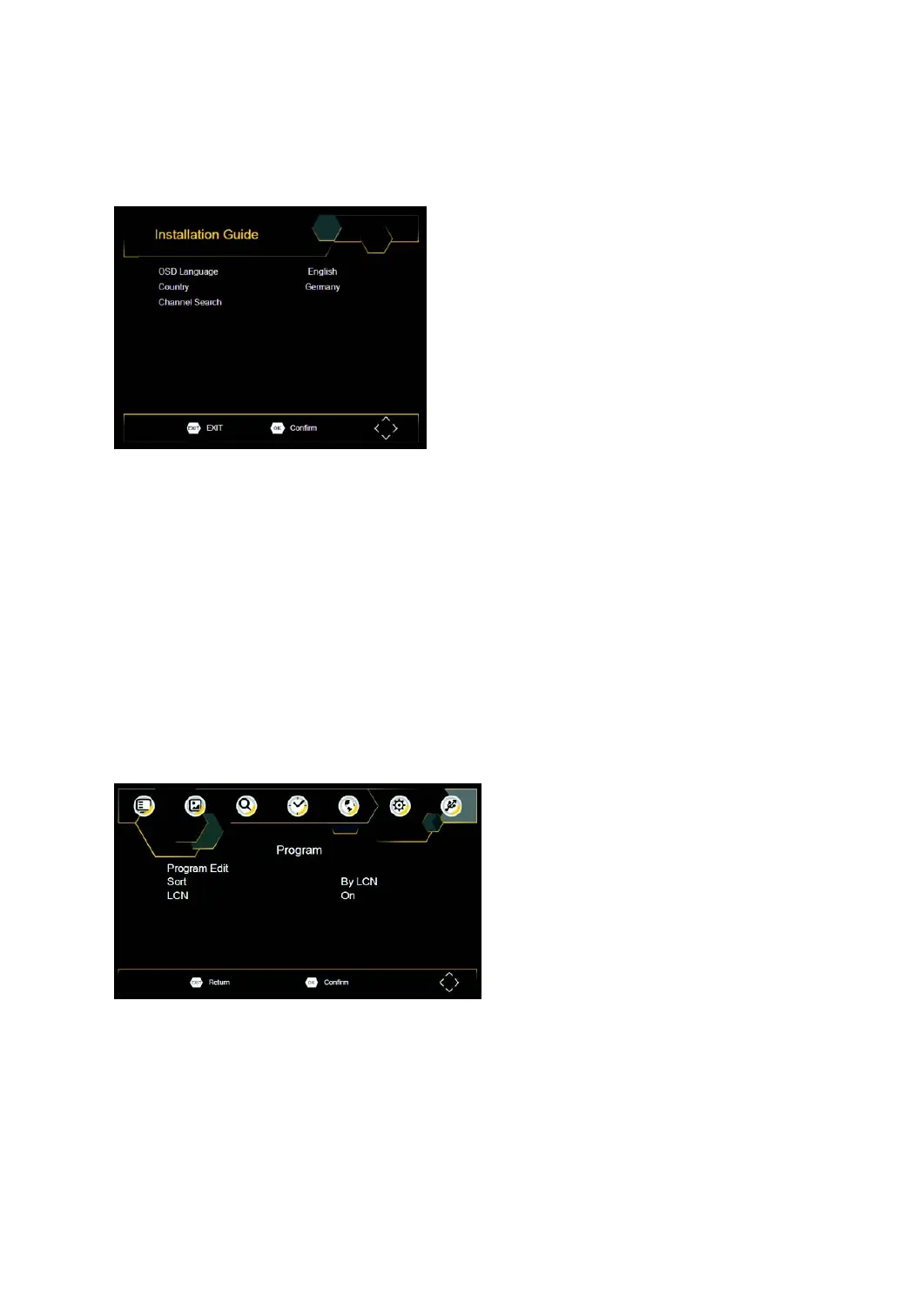
Afterallconnectionshavebeenmadeproperly,switchonTVandmakesurethereceiverisconnectedto
theMainPower.PressPowerbuttontoswitchreceiveron.Ifyouareusingthereceiverforthefirsttimeor
restoredtoFactoryDefault,theMainMenuwillappearonyourTVscreen.
(1) Select[OSDLanguage]andpressRIGHT/LEFTkeytoselectalanguage.
(2) Select[Country]andpressRIGHT/LEFTkeytoselectyourcountryofresidence.
(3) Select[ChannelSearch]andpressRIGHTorOKkeytobeginAutomaticchannelsearch.
(4) Oncechanneltuningiscomplete,youarenowreadytowatchTV.
BasicOperation
ProgramManageSettings
ToaccesstheMenu,presstheSETUPbuttonandselect[Program].TheMenuprovidesoptionstoadjust
theProgramManageSettings.SelectanoptionandpressOKorRIGHTtoadjustthatsetting.PresstheEXIT
buttontoexittheMenu.



 To Next Page