•12.7mmRamboopticaldrive(onsomemodels)
Wirelessfeatures
•IntegratedwirelessLAN
•100/1000MbpsEthernetcommunication
Statusindicators
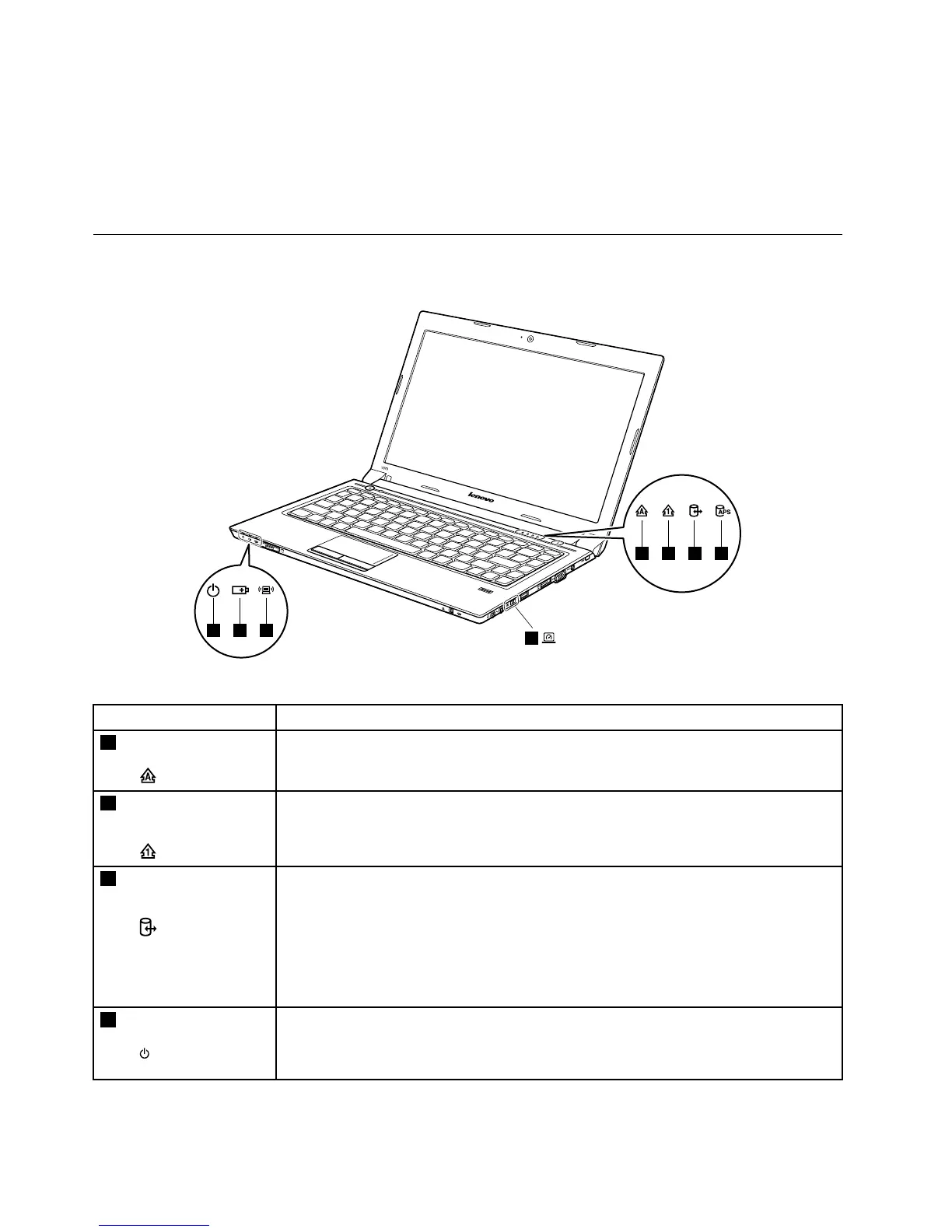
Thistopicpresentsthesystemstatusindicatorsthatshowthestatusofthecomputer.
Table1.Statusindicators
IndicatorMeaning
1
CapsLockindicatorWhite:Capslockmodeisenabled.Y oucanenterallalphabeticcharacters(A-Z)in
uppercasewithoutpressingtheShiftkey.ToenableordisableCapslockmode,press
theCapslockkey(CapsLk).
2
NumericLock
indicator
White:Theseparatenumerickeypadonthekeyboardisenabled.Toenableordisable
thenumerickeypad,pressthenumericlockkey(NmLk).
3
Deviceaccess
statusindicator
On:Theharddiskdriveoropticaldriveisreadingorwritingdata.
Attention:
•Whentheindicatorison,donotputthecomputerintosleepmodeorturnoffthe
computer.
•Whentheindicatorison,donotmovethecomputer.Suddenphysicalshockcould
causedriveerrors.
4
Poweronindicator
•Solidwhite:Systemisenabled.
•Blinkingwhite:Systemisinsleepmode.
•Off:Systemisinhibernatemodeorshutdown.
38HardwareMaintenanceManual


 To Next Page