Lenovo IdeaPad S310
53
1110 LCD panel, LCD cable, hinges
For access, remove these FRUs in order:
• “1010 Battery pack” on page 33
• “1020 Hard disk drive” on page 35
• “1030 DIMM” on page 37
• “1040 PCI Express Mini Card for wireless LAN/WAN” on page 38
• “1050 Fan assembly and Heat Sink assembly” on page 40
• “1060 Keyboard” on page 42
• “1070 System board” on page 44
• “1080 LCD unit” on page 47
• “1090 Speakers, base cover, USB board, power assembly and power board”
on page 49
• “1100 LCD front bezel” on page 52
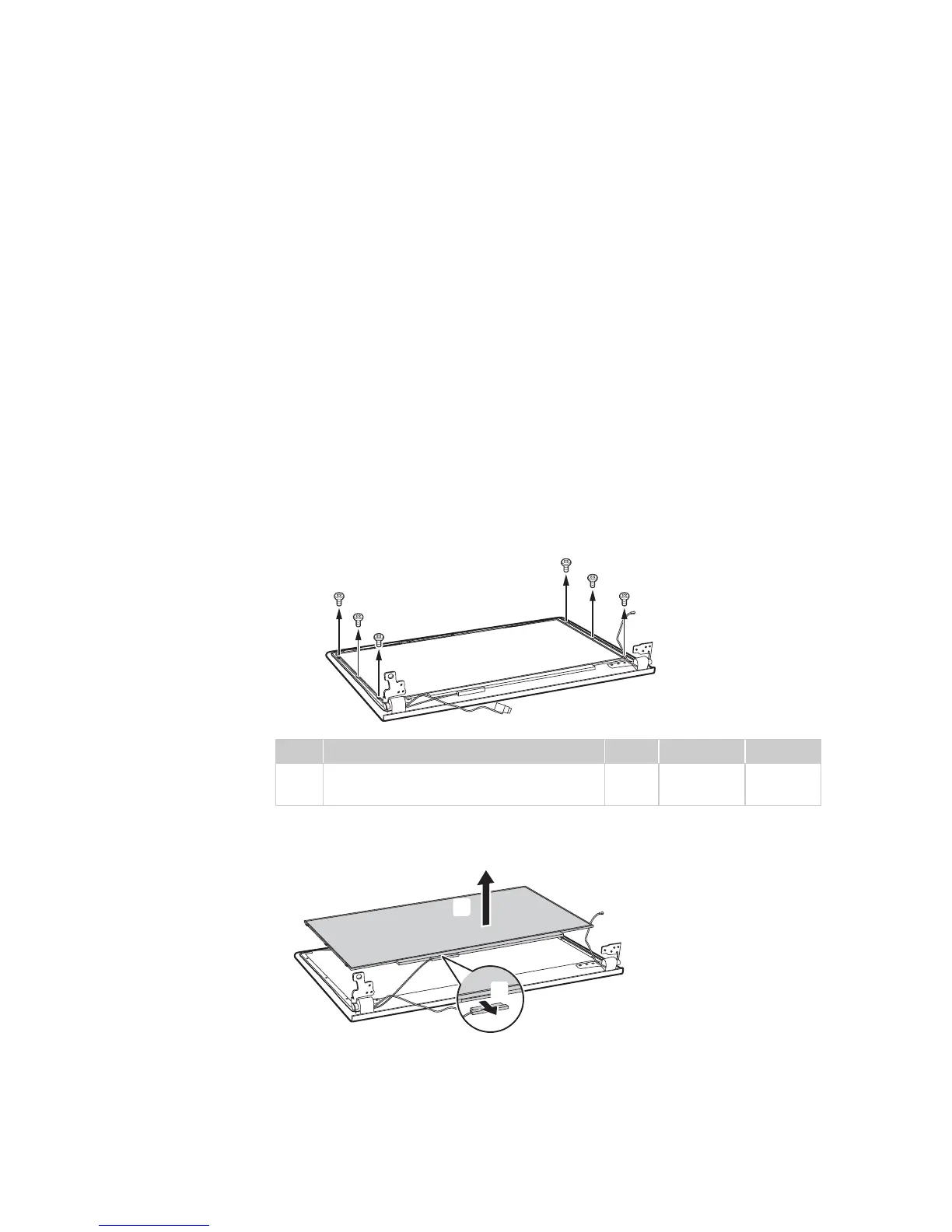
Figure 11. LCD panel, LCD cable, hinges
Remove screws .
Disconnect the connector , lift the LCD panel in the direction shown by arrow
.
When installing: Make sure that the connector is attached firmly.
Step Screw (quantity) Color Torque P/N
M1.6 × 3 mm, flat-head, nylok-coated
(6)
Black 1.85 kgfcm 90202857
a
a
a
a
a
a
a




 To Next Page