Lenovo IdeaPad S310
33
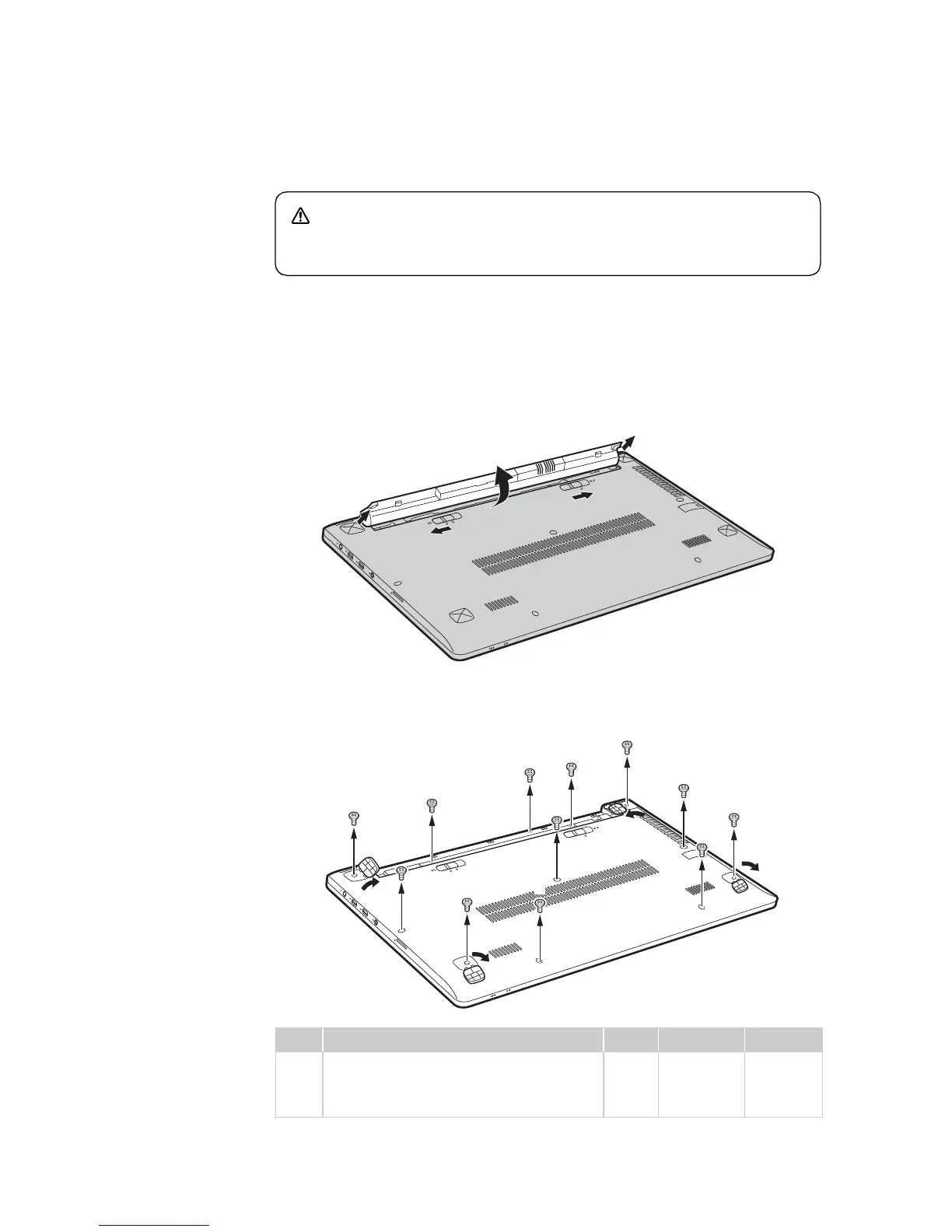
1010 Battery pack
Figure 1. Removal steps of battery pack
Unlock the manual latch . Slide the spring-loaded latch to the unlocked
position to eject the battery pack . Lift up the inner edge of the battery pack,
pivoting it on the outer edge . Slide the battery pack in the indicated direction
to remove it .
Open four rubber foot pads with a screw driver in the direction shown by arrows
, then remove nine screws , three screws .
Step Screw (quantity) Color Torque P/N
2.5 × 5 mm, flat-head, nylok-coated (9)
M2.0 × 3 mm, flat-head, nylok-coated
(3)
Black
Silver
3.0 kgfcm
1.85 kgfcm
90202854
DANGER
•Only use the battery specified in the parts list for your computer. Any
other battery could ignite or explode.
a
b
c
d
a
b
c
d
e
f g
e
f
f
f
f
f
f
g
g
f
f
f
e
e
e
g
a




 To Next Page