Chapter 2. Learning the basics
11
Hotkeys
- - - - - - - - - - - - - - - - - - - - - - - - - - - - - - - - - - - - - - - - - - - - - - - - - - - - - - - - - - - - - - - - - - - - - - - - - - - - - - - - - - - - - - - - - - - - - - - - - - - - - - - -
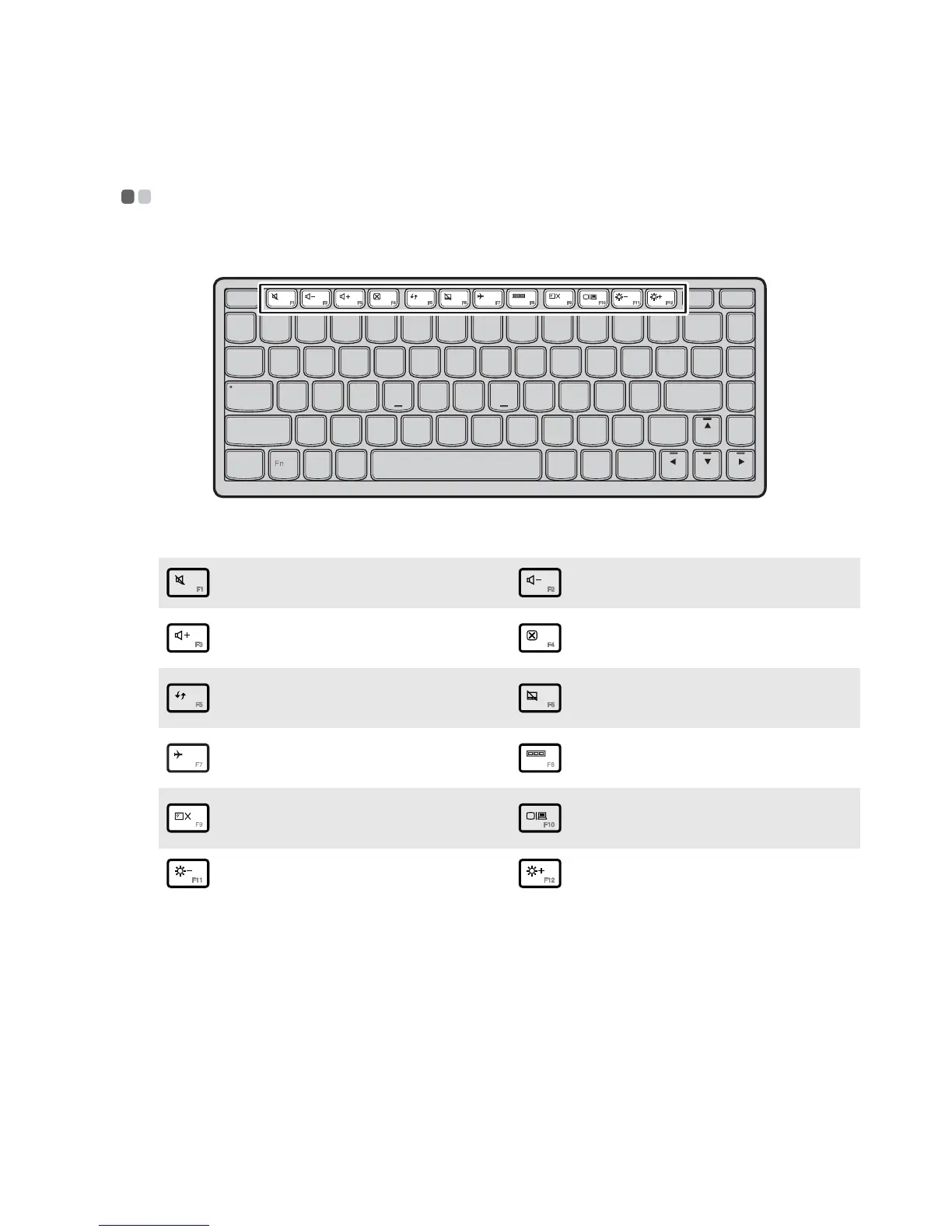
The hotkeys are located in the first row of the keyboard.
By pressing the appropriate hotkey, you can change system settings instantly.
The following describes the function of each hotkey.
:
Mute/Unmute.
:
Decrease sound volume.
:
Increase sound volume.
:
Close active window or
program.
:
Refresh desktop or Web
pages.
:
Enable/Disable the
touchpad.
:
Enable/disable Airplane
mode.
:
Display all currently active
apps.
:
Turn on/off the backlight of
the LCD screen.
:
Open the interface for
changing display devices.
:
Decrease display brightness.
:
Increase display brightness.






 To Next Page