Home
Lenovo
Laptop
IdeaPad S310
Page 27
Lenovo IdeaPad S310 - Page 27
45 pages
Manual
Save Page as PDF
To Next Page
To Next Page
To Previous Page
To Previous Page
Loading...
Chapter
3. Star
t
ing to u
se Windows 8
23
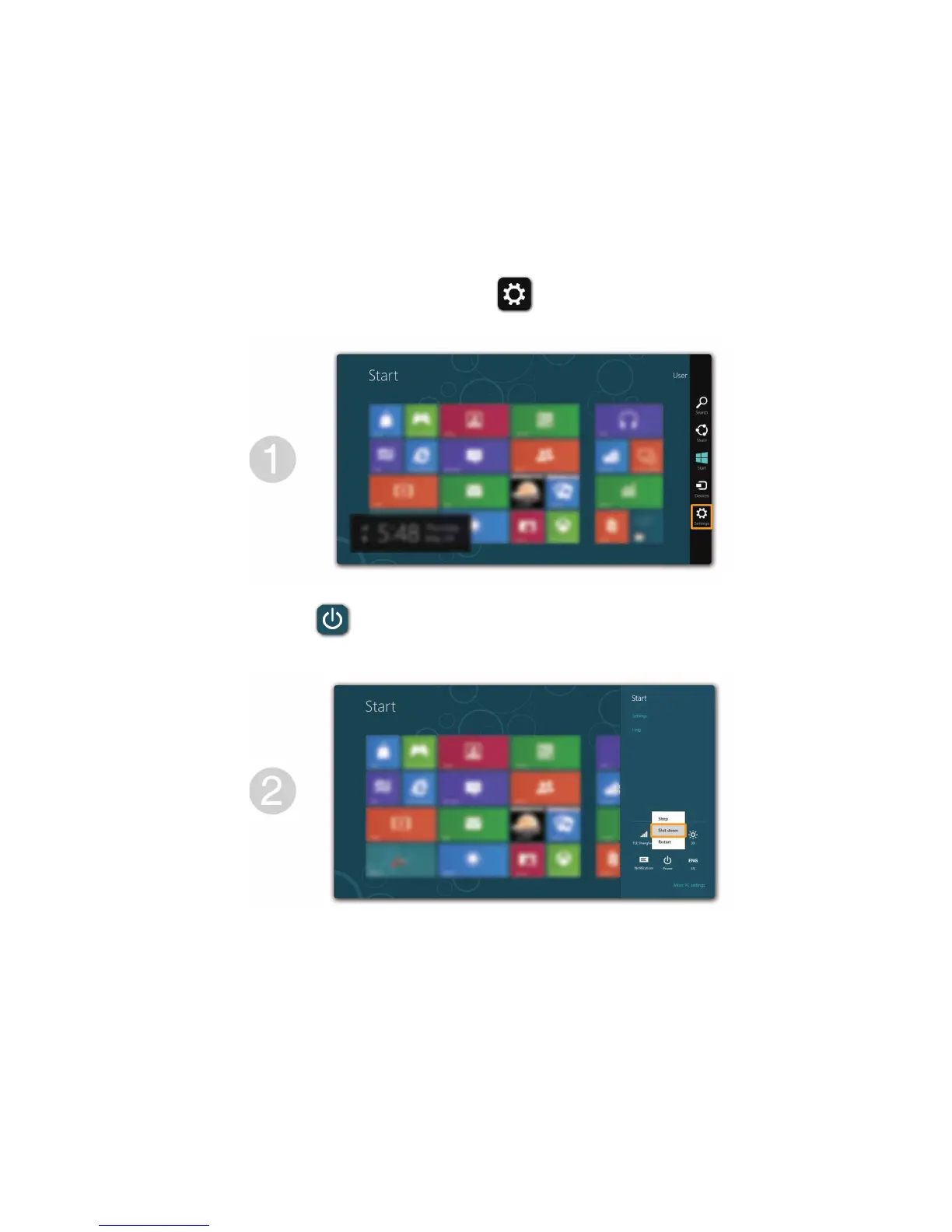
Shutting do
wn the computer
If you are not going to
use your comp
uter for a long time, shu
t it down.
T
o shut down your com
puter:
1
Open the charms, select
Set
tings
.
2
Select
Power
→
Shut do
wn
.
26
28
Table of Contents
Main Page
Default Chapter
1
User Guide
1
Table of Contents
3
Chapter 1. Getting to Know Your Computer
5
Top View
5
Left-Side View
7
Right-Side View
8
Front View
9
Bottom View
10
Chapter 2. Learning the Basics
11
First Use
11
Using AC Adapter and Battery
12
Using the Touchpad
14
Hotkeys
15
Connecting External Devices
17
Connecting Usb Devices
18
Special Keys and Buttons
20
System Status Indicators
21
Chapter 3. Starting to Use Windows 8
23
Configuring the Operating System for the First Time
23
Operating System Interfaces
23
The Charms
24
Putting the Computer to Sleep or Shutting It down
26
Help and Support
28
Chapter 4. Connecting to the Internet
29
Wired Connection
29
Wireless Connection
31
Connecting to Wireless Lan
32
Connecting to a Wireless Network
32
Chapter 5. Lenovo Onekey Recovery System
33
Chapter 6. Troubleshooting
35
Frequently Asked Questions
35
Troubleshooting
38
Trademarks
43
Other manuals for Lenovo IdeaPad S310
Maintenance Manual
80 pages
Related product manuals
Lenovo IdeaPad S300
43 pages
Lenovo ideapad S340
10 pages
Lenovo IdeaPad S340-13IML
64 pages
Lenovo IdeaPad S340-15IIL
66 pages
Lenovo IdeaPad S340-14IIL
66 pages
Lenovo IdeaPad S340 Series
72 pages
Lenovo IdeaPad S340-14IWLTouch
72 pages
Lenovo IdeaPad S10
154 pages
Lenovo ideapad S540
10 pages
Lenovo IdeaPad S205
46 pages
Lenovo IdeaPad S110
88 pages
Lenovo IdeaPad S10-2
140 pages




 To Next Page