Apps
Digital wellbeing & parental controls
Set limits on how much time you spend on your phone, get a bedtime reminder, and
manage notifications.
Find it: Swipe up and tap
Settings > Digital Wellbeing & parental controls
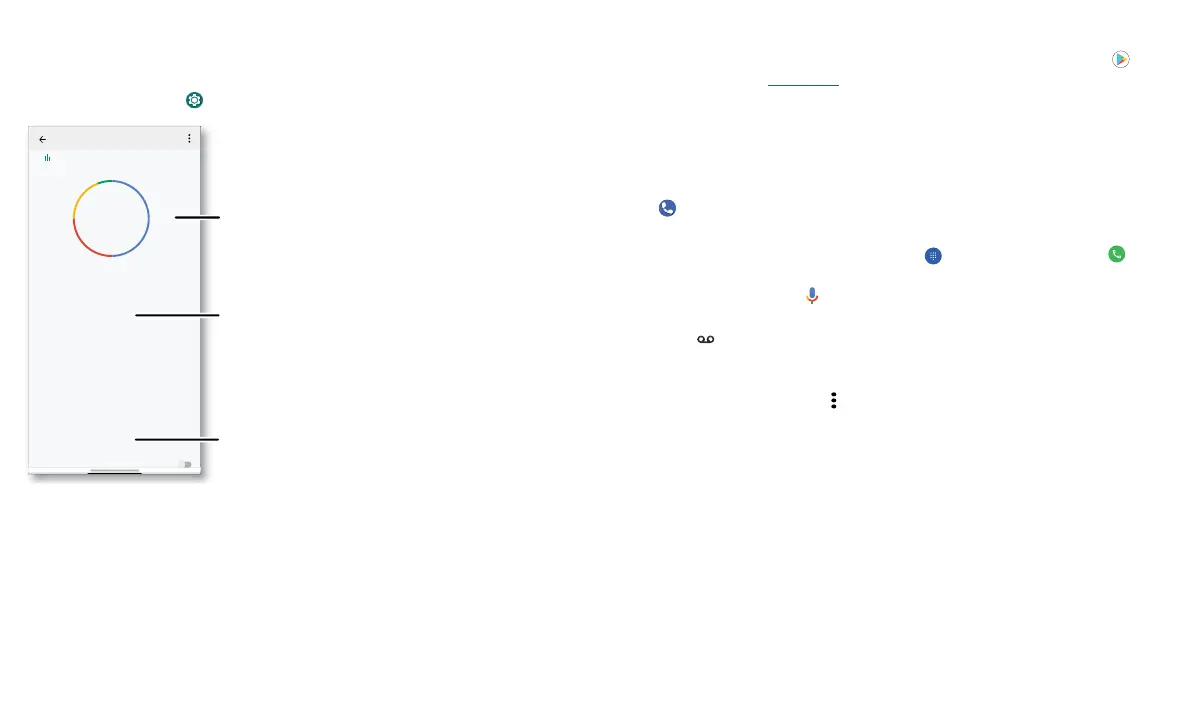
Digital wellbeing screen that shows options, such as Do Not Disturb and options for bedtime, app limits, and managing notifications.
To supervise this phone remotely, view and set screen time limits, and add restrictions
to services and apps, tap Set up parental controls.
WAYS TO DISCONNECT
Dashboard
Focus mode
ap to set up
o t
mers se
REDUCE INTERRUPTIONS
Manage notifications
Do Not Disturb
Digital Wellbeing & parental co...
Contacts
P
one
Camer
ett
ngs
3 12
Un
oc
s Noti
cations
1 hr, 40 mins
TODAY
Your Digital Wellbeing tools
Show icons in the app list
Turn on Do Not Disturb.
Limit your app time and
more.
See a breakdown of how you
spend your time on your
phone.
Apps
Your phone comes ready with some great apps. To find and add more apps, tap Play
Store. To learn more, see App safety.
Phone
Keep in touch by choosing a contact, returning a missed call, or using a voice command
to start a call.
Make a call
Find it: Phone
» Call a contact: To call a contact or recent call, tap the contact name.
» Dial a phone number: To open the dialpad, tap . Enter a number, then tap to
call it.
» Voice dial: To voice dial, tap on the home screen or say “Hey Google”, then say
“Call <name>”.
» Voicemail: appears in the status bar when you have new voicemail. To hear it,
swipe down and tap the notification.
Tip: To enter the international dialing code (+), touch and hold 0. To add 2-sec pause
or wait after numbers, tap Menu
.



 To Next Page